Scikit-learn depends on compiled scientific Python packages, so Red Hat-family systems need both a suitable interpreter and an isolated environment before model code can import it. DNF provides Python and pip, while pip installs the current scikit-learn wheel and its Python dependencies inside the project environment.
The upstream installation path recommends a virtual environment on Linux to avoid mixing pip packages with distribution-managed Python files. On Red Hat Enterprise Linux 9 and compatible builds, the default python3 command may be too old for recent scikit-learn releases, so installing the versioned python3.12 packages avoids silently pinning the library to an older release.
A completed environment should resolve python from /home/user/sklearn-env, show scikit-learn in that environment, and run a small estimator without import errors. Fedora systems whose default python3 already meets the Python requirement for scikit-learn can substitute python3 for python3.12 consistently.
Related: Install scikit-learn on Ubuntu or Debian
Related: Install scikit-learn on SUSE Linux
Steps to install scikit-learn on Fedora, CentOS Stream, or Red Hat Enterprise Linux:
- Open a terminal with sudo privileges.
- Install Python 3.12 and pip from the DNF repositories.
$ sudo dnf install python3.12 python3.12-pip
Red Hat Enterprise Linux 9.8 resolves these packages from AppStream. On Fedora, use sudo dnf install python3 python3-pip when python3 --version already returns Python 3.10 or newer. If DNF cannot find the requested interpreter, enable the supported repositories for the host before continuing.
- Confirm that the versioned interpreter is available.
$ python3.12 --version
Python 3.12.13
Recent scikit-learn releases require Python 3.10 or newer. Fedora users may use python3 when this check returns a supported version.
- Create a virtual environment for scikit-learn.
$ python3.12 -m venv ~/sklearn-env
- Activate the virtual environment.
$ source ~/sklearn-env/bin/activate
After activation, python and pip resolve inside /home/user/sklearn-env. Reactivate this environment in each new terminal before running project code.
- Upgrade pip inside the virtual environment.
$ python -m pip install --upgrade pip
Requirement already satisfied: pip in /home/user/sklearn-env/lib64/python3.12/site-packages (23.2.1)
Collecting pip
##### snipped #####
Successfully installed pip-26.1.2
- Install scikit-learn into the activated environment.
$ python -m pip install --upgrade scikit-learn
Collecting scikit-learn
##### snipped #####
Successfully installed joblib-1.5.3 narwhals-2.22.1 numpy-2.5.0 scikit-learn-1.9.0 scipy-1.18.0 threadpoolctl-3.6.0
The exact dependency versions change as PyPI publishes new wheels. Keep the install inside the activated environment instead of using sudo pip.
- Check the installed package location.
$ python -m pip show scikit-learn
Name: scikit-learn
Version: 1.9.0
Location: /home/user/sklearn-env/lib64/python3.12/site-packages
Requires: joblib, narwhals, numpy, scipy, threadpoolctl
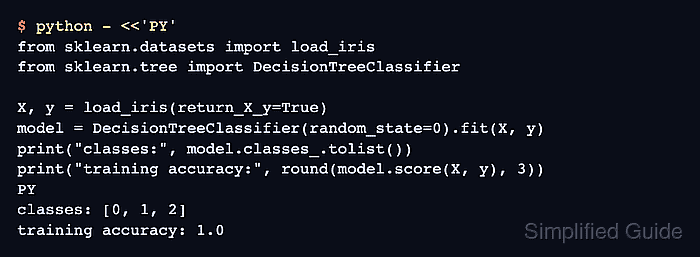
- Run a small estimator smoke test.
$ python - <<'PY'
from sklearn.datasets import load_iris
from sklearn.tree import DecisionTreeClassifier

X, y = load_iris(return_X_y=True)
model = DecisionTreeClassifier(random_state=0).fit(X, y)
print("classes:", model.classes_.tolist())
print("training accuracy:", round(model.score(X, y), 3))
PY
classes: [0, 1, 2]
training accuracy: 1.0

Mohd Shakir Zakaria is a cloud architect with deep roots in software development and open-source advocacy. Certified in AWS, Red Hat, VMware, ITIL, and Linux, he specializes in designing and managing robust cloud and on-premises infrastructures.


