Windows data-science projects often share a workstation with notebooks, editors, and several Python runtimes. Installing scikit-learn inside a project virtual environment keeps its numerical dependencies tied to that project instead of changing the base runtime used by other tools.
The supported Windows path uses 64-bit Python 3, the built-in venv module, and pip. Activating .venv\Scripts\Activate.ps1 in PowerShell places the project interpreter first on PATH, and running python -m pip keeps the package operation bound to that interpreter.
Use a recent 64-bit Python release that has compatible scikit-learn wheels. If pip cannot find a matching distribution, update Python before trying source builds or compiler workarounds. A package metadata check, dependency check, and small estimator run confirm that the active environment can import sklearn and execute model code.
Related: Install Python on Windows
Related: Install pip on Windows
Related: Create a Python virtual environment
Steps to install scikit-learn on Windows with venv and pip:
- Open PowerShell in the project directory where scikit-learn should be installed.
- Confirm that Python 3 responds from the current shell.
PS C:\Users\analyst\ml-project> python --version
Python 3.14.6
If python is missing or opens the Microsoft Store, install or repair Python before creating the environment.
Related: Install Python on Windows - Confirm that the runtime is 64-bit.
PS C:\Users\analyst\ml-project> python -c "import platform; print(platform.architecture()[0])"
64bit
If this prints 32bit, install a 64-bit Python runtime before continuing because current scikit-learn wheels target 64-bit Windows.
- Create a project virtual environment in .venv.
PS C:\Users\analyst\ml-project> python -m venv .venv
The command normally returns no output when the environment is created.
Related: Create a Python virtual environment - Activate the virtual environment in the current PowerShell session.
PS C:\Users\analyst\ml-project> .\.venv\Scripts\Activate.ps1
(.venv) PS C:\Users\analyst\ml-project>
If PowerShell blocks .venv\Scripts\Activate.ps1, confirm the policy with your administrator before changing the CurrentUser execution policy. Python documents Set-ExecutionPolicy -ExecutionPolicy RemoteSigned -Scope CurrentUser as the user-scoped fix.
- Confirm that pip belongs to the activated environment.
(.venv) PS C:\Users\analyst\ml-project> python -m pip --version
pip 26.1.2 from C:\Users\analyst\ml-project\.venv\Lib\site-packages\pip (python 3.14)
Use python -m pip instead of a standalone pip command when several Python installs are present.
Related: Install pip on Windows - Install scikit-learn into the activated environment.
(.venv) PS C:\Users\analyst\ml-project> python -m pip install --upgrade scikit-learn
Collecting scikit-learn
  Downloading scikit_learn-1.9.0-cp314-cp314-win_amd64.whl.metadata (11 kB)
Collecting numpy>=1.24.1 (from scikit-learn)
Collecting scipy>=1.10.0 (from scikit-learn)
Collecting joblib>=1.4.0 (from scikit-learn)
Collecting narwhals>=2.0.1 (from scikit-learn)
Collecting threadpoolctl>=3.5.0 (from scikit-learn)
##### snipped #####
Installing collected packages: threadpoolctl, numpy, narwhals, joblib, scipy, scikit-learn
Successfully installed joblib-1.5.3 narwhals-2.22.1 numpy-2.5.0 scikit-learn-1.9.0 scipy-1.18.0 threadpoolctl-3.6.0
--upgrade asks pip for the newest compatible release visible to the active package index. Exact wheel names and dependency versions change over time.
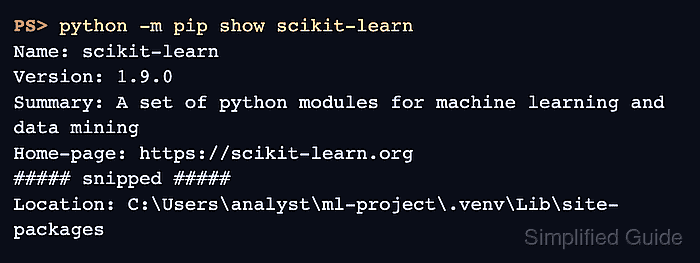
- Confirm that pip recorded scikit-learn inside .venv.
(.venv) PS C:\Users\analyst\ml-project> python -m pip show scikit-learn
Name: scikit-learn
Version: 1.9.0
Summary: A set of python modules for machine learning and data mining
Home-page: https://scikit-learn.org
##### snipped #####
Location: C:\Users\analyst\ml-project\.venv\Lib\site-packages
Requires: joblib, narwhals, numpy, scipy, threadpoolctl
Required-by:
The Location path should point inside the project environment, not C:\Program Files\Python314 or another base interpreter location.
- Check the installed dependency set.
(.venv) PS C:\Users\analyst\ml-project> python -m pip check
No broken requirements found.
If this command reports a conflict, recreate the environment or install the project's tested dependency set before training models.
- Run an estimator smoke test through the active environment.
(.venv) PS C:\Users\analyst\ml-project> @'
import sklearn
from sklearn.datasets import load_iris
from sklearn.tree import DecisionTreeClassifier

X, y = load_iris(return_X_y=True)
model = DecisionTreeClassifier(random_state=0).fit(X, y)

print(f"scikit-learn: {sklearn.__version__}")
print(f"classes: {model.classes_.tolist()}")
print(f"first prediction: {model.predict([X[0]])[0]}")
'@ | python
scikit-learn: 1.9.0
classes: [0, 1, 2]
first prediction: 0

Mohd Shakir Zakaria is a cloud architect with deep roots in software development and open-source advocacy. Certified in AWS, Red Hat, VMware, ITIL, and Linux, he specializes in designing and managing robust cloud and on-premises infrastructures.


