A new PyTorch release reaches a Linux project through the Python environment that already runs its code, and a newer version number alone proves little. A successful upgrade leaves that environment on the target release with the same CPU or CUDA build, a matching torchvision, and tensor code that still runs.
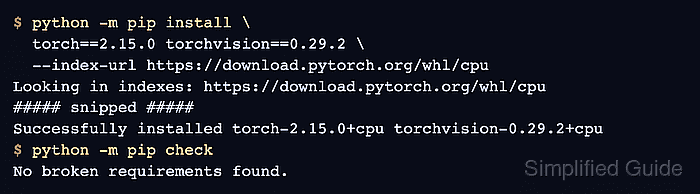
pip takes each wheel from the index it is given, not from the build already installed. On Linux, the default wheel on PyPI is a CUDA build, so an upgrade that names no index replaces a CPU build with it and adds the NVIDIA runtime packages. Naming the wheel index and the exact versions keeps the build a deliberate choice.
PyTorch 2.15 needs Python 3.11 or newer and drops the older CUDA wheels, so an older environment may have to change before pip can finish. Multi-GPU projects also move to a rewritten NCCL backend by default. A package list frozen before the change is the way back, because the earlier wheels remain on the same index.
Steps to upgrade PyTorch with pip on Linux:
- Activate the project's virtual environment from the project directory.
$ source .venv/bin/activate
PyTorch 2.15 wheels need Python 3.11 or newer. A Python 3.10 environment has to be rebuilt on a newer interpreter before it can take this upgrade.
Related: How to create a virtual environment for PyTorch - Save the installed package versions to a rollback file.
(.venv) $ python -m pip freeze > requirements-before-upgrade.txt
The file records the exact version and build of the installed packages.
- List the PyTorch packages in the rollback file.
(.venv) $ grep '^torch' requirements-before-upgrade.txt
torch==2.14.1+cpu
torchaudio==2.11.1+cpu
torchmetrics==1.9.0
torchvision==0.29.1+cpu
The text after the + sign names the wheel build, here cpu. torch and torchvision move together, and the dependency check further down reports any other package whose version requirement excludes the new torch. A project with no torchvision line leaves it out of both pip install commands and deletes the lines that use it from the smoke test.
- Run a tensor smoke test on the current version.
(.venv) $ python - <<'PY'
import torch
import torchvision

device = "cuda" if torch.cuda.is_available() else "cpu"
data = [[0, 0, 2, 2], [0, 0, 2, 1.9], [5, 5, 6, 6]]
boxes = torch.tensor(data, device=device)
scores = torch.tensor([0.9, 0.8, 0.7], device=device)
print("torch:", torch.__version__)
print("torchvision:", torchvision.__version__)
print("cuda build:", torch.version.cuda, "device:", device)
print("kept boxes:", torchvision.ops.nms(boxes, scores, 0.5))
PY
torch: 2.14.1+cpu
torchvision: 0.29.1+cpu
cuda build: None device: cpu
kept boxes: tensor([0, 2])
The test runs tensors and the torchvision box filter on the GPU when PyTorch can use one, and on the CPU otherwise. This output is the baseline for the same test after the upgrade.
- Preview the upgrade to PyTorch 2.15.0 and torchvision 0.29.2.
(.venv) $ python -m pip install --dry-run \
  torch==2.15.0 torchvision==0.29.2 \
  --index-url https://download.pytorch.org/whl/cpu
Looking in indexes: https://download.pytorch.org/whl/cpu
Collecting torch==2.15.0
Collecting torchvision==0.29.2
##### snipped #####
Would install torch-2.15.0+cpu torchvision-0.29.2+cpu
The --index-url address selects the build, so its last part has to match the suffix from the package list. A cu132 or cu134 build uses that name in place of cpu. Any other CUDA build, such as cu126, cu128 or cu130, has no 2.15 wheels and moves to cu132 or cu134 once the GPU driver is confirmed to support it. A package list with no suffix came from PyPI, so the option comes out and pip installs the default CUDA 13.2 wheel.
Related: How to enable CUDA in PyTorchA target older than the latest release takes its matched pair from the previous PyTorch versions page.
- Upgrade torch and torchvision to the previewed builds.
(.venv) $ python -m pip install \
  torch==2.15.0 torchvision==0.29.2 \
  --index-url https://download.pytorch.org/whl/cpu
Looking in indexes: https://download.pytorch.org/whl/cpu
Collecting torch==2.15.0
Collecting torchvision==0.29.2
##### snipped #####
Successfully installed torch-2.15.0+cpu torchvision-0.29.2+cpu
The PyTorch 2.15 release notes list the other behavior changes, including the setting that restores the previous NCCL backend.
- Check the environment for dependency conflicts.
(.venv) $ python -m pip check
No broken requirements found.
A package that does not accept the new torch appears here instead, such as torchaudio 2.10.0+cpu has requirement torch==2.10.0, but you have torch 2.15.0+cpu. If one appears, upgrade it by name and rerun this check.
(.venv) $ python -m pip install --upgrade torchaudio \
  --extra-index-url https://download.pytorch.org/whl/cpu
A CUDA upgrade uses the build name from its pip install command in place of cpu, and a package list with no suffix leaves out --extra-index-url. The same command moves a torchaudio package left on an older CUDA build, which this check does not report and which fails on import. If no release of that package accepts the new torch, restore the rollback file as shown in the last step.
CUDA wheels on Arm Linux also print nvidia-cusparselt-cu13 0.8.1 is not supported on this platform, on 2.14.1 as well, while the smoke test still passes.
- Run the same tensor smoke test on the upgraded version.
(.venv) $ python - <<'PY'
import torch
import torchvision

device = "cuda" if torch.cuda.is_available() else "cpu"
data = [[0, 0, 2, 2], [0, 0, 2, 1.9], [5, 5, 6, 6]]
boxes = torch.tensor(data, device=device)
scores = torch.tensor([0.9, 0.8, 0.7], device=device)
print("torch:", torch.__version__)
print("torchvision:", torchvision.__version__)
print("cuda build:", torch.version.cuda, "device:", device)
print("kept boxes:", torchvision.ops.nms(boxes, scores, 0.5))
PY
torch: 2.15.0+cpu
torchvision: 0.29.2+cpu
cuda build: None device: cpu
kept boxes: tensor([0, 2])
The torch and torchvision lines show the new versions, while the device value and kept boxes match the baseline. A CUDA build reports its CUDA version and device: cuda, and device: cpu on that machine means PyTorch cannot use the GPU.
Related: How to fix PyTorch not detecting a GPUIf this test or the project's own code fails, restore the saved versions with the rollback file.
(.venv) $ python -m pip install \
  -r requirements-before-upgrade.txt \
  --extra-index-url https://download.pytorch.org/whl/cpu
A saved cu130 or other CUDA build takes its own name in place of cpu, and a saved list with no suffix leaves out --extra-index-url. Packages that the upgrade added stay installed, and python -m pip check reports any that conflict with the restored versions.
Project files that pin torch or torchvision, such as requirements.txt, need the new versions as well, or the next install from them brings the old versions back.