AMD GPUs reach PyTorch through ROCm and HIP rather than the NVIDIA driver stack. A Linux project is ROCm-enabled only when the host ROCm runtime can see the card, the active Python environment imports a ROCm-built PyTorch wheel, and tensors are moved onto the accelerator device.
PyTorch intentionally exposes ROCm devices through the existing torch.cuda interface. On a working ROCm install, torch.version.hip identifies the HIP build, torch.cuda.is_available() returns True, and device strings still look like cuda:0 even though the hardware is AMD.
Use the PyTorch install selector for the wheel index because stable and nightly builds expose different ROCm releases over time. The package path here assumes Linux with a supported AMD GPU and a ROCm runtime that already provides rocminfo; fix the driver or GPU passthrough layer before reinstalling PyTorch if the host cannot see the card.
Related: How to install PyTorch with pip
Related: How to enable CUDA in PyTorch
Related: How to enable MPS in PyTorch
Related: How to fix PyTorch not detecting a GPU
Steps to enable ROCm in PyTorch:
- Open a terminal on the Linux host with the AMD GPU.
- Confirm that ROCm can see the GPU.
$ rocminfo
ROCk module is loaded
=====================
HSA System Attributes
=====================
##### snipped #####
Agent 2
  Name:                    gfx1100
  Marketing Name:          AMD Radeon RX 7900 XTX
##### snipped #####
If rocminfo is missing, reports no agent, or shows only CPU agents, fix the ROCm driver installation, container device passthrough, or hardware support before changing the PyTorch package.
- Create an isolated Python environment for the ROCm build.
$ python3 -m venv ~/venvs/torch-rocm
- Activate the Python environment.
$ source ~/venvs/torch-rocm/bin/activate
(torch-rocm) $
Use the project environment instead when the application already has one. The active environment is where pip installs or replaces torch.
- Upgrade pip in the active environment.
(torch-rocm) $ python -m pip install --upgrade pip
- Install the ROCm-enabled PyTorch wheel from the ROCm wheel index selected for the host.
(torch-rocm) $ python -m pip install torch torchvision torchaudio --index-url https://download.pytorch.org/whl/rocm6.3
Looking in indexes: https://download.pytorch.org/whl/rocm6.3
Collecting torch
##### snipped #####
Successfully installed torch-2.7.0+rocm6.3 torchaudio-2.7.0+rocm6.3 torchvision-0.22.0+rocm6.3
The --index-url value must match the ROCm platform shown by the PyTorch install selector. Use the generated command if the selector offers a newer stable or nightly ROCm wheel for the target host.
Related: How to install PyTorch with pip - Check that the installed PyTorch build reports a HIP runtime.
(torch-rocm) $ python -c "import torch; print(torch.__version__); print(torch.version.hip); print(torch.version.cuda)"
2.7.0+rocm6.3
6.3.42131
None
The exact PyTorch and HIP version strings change as new wheels are released. A ROCm build should print a non-empty torch.version.hip value and None for torch.version.cuda.
- Create a ROCm smoke script that checks the backend and runs one tensor and model operation on the AMD GPU.
- rocm_smoke.py
import torch
from torch import nn


print(f"torch={torch.__version__}")
print(f"rocm_build={torch.version.hip}")
print(f"cuda_runtime={torch.version.cuda}")
print(f"cuda_available={torch.cuda.is_available()}")

if not torch.version.hip:
    raise SystemExit("This PyTorch install is not a ROCm build")
if not torch.cuda.is_available():
    raise SystemExit("ROCm GPU is not available to PyTorch")

device = torch.device("cuda")
x = torch.tensor([1.0, 2.0, 3.0], device=device)
y = x * 2
model = nn.Linear(3, 1).to(device)

with torch.no_grad():
    output = model(y)

print(f"device_count={torch.cuda.device_count()}")
print(f"device_name={torch.cuda.get_device_name(0)}")
print(f"tensor={y}")
print(f"tensor_device={y.device}")
print(f"model_device={next(model.parameters()).device}")
print(f"output_device={output.device}")
print("rocm_smoke=True")
cuda is the correct PyTorch device type for ROCm/HIP. rocm and hip are not valid device strings in torch.device().
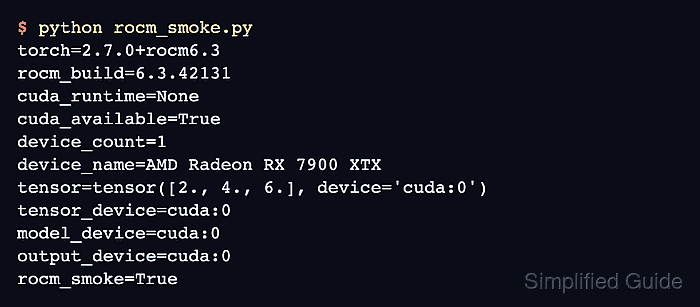
- Run the ROCm smoke script.
(torch-rocm) $ python rocm_smoke.py
torch=2.7.0+rocm6.3
rocm_build=6.3.42131
cuda_runtime=None
cuda_available=True
device_count=1
device_name=AMD Radeon RX 7900 XTX
tensor=tensor([2., 4., 6.], device='cuda:0')
tensor_device=cuda:0
model_device=cuda:0
output_device=cuda:0
rocm_smoke=True
cuda_available=True, a non-empty rocm_build line, and tensor_device=cuda:0 together show that the active PyTorch environment is using ROCm-backed GPU execution.
- Add a strict ROCm device check to code that must run on the AMD GPU.
if not torch.version.hip or not torch.cuda.is_available():
    raise RuntimeError("ROCm is not available in this Python environment")

device = torch.device("cuda")
Use a portable selector when the same script should run on CUDA, MPS, or CPU depending on the host.
Related: How to select a device in PyTorch - Move the model and input tensors to the ROCm-backed device.
model = build_model().to(device)

for inputs, targets in train_loader:
    inputs = inputs.to(device)
    targets = targets.to(device)

    outputs = model(inputs)
    loss = loss_fn(outputs, targets)
Model parameters, inputs, targets, and losses must stay on compatible devices. Mixing CPU and cuda:0 tensors in the same operation raises a device mismatch error.
- Print the first real run's devices while wiring the project code.
print(f"model_device={next(model.parameters()).device}")
print(f"input_device={inputs.device}")
print(f"output_device={outputs.device}")
Each line should report cuda:0 on the ROCm host before the project run is treated as GPU-enabled.
- Remove the smoke script after the project code uses the ROCm device.
(torch-rocm) $ rm rocm_smoke.py

Mohd Shakir Zakaria is a cloud architect with deep roots in software development and open-source advocacy. Certified in AWS, Red Hat, VMware, ITIL, and Linux, he specializes in designing and managing robust cloud and on-premises infrastructures.


