Enabling the PHP-FPM slow log matters when a request is visibly slow but normal access logging only proves that time was spent somewhere between the web server and the application. A slowlog backtrace shows what the PHP worker was doing when the request crossed the threshold, which is often the fastest way to separate application code stalls from upstream buffering, network delay, or web-server routing problems.
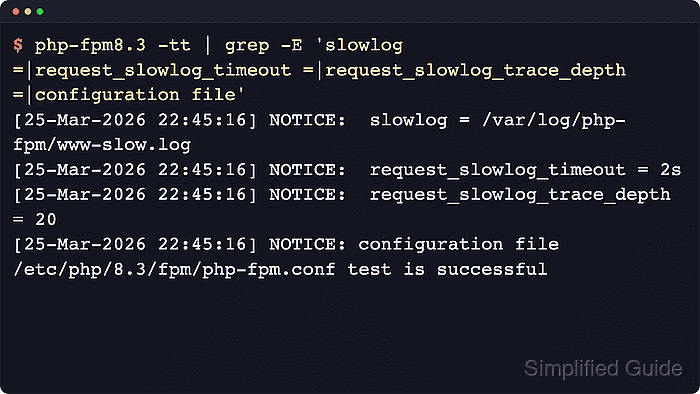
PHP-FPM enables this per pool with the slowlog path, request_slowlog_timeout threshold, and optional request_slowlog_trace_depth limit. When a request runs longer than the configured timeout, PHP-FPM tries to write a PHP stack trace for that pool without terminating the request itself, so request_terminate_timeout remains a separate control when workers must actually be killed.
Examples below use the current Ubuntu 26.04 LTS package layout under /etc/php/8.5/fpm/pool.d with the php8.5-fpm service. Replace 8.5 with the installed branch on other Ubuntu or Debian hosts, and reuse /etc/php-fpm.d plus the unversioned php-fpm service on Fedora, Red Hat, or CentOS Stream systems. Some container and hardened host policies block the ptrace call used to collect backtraces, so validate the pool before reloading and inspect the main PHP-FPM error log if a confirmed slow request still leaves the slowlog empty.
Steps to enable the PHP-FPM slow log:
- List the available PHP-FPM pool files and choose the pool that serves the application.
$ find /etc/php/8.5/fpm/pool.d -maxdepth 1 -name '*.conf' -print
/etc/php/8.5/fpm/pool.d/www.conf
Ubuntu 26.04 LTS stores pool files under /etc/php/8.5/fpm/pool.d. Current Debian 13 uses the same layout with 8.4, while Fedora, Red Hat, and CentOS Stream usually use /etc/php-fpm.d. Edit the application pool instead of the default www pool when a custom pool already exists.
Related: How to create a PHP-FPM pool
Related: How to find PHP configuration files - Create a backup of the target pool file before editing it.
$ sudo cp /etc/php/8.5/fpm/pool.d/www.conf /etc/php/8.5/fpm/pool.d/www.conf.bak-before-slowlog
A broken pool file can keep new workers from loading after the reload, so a rollback copy shortens recovery.
- Open the target pool file in a text editor.
$ sudo vi /etc/php/8.5/fpm/pool.d/www.conf
Use the discovered pool path when the host installs a different PHP branch or the unversioned /etc/php-fpm.d layout.
- Set the slowlog directives inside the selected pool section.
slowlog = /var/log/php-fpm/www-slow.log
request_slowlog_timeout = 2s
request_slowlog_trace_depth = 20
The PHP manual documents 0 as off for request_slowlog_timeout and accepts s, m, h, or d units. request_slowlog_trace_depth defaults to 20 on current PHP-FPM releases.
Use one slowlog file per pool so traces from different applications do not mix together.
- Create the slowlog directory and file so PHP-FPM can open the configured path after reload.
$ sudo install -d -o root -g root -m 0755 /var/log/php-fpm
$ sudo install -o root -g root -m 0640 /dev/null /var/log/php-fpm/www-slow.log
Reuse the host's existing PHP-FPM log directory or logrotate policy when one is already in place, but keep the resolved slowlog path aligned with what the service can open after reload. Adjust the file group only when non-root log readers need access.
- Test the PHP-FPM configuration before reloading the service.
$ sudo php-fpm8.5 -tt
[05-Jun-2026 21:56:53] NOTICE: [global]
##### snipped #####
[05-Jun-2026 21:56:53] NOTICE: [www]
##### snipped #####
[05-Jun-2026 21:56:53] NOTICE: 	slowlog = /var/log/php-fpm/www-slow.log
[05-Jun-2026 21:56:53] NOTICE: 	request_slowlog_timeout = 2s
[05-Jun-2026 21:56:53] NOTICE: 	request_slowlog_trace_depth = 20
##### snipped #####
[05-Jun-2026 21:56:53] NOTICE: configuration file /etc/php/8.5/fpm/php-fpm.conf test is successful
Some distributions use the generic binary name php-fpm -tt instead of a versioned binary. The -tt check prints the effective pool values as well as the final syntax result.
Do not reload the service until the configuration test succeeds.
- Reload the PHP-FPM service so the pool picks up the slow-request settings.
$ sudo systemctl reload php8.5-fpm
Ubuntu and Debian packages commonly expose a versioned unit such as php8.5-fpm or php8.4-fpm, while Fedora, Red Hat, and CentOS Stream usually use php-fpm.
- Create a temporary slow probe inside the document root served by the edited pool.
$ sudo tee /var/www/portal.example.test/public/slowlog-probe.php >/dev/null <<'PHP'
<?php
sleep(3);
echo "slow probe complete", PHP_EOL;
PHP
Replace /var/www/portal.example.test/public with the real document root behind the edited pool. The probe only needs to run slightly longer than request_slowlog_timeout.
Remove the probe file after verification so an artificial slow endpoint is not left exposed.
- Request the probe through the same host and path that reach the edited PHP-FPM pool.
$ curl -sS https://portal.example.test/slowlog-probe.php
slow probe complete
Use the same hostname, scheme, and reverse-proxy path that normally route traffic into the target pool.
- Inspect the slowlog file for the new backtrace entry.
$ sudo cat /var/log/php-fpm/www-slow.log
[05-Jun-2026 21:56:57]  [pool www] pid 8783
script_filename = /var/www/portal.example.test/public/slowlog-probe.php
[0x0000ffffa6814080] sleep() /var/www/portal.example.test/public/slowlog-probe.php:2
The timestamp, PID, memory address, and script path vary, but a matching script_filename plus at least one PHP stack frame confirms that the slow log is active.
If the request clearly exceeded the timeout but the slowlog file stayed empty, continue with the next step before changing the pool directives again.
- Inspect the PHP-FPM error log if the request exceeded the timeout but the slowlog file stayed empty.
$ sudo cat /var/log/php8.5-fpm.log
##### snipped #####
[05-Jun-2026 21:54:42] ERROR: failed to ptrace(ATTACH) child 8783: Operation not permitted (1)
[05-Jun-2026 21:54:42] WARNING: [pool www] child 8783, script '/var/www/portal.example.test/public/slowlog-probe.php' (request: "GET /slowlog-probe.php") executing too slow (2.364270 sec), logging
Ubuntu and Debian commonly log PHP-FPM master messages to versioned files such as /var/log/php8.5-fpm.log or /var/log/php8.4-fpm.log, while Fedora and RHEL-family hosts often use /var/log/php-fpm/error.log or the journal. The important signal is that the request was marked slow but the backtrace capture failed.
On containerized or hardened hosts, ptrace can be blocked by the runtime or local security policy. Allow the required ptrace capability or equivalent runtime setting first, and evaluate the pool-level process.dumpable directive only where the local policy permits it.
Related: How to configure PHP error logging
- Remove the temporary slow probe after the slowlog entry is confirmed or the failure is diagnosed.
$ sudo rm /var/www/portal.example.test/public/slowlog-probe.php

Mohd Shakir Zakaria is a cloud architect with deep roots in software development and open-source advocacy. Certified in AWS, Red Hat, VMware, ITIL, and Linux, he specializes in designing and managing robust cloud and on-premises infrastructures.


