Managing PHP-FPM cleanly matters after pool edits, php.ini changes, package upgrades, and incident response because the service owns the worker processes and listener that web servers hand PHP requests to. Fast control over the service shortens outages when a bad pool file blocks new workers or when a rollback needs a controlled worker recycle.
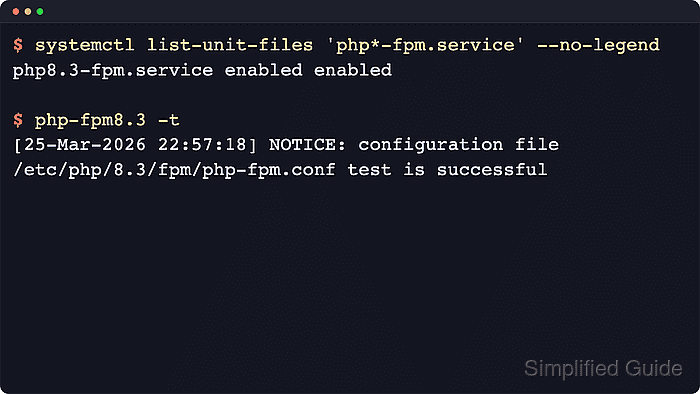
On systemd hosts, PHP-FPM is controlled through a service unit and the usual lifecycle actions in systemctl. status shows whether the master process and pools are running, reload asks the master to reread configuration gracefully, and restart replaces the worker tree when a full reinitialization is safer than an in-place reload.
On Ubuntu 26.04, the packaged service is php8.5-fpm with configuration under
/etc/php/8.5/fpm/
. Other Ubuntu and Debian releases expose the branch packaged for that release, while Fedora, Red Hat, and CentOS Stream usually use the unversioned php-fpm service with
/etc/php-fpm.conf
and
/etc/php-fpm.d/
. Run a config test before reloading or restarting so a broken pool file or directive does not turn routine service control into downtime.
Steps to manage the PHP-FPM service in Linux:
- Identify the installed PHP-FPM unit name before running lifecycle commands.
$ systemctl list-unit-files 'php*-fpm.service' --no-legend
php8.5-fpm.service enabled enabled
Ubuntu and Debian commonly expose a versioned unit such as php8.5-fpm, while Fedora, Red Hat, and CentOS Stream typically use php-fpm. If more than one unit appears, control the branch that actually serves the site.
- Test the PHP-FPM configuration with the binary that matches the selected service before using reload or restart.
$ sudo php-fpm8.5 -t
[05-Jun-2026 21:47:53] NOTICE: configuration file /etc/php/8.5/fpm/php-fpm.conf test is successful
The PHP-FPM man page documents -t as a configuration test and -tt as the same test plus a dump of resolved settings. Use php-fpm -t on systems that package the unversioned binary. Related: How to find PHP configuration files
Do not reload or restart the service until the configuration test succeeds.
- Check the current PHP-FPM service state before making a change.
$ sudo systemctl status php8.5-fpm --no-pager
● php8.5-fpm.service - The PHP 8.5 FastCGI Process Manager
     Loaded: loaded (/usr/lib/systemd/system/php8.5-fpm.service; enabled; preset: enabled)
     Active: active (running) since Fri 2026-06-05 21:47:48 UTC; 5s ago
 Invocation: 8f4c2d6a9b0c4e1d
       Docs: man:php-fpm8.5(8)
    Process: 78 ExecStartPost=/usr/lib/php/php-fpm-socket-helper install /run/php/php-fpm.sock /etc/php/8.5/fpm/pool.d/www.conf 85 (code=exited, status=0/SUCCESS)
   Main PID: 61 (php-fpm8.5)
     Status: "Ready to handle connections"
      Tasks: 3 (limit: 14335)
     Memory: 10.8M (peak: 12.6M)
        CPU: 49ms
     CGroup: /system.slice/php8.5-fpm.service
             ├─61 "php-fpm: master process (/etc/php/8.5/fpm/php-fpm.conf)"
             ├─76 "php-fpm: pool www"
             └─77 "php-fpm: pool www"

Jun 05 21:47:48 php-app-01 systemd[1]: Starting php8.5-fpm.service - The PHP 8.5 FastCGI Process Manager...
Jun 05 21:47:48 php-app-01 systemd[1]: Started php8.5-fpm.service - The PHP 8.5 FastCGI Process Manager.
Replace php8.5-fpm with the discovered unit name when the host uses a different PHP branch or the unversioned php-fpm service.
- Reload PHP-FPM after a successful configuration change that supports a graceful reread.
$ sudo systemctl reload php8.5-fpm
PHP-FPM supports graceful worker reloads. If systemctl reload returns Job type reload is not applicable, use restart after a successful config test instead.
- Restart PHP-FPM when a full worker reinitialization is required.
$ sudo systemctl restart php8.5-fpm
Restart replaces the existing workers and can interrupt in-flight PHP requests during the restart window.
- Stop the PHP-FPM service when the FastCGI backend must be taken offline.
$ sudo systemctl stop php8.5-fpm
Stopping PHP-FPM removes the web server's FastCGI backend and commonly produces 502 Bad Gateway or similar upstream errors for PHP requests until the service comes back.
- Start the PHP-FPM service again.
$ sudo systemctl start php8.5-fpm
- Disable PHP-FPM from starting automatically at boot.
$ sudo systemctl disable --now php8.5-fpm
Synchronizing state of php8.5-fpm.service with SysV service script with /usr/lib/systemd/systemd-sysv-install.
Executing: /usr/lib/systemd/systemd-sysv-install disable php8.5-fpm
Removed '/etc/systemd/system/multi-user.target.wants/php8.5-fpm.service'.
The --now option stops the service immediately as well as removing the boot-time symlink.
- Enable PHP-FPM to start automatically at boot.
$ sudo systemctl enable --now php8.5-fpm
Synchronizing state of php8.5-fpm.service with SysV service script with /usr/lib/systemd/systemd-sysv-install.
Executing: /usr/lib/systemd/systemd-sysv-install enable php8.5-fpm
Created symlink '/etc/systemd/system/multi-user.target.wants/php8.5-fpm.service' → '/usr/lib/systemd/system/php8.5-fpm.service'.
The --now option starts the service immediately after enabling it.
- Review recent unit logs when PHP-FPM fails to start, reload, or stop cleanly.
$ sudo journalctl --unit=php8.5-fpm.service --no-pager --lines=10
Jun 05 21:47:53 php-app-01 systemd[1]: Stopping php8.5-fpm.service - The PHP 8.5 FastCGI Process Manager...
Jun 05 21:47:53 php-app-01 systemd[1]: php8.5-fpm.service: Deactivated successfully.
Jun 05 21:47:53 php-app-01 systemd[1]: Stopped php8.5-fpm.service - The PHP 8.5 FastCGI Process Manager.
Jun 05 21:47:53 php-app-01 systemd[1]: Starting php8.5-fpm.service - The PHP 8.5 FastCGI Process Manager...
Jun 05 21:47:53 php-app-01 systemd[1]: Started php8.5-fpm.service - The PHP 8.5 FastCGI Process Manager.
Jun 05 21:47:53 php-app-01 systemd[1]: Stopping php8.5-fpm.service - The PHP 8.5 FastCGI Process Manager...
Jun 05 21:47:53 php-app-01 systemd[1]: php8.5-fpm.service: Deactivated successfully.
Jun 05 21:47:53 php-app-01 systemd[1]: Stopped php8.5-fpm.service - The PHP 8.5 FastCGI Process Manager.
Jun 05 21:47:54 php-app-01 systemd[1]: Starting php8.5-fpm.service - The PHP 8.5 FastCGI Process Manager...
Jun 05 21:47:54 php-app-01 systemd[1]: Started php8.5-fpm.service - The PHP 8.5 FastCGI Process Manager.
Use the full unit name with the .service suffix when querying the journal.
- Verify the runtime and boot state after the service action.
$ systemctl is-active php8.5-fpm
active

$ systemctl is-enabled php8.5-fpm
enabled
systemctl is-enabled still reports the boot state on hosts where package installation or startup was blocked by container policy or policy-rc.d.

Mohd Shakir Zakaria is a cloud architect with deep roots in software development and open-source advocacy. Certified in AWS, Red Hat, VMware, ITIL, and Linux, he specializes in designing and managing robust cloud and on-premises infrastructures.


