Creating a separate PHP-FPM pool isolates one site or application from other PHP workloads that share the same master service. A dedicated pool can run under its own Unix account, expose its own socket or TCP listener, and keep request limits or logging choices separate from the packaged default pool.
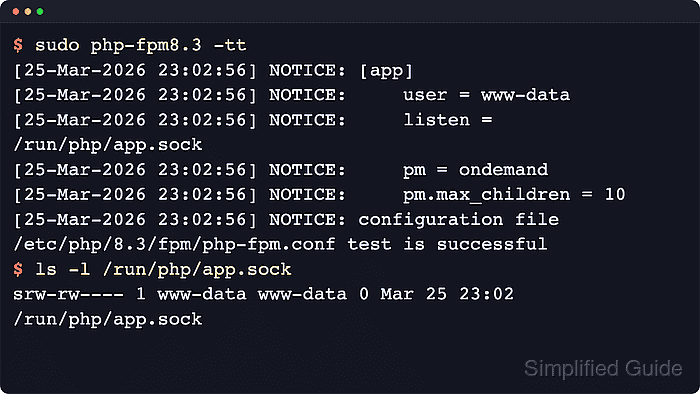
A pool is a named configuration section loaded by PHP-FPM when the main php-fpm.conf file includes the pool directory. Each pool needs a unique listen endpoint, an existing runtime user, and a valid process-manager definition. The php-fpm -tt test resolves those values before a reload so configuration problems can be caught before traffic is pointed at the new backend.
Examples below use the current Ubuntu 26.04 LTS package layout under
/etc/php/8.5/fpm/pool.d/
. Replace 8.5 with the installed branch on Ubuntu or Debian hosts, and reuse
/etc/php-fpm.d/
on Fedora, Red Hat, or CentOS Stream systems. When a Unix socket is used, keep the socket path short and make its ownership or mode match the web-server account, otherwise PHP-FPM can start while the web server still cannot connect.
Related: How to enable the PHP-FPM status page
Related: How to enable the PHP-FPM slow log
Steps to create a PHP-FPM pool:
- Check the existing listener paths before choosing a new pool name and socket path.
$ grep -H '^listen = ' /etc/php/*/fpm/pool.d/*.conf
/etc/php/8.5/fpm/pool.d/www.conf:listen = /run/php/php8.5-fpm.sock
Ubuntu and Debian packages commonly store pool files under /etc/php/<version>/fpm/pool.d. Fedora, Red Hat, and CentOS Stream usually use /etc/php-fpm.d instead, so reuse the active package layout instead of mixing paths from another distribution.
- Create the service account that will own the new pool processes.
$ sudo useradd --system --user-group --no-create-home --shell /usr/sbin/nologin billing
Skip this command when the application already has a dedicated Unix account, and use that existing account name in the pool file instead.
- Create a new pool file named after the application or site.
$ sudo vi /etc/php/8.5/fpm/pool.d/billing.conf
Keep the filename and the pool name aligned with the application so later status checks, log paths, and listener targets stay easy to recognize.
Related: How to find PHP configuration files
- Add the new pool definition with a unique section name and listener.
[billing]
user = billing
group = billing
listen = /run/php/billing.sock
listen.owner = www-data
listen.group = www-data
listen.mode = 0660
pm = ondemand
pm.max_children = 10
pm.process_idle_timeout = 10s
The PHP manual marks listen, user, pm, and pm.max_children as mandatory pool directives. The ondemand example above also uses pm.process_idle_timeout, while pm = dynamic requires pm.start_servers, pm.min_spare_servers, and pm.max_spare_servers as well.
Keep Unix-socket paths short. If the full socket path becomes too long, PHP-FPM can fail to bind the listener even when the pool syntax is otherwise valid.
- Test the full PHP-FPM configuration before reloading the service.
$ sudo php-fpm8.5 -tt
[05-Jun-2026 21:46:01] NOTICE: [global]
##### snipped #####
[05-Jun-2026 21:46:01] NOTICE: [billing]
[05-Jun-2026 21:46:01] NOTICE:     user = billing
[05-Jun-2026 21:46:01] NOTICE:     group = billing
[05-Jun-2026 21:46:01] NOTICE:     listen = /run/php/billing.sock
[05-Jun-2026 21:46:01] NOTICE:     listen.owner = www-data
[05-Jun-2026 21:46:01] NOTICE:     listen.group = www-data
[05-Jun-2026 21:46:01] NOTICE:     listen.mode = 0660
[05-Jun-2026 21:46:01] NOTICE:     pm = ondemand
[05-Jun-2026 21:46:01] NOTICE:     pm.max_children = 10
[05-Jun-2026 21:46:01] NOTICE:     pm.process_idle_timeout = 10
##### snipped #####
[05-Jun-2026 21:46:01] NOTICE: configuration file /etc/php/8.5/fpm/php-fpm.conf test is successful
Use the binary that matches the installed PHP branch, such as php-fpm8.4 on Debian 13 or php-fpm8.5 on current Ubuntu 26.04. RHEL-family packages commonly use the unversioned php-fpm -tt command.
Do not reload the service until the configuration test is successful.
- Reload PHP-FPM so it reads the new pool file.
$ sudo systemctl reload php8.5-fpm
Replace php8.5-fpm with the installed unit name when the host uses another PHP branch or the unversioned php-fpm service.
- Confirm that PHP-FPM created the new listener after the reload.
$ ls -l /run/php/billing.sock
srw-rw---- 1 www-data www-data 0 Jun  5 21:46 /run/php/billing.sock
If the pool listens on a TCP address instead of a Unix socket, verify the bound endpoint with ss -ltn instead of checking /run/php.
The new pool stays unused until the web server or reverse proxy is pointed at this listener, so update that upstream target separately if requests still land on the default pool.

Mohd Shakir Zakaria is a cloud architect with deep roots in software development and open-source advocacy. Certified in AWS, Red Hat, VMware, ITIL, and Linux, he specializes in designing and managing robust cloud and on-premises infrastructures.


