Support tickets and other free-text inputs often need a fixed label before an application can route them. An Ollama decision model selects from supplied candidates and returns their probabilities, allowing an application to compare choices without parsing a chat reply.
The public tev1:0.8b model supports local CPU inference and requires Ollama 0.40.4 or later. A running local Ollama server, curl, and Python 3 for displaying JSON are needed; local decision requests do not require an Ollama account or API key.
Candidate descriptions define what each label means. An other candidate covers text outside the named categories, while a high probability expresses the model's preference among those candidates rather than a guarantee of accuracy on your data.
Steps to run a decision model in Ollama:
- Check that the installed Ollama version meets Tev1's minimum of 0.40.4.
$ ollama --version
ollama version is 0.40.16
An older version needs an update before loading this model. A client/server mismatch warning means the running server also needs attention.
Related: How to update Ollama on Linux - Download the tev1:0.8b decision model to the local server.
$ ollama pull tev1:0.8b
##### snipped #####
success
The download is approximately 834 MB, with additional memory needed during inference. A previously downloaded copy is reused. This is a decision model; substituting a regular chat model does not provide the same candidate scoring.
Related: How to pull an Ollama model - Classify the refund request using the three supplied team candidates.
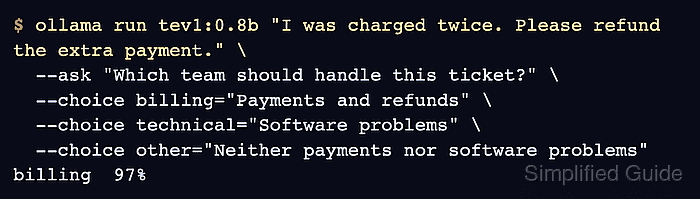
$ ollama run tev1:0.8b "I was charged twice. Please refund the extra payment." \
  --ask "Which team should handle this ticket?" \
  --choice billing="Payments and refunds" \
  --choice technical="Software problems" \
  --choice other="Neither payments nor software problems"
billing  97%
The text after the model name is the input being judged. Each --choice supplies a label and its description for the preceding --ask question. The CLI prints the selected label and its probability; results can vary. Your own text, question, and candidate descriptions can replace these ticket details.
- Confirm the choice and each candidate's probability through the local System One API.
$ curl -fsS http://localhost:11434/v1/systemone \
  -H 'Content-Type: application/json' \
  -d '{
    "model": "tev1:0.8b",
    "state": "I was charged twice. Please refund the extra payment.",
    "questions": {
      "team": {
        "type": "choice",
        "instructions": "Which team should handle this ticket?",
        "criteria": {
          "billing": "Payments and refunds",
          "technical": "Software problems",
          "other": "Neither payments nor software problems"
        }
      }
    }
  }' | python3 -m json.tool
Example output:
{
    "model": "tev1:0.8b",
    "answers": {
        "team": {
            "type": "choice",
            "choice": "billing",
            "probabilities": {
                "billing": 0.9659994638954157,
                "technical": 0.00030027107441768416,
                "other": 0.03370026503016657
            },
            "confidence": 0.9489991958431235
        }
    },
    "usage": {
        "input_tokens": 140,
        "output_tokens": 0
    }
}
state holds the input text, and criteria maps each allowed label to its description. Python's json.tool only formats the response for reading. Under answers.team, choice should name a supplied candidate and probabilities should contain all three labels with values from 0 to 1. Here, billing has the highest probability, matching the CLI's rounded 97%. Missing answers, an error response, or a connection failure means the decision request has not completed. confidence measures how concentrated the probabilities are, not the chance that the answer is correct.