Optimizing MySQL or MariaDB server performance is safest when slowdowns are tied to server counters before memory, thread, or durability settings change. A measured tuning pass separates single-node pressure from slow SQL or client reconnect patterns, so the next change targets the part of the server that is actually limiting throughput.
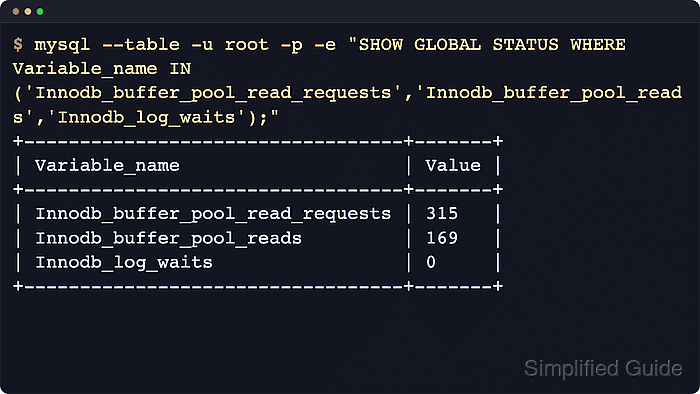
Most server-wide slowdowns show up as hot data falling out of the InnoDB buffer pool, connection churn creating extra threads, temporary tables spilling to disk, or the redo and binary-log path forcing more flush work than the storage layer can absorb. Status counters such as Threads_running, Created_tmp_disk_tables, Innodb_buffer_pool_reads, and Innodb_log_waits show which condition is growing, while the slow query log separates inefficient SQL from server-level pressure.
Branch differences change which setting is safe to edit. MySQL 8.0.30 and later, including current 9.x releases, use innodb_redo_log_capacity for redo sizing, while MariaDB continues to expose redo sizing through innodb_log_file_size and uses innodb_buffer_pool_size_max as the live buffer-pool growth ceiling. Make one change at a time, persist it in the option-file chain, and restart only when the chosen variable or branch requires it.
Related: How to optimize MySQL or MariaDB performance
Related: How to monitor performance metrics in MySQL or MariaDB
Related: How to configure slow query log in MySQL or MariaDB
Related: How to tune InnoDB buffer pool size in MySQL or MariaDB
Related: How to change InnoDB log file size in MySQL or MariaDB
Related: How to limit active connections in MySQL or MariaDB
Related: How to view and set server variables in MySQL or MariaDB
Related: How to view the MySQL or MariaDB server error log
Related: How to manage MySQL or MariaDB service with systemctl in Linux
Related: How to use MySQLTuner for MySQL or MariaDB
Related: How to configure MySQL or MariaDB replication
Related: How to set up MySQL read/write load balancing with HAProxy and replication
Steps to optimize MySQL or MariaDB server performance:
- Identify the server product and version before changing any performance setting.
$ mariadb --table -u root -p -e "SELECT VERSION() AS version, @@version_comment AS comment;"
+------------------------+---------------------------------+
| version                | comment                         |
+------------------------+---------------------------------+
| 11.8.8-MariaDB-ubu2404 | mariadb.org binary distribution |
+------------------------+---------------------------------+
Use mysql instead of mariadb on MySQL Server hosts. The SQL in these checks is the same for both products unless the step names a product-specific variable.
- Capture baseline concurrency, cache, temp-table, and redo-pressure counters during a representative load window.
$ mariadb --table -u root -p -e "SHOW GLOBAL STATUS WHERE Variable_name IN ('Threads_connected','Threads_running','Innodb_buffer_pool_read_requests','Innodb_buffer_pool_reads','Created_tmp_tables','Created_tmp_disk_tables','Innodb_log_waits');"
+----------------------------------+-------+
| Variable_name                    | Value |
+----------------------------------+-------+
| Created_tmp_disk_tables          | 0     |
| Created_tmp_tables               | 1     |
| Innodb_buffer_pool_read_requests | 19    |
| Innodb_buffer_pool_reads         | 152   |
| Innodb_log_waits                 | 0     |
| Threads_connected                | 1     |
| Threads_running                  | 1     |
+----------------------------------+-------+
Compare the change in these counters over the same load window before and after each tuning change instead of trusting one isolated sample.
After the working set is warm, a fast-growing Innodb_buffer_pool_reads count points to buffer-pool misses, Created_tmp_disk_tables points to disk-backed sorts or GROUP BY work, and Innodb_log_waits points to redo pressure.
- Check whether connection churn is forcing extra thread creation.
$ mariadb --table -u root -p -e "SHOW GLOBAL STATUS WHERE Variable_name IN ('Threads_created','Connections');"
+-----------------+-------+
| Variable_name   | Value |
+-----------------+-------+
| Connections     | 7     |
| Threads_created | 1     |
+-----------------+-------+
If Threads_created keeps rising quickly relative to Connections, either the thread cache is too small for the workload or clients are reconnecting too often.
- Check the configured thread cache before increasing it.
$ mariadb --table -u root -p -e "SHOW GLOBAL VARIABLES LIKE 'thread_cache_size';"
+-------------------+-------+
| Variable_name     | Value |
+-------------------+-------+
| thread_cache_size | 151   |
+-------------------+-------+
A larger thread cache helps only when connections are repeatedly creating new threads. It does not fix a high number of long-running queries.
- Confirm that slow-query visibility is enabled before changing memory, concurrency, or durability settings.
$ mariadb --table -u root -p -e "SHOW GLOBAL VARIABLES WHERE Variable_name IN ('slow_query_log','long_query_time','log_output');"
+-----------------+-----------+
| Variable_name   | Value     |
+-----------------+-----------+
| log_output      | FILE      |
| long_query_time | 10.000000 |
| slow_query_log  | OFF       |
+-----------------+-----------+
Server tuning without the slow query log often masks the real issue by treating inefficient SQL as a memory or connection problem.
- Review the current memory, concurrency, and durability variables before deciding which knob actually matches the bottleneck.
$ mariadb --table -u root -p -e "SHOW GLOBAL VARIABLES WHERE Variable_name IN ('innodb_buffer_pool_size','innodb_buffer_pool_size_max','max_connections','thread_cache_size','table_open_cache','innodb_flush_log_at_trx_commit','sync_binlog');"
+--------------------------------+-----------+
| Variable_name                  | Value     |
+--------------------------------+-----------+
| innodb_buffer_pool_size        | 134217728 |
| innodb_buffer_pool_size_max    | 134217728 |
| innodb_flush_log_at_trx_commit | 1         |
| max_connections                | 151       |
| sync_binlog                    | 0         |
| table_open_cache               | 2000      |
| thread_cache_size              | 151       |
+--------------------------------+-----------+
Do not lower innodb_flush_log_at_trx_commit or relax sync_binlog just to chase benchmark numbers unless the workload owner explicitly accepts weaker crash durability.
On dedicated MySQL hosts, current upstream documentation also supports --innodb-dedicated-server to auto-size the buffer pool and redo capacity at startup. Do not assume MariaDB provides the same feature.
- Check the redo capacity on MySQL 8.0.30 and later.
$ mysql --table -u root -p -e "SHOW GLOBAL VARIABLES LIKE 'innodb_redo_log_capacity';"
+--------------------------+-----------+
| Variable_name            | Value     |
+--------------------------+-----------+
| innodb_redo_log_capacity | 104857600 |
+--------------------------+-----------+
MySQL reports the effective resized capacity through Innodb_redo_log_capacity_resized. Current MySQL 9.x no longer returns innodb_log_file_size or innodb_log_files_in_group from this branch check.
- Check the redo file size on MariaDB.
$ mariadb --table -u root -p -e "SHOW GLOBAL VARIABLES LIKE 'innodb_log_file_size';"
+----------------------+-----------+
| Variable_name        | Value     |
+----------------------+-----------+
| innodb_log_file_size | 100663296 |
+----------------------+-----------+
MariaDB 10.9 and later can resize innodb_log_file_size dynamically. Older branches still require the stop-change-start procedure.
- Inspect InnoDB memory state when cache misses or write stalls stay high.
$ mariadb -u root -p -e "SHOW ENGINE INNODB STATUS\G"
BUFFER POOL AND MEMORY
----------------------
Total large memory allocated 167772160
Dictionary memory allocated 861600
Buffer pool size   8032
Free buffers       7722
Database pages     310
Old database pages 0
Modified db pages  29
Buffer pool size is shown in pages, typically 16KiB each. Review this output together with Innodb_buffer_pool_reads and Innodb_log_waits instead of changing several InnoDB settings at once.
- Print the option-file search order before deciding where to persist a tuning change.
$ mariadbd --verbose --help
Default options are read from the following files in the given order:
/etc/my.cnf /etc/mysql/my.cnf ~/.my.cnf
The following groups are read: mysqld server mysqld-11.8 mariadb mariadb-11.8 mariadbd mariadbd-11.8 client-server galera
##### snipped #####
Use the discovered include chain instead of guessing. Common late-loaded override paths are /etc/mysql/conf.d/, /etc/mysql/mariadb.conf.d/, and /etc/my.cnf.d/ depending on the package layout.
- Persist only the setting that matches the bottleneck you measured, and keep it in a late-loaded drop-in instead of editing vendor defaults in place.
$ sudoedit /etc/mysql/conf.d/server-performance.cnf
[mysqld]
innodb_buffer_pool_size = 8G
thread_cache_size = 64
table_open_cache = 4000
Add only the variables justified by your baseline. When redo pressure is the real problem, use innodb_redo_log_capacity on current MySQL or innodb_log_file_size on current MariaDB instead of inflating unrelated settings.
Keep innodb_flush_log_at_trx_commit = 1 and, when binary logging is part of recovery or replication, sync_binlog = 1 unless the business has explicitly accepted the weaker durability trade-off.
- Trial a dynamic change live only when the current branch documents that variable as dynamic.
mysql> SET PERSIST innodb_buffer_pool_size = 8589934592;

MariaDB> SET GLOBAL innodb_buffer_pool_size = 8589934592;
MySQL SET PERSIST writes the value to mysqld-auto.cnf. MariaDB SET GLOBAL changes runtime behavior only, so the same value still belongs in the option file. Current MariaDB can grow the buffer pool live only up to innodb_buffer_pool_size_max set at startup.
Redo sizing is branch-sensitive: current MySQL can resize innodb_redo_log_capacity online, and current MariaDB can resize innodb_log_file_size dynamically, but older releases still need the classic stop-change-start procedure.
- Restart the database service only when the chosen change requires it.
$ sudo systemctl restart mariadb
Use sudo systemctl restart mysql on packages whose service unit is named mysql.
A bad option-file change can prevent mysqld from starting at all, so do not queue multiple unrelated edits into the same restart.
- Confirm that the database service is active after any restart.
$ sudo systemctl is-active mariadb
active
- Re-run the same variable and status queries after the change and accept the tuning only when the same workload window shows the expected direction.
$ mariadb --table -u root -p -e "SHOW GLOBAL STATUS WHERE Variable_name IN ('Threads_running','Innodb_buffer_pool_reads','Innodb_buffer_pool_read_requests','Created_tmp_disk_tables','Innodb_log_waits');"
+----------------------------------+-------+
| Variable_name                    | Value |
+----------------------------------+-------+
| Created_tmp_disk_tables          | 0     |
| Innodb_buffer_pool_read_requests | 19    |
| Innodb_buffer_pool_reads         | 152   |
| Innodb_log_waits                 | 0     |
| Threads_running                  | 1     |
+----------------------------------+-------+
Successful tuning usually shows as lower growth rates for cache misses, disk-backed temp tables, redo waits, or runnable threads under comparable load, not just a different static variable value.
- Escalate to query tuning, read scaling, or topology changes only after the single-node counters stop pointing at a server-level fix.

Mohd Shakir Zakaria is a cloud architect with deep roots in software development and open-source advocacy. Certified in AWS, Red Hat, VMware, ITIL, and Linux, he specializes in designing and managing robust cloud and on-premises infrastructures.


