Changing the InnoDB redo log size gives the server more room to absorb write bursts before it has to checkpoint dirty pages back to the data files. That can reduce flush pressure and write stalls on busy systems, but larger redo logs also mean more work during crash recovery after an unclean shutdown.
InnoDB records committed changes in the redo log before the modified pages are flushed to the tablespace. Current MySQL releases size redo as total capacity through innodb_redo_log_capacity and keep the files in a #innodb_redo directory by default, while current MariaDB releases still size redo with innodb_log_file_size and keep the files as ib_logfile* in the redo log directory.
The exact procedure depends on version. MySQL 8.0.30 and newer can resize redo online, and current MariaDB documentation marks innodb_log_file_size as dynamic from MariaDB 10.9 onward. Older MySQL and older MariaDB releases still need a clean stop, a config change, and a restart with the old redo files moved out of the way. Record the current paths first, and make sure the redo directory has enough free space for the new size.
Steps to change InnoDB redo log size in MySQL or MariaDB:
- Identify the server product and version before changing any redo settings.
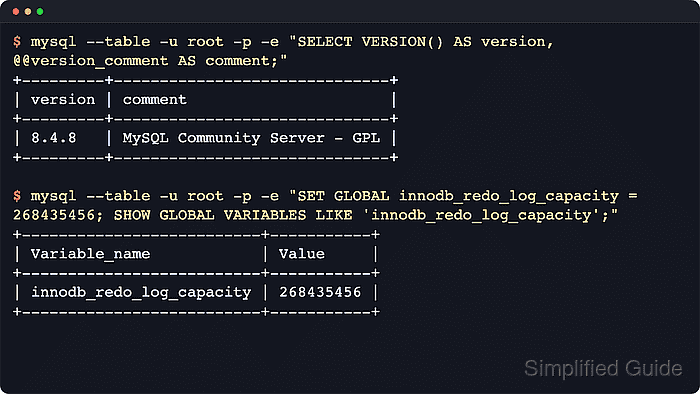
$ mysql --table -u root -p -e "SELECT VERSION() AS version, @@version_comment AS comment;"
+---------+------------------------------+
| version | comment                      |
+---------+------------------------------+
| 8.4.9   | MySQL Community Server - GPL |
+---------+------------------------------+
On MariaDB, the same command reports a version string such as 11.4.10-MariaDB and a comment such as mariadb.org binary distribution.
- Record the current redo settings and directories.
$ mysql --table -u root -p -e "SHOW GLOBAL VARIABLES WHERE Variable_name IN ('datadir','innodb_log_group_home_dir','innodb_log_file_size','innodb_log_files_in_group','innodb_redo_log_capacity');"
+---------------------------+-----------------+
| Variable_name             | Value           |
+---------------------------+-----------------+
| datadir                   | /var/lib/mysql/ |
| innodb_log_file_size      | 50331648        |
| innodb_log_files_in_group | 2               |
| innodb_log_group_home_dir | ./              |
| innodb_redo_log_capacity  | 104857600       |
+---------------------------+-----------------+
On current MariaDB releases, innodb_redo_log_capacity is absent and innodb_log_files_in_group may also be absent because MariaDB deprecated and removed that setting after the redo layout changed.
- Choose a target size that matches the workload.
Larger redo logs reduce checkpoint pressure during sustained writes, but they also lengthen crash recovery because more redo may need to be scanned and applied on startup.
- Confirm free disk space in the redo log directory before resizing.
$ df -h /var/lib/mysql
Filesystem      Size  Used Avail Use% Mounted on
/dev/vda1        59G   20G   36G  36% /var/lib/mysql
If innodb_log_group_home_dir is ./, use the datadir path. If innodb_log_group_home_dir points somewhere else, check that directory instead.
- Create or edit a late-loaded configuration drop-in so the new size survives restarts.
$ sudoedit /etc/mysql/conf.d/z-redo-log.cnf
MariaDB on Debian or Ubuntu commonly uses /etc/mysql/mariadb.conf.d/z-redo-log.cnf.
RHEL-family systems commonly use /etc/my.cnf.d/z-redo-log.cnf. - Add the redo setting that matches the server branch you identified.
MySQL 8.0.30 and newer use innodb_redo_log_capacity as total redo space. MariaDB and older MySQL releases use innodb_log_file_size. Current MariaDB releases default to one redo file, so do not assume ib_logfile1 exists.
[mysqld]
innodb_redo_log_capacity=256M
[mariadb]
innodb_log_file_size=256M
For MySQL 8.0.29 and older, place innodb_log_file_size=256M under [mysqld] instead of using innodb_redo_log_capacity.
- If the server is MySQL 8.0.30 or newer, apply the new total redo capacity online.
$ mysql --table -u root -p -e "SET GLOBAL innodb_redo_log_capacity = 268435456; SHOW GLOBAL VARIABLES LIKE 'innodb_redo_log_capacity'; SHOW GLOBAL STATUS LIKE 'Innodb_redo_log_capacity_resized';"
+--------------------------+-----------+
| Variable_name            | Value     |
+--------------------------+-----------+
| innodb_redo_log_capacity | 268435456 |
+--------------------------+-----------+
+----------------------------------+-----------+
| Variable_name                    | Value     |
+----------------------------------+-----------+
| Innodb_redo_log_capacity_resized | 268435456 |
+----------------------------------+-----------+
When innodb_redo_log_capacity is defined, MySQL ignores innodb_log_file_size and innodb_log_files_in_group for sizing. The runtime variable shows the requested value, while Innodb_redo_log_capacity_resized shows the capacity InnoDB has fully resized to.
- If the server is MariaDB 10.9 or newer, apply the new redo file size online and wait for the resize to complete.
$ mariadb --table -u root -p -e "SET GLOBAL innodb_log_file_size = 268435456; SHOW GLOBAL VARIABLES LIKE 'innodb_log_file_size';"
+----------------------+-----------+
| Variable_name        | Value     |
+----------------------+-----------+
| innodb_log_file_size | 268435456 |
+----------------------+-----------+
Current MariaDB documentation marks innodb_log_file_size as dynamic from MariaDB 10.9 onward. The resize runs in the background, so keep polling the variable until it shows the new value and leave the same size in the config file so a restart does not fall back to the old setting.
- If the server is older MySQL or older MariaDB, stop it cleanly before replacing redo files.
$ sudo systemctl stop mysql
Replace mysql with mariadb or mysqld if that is the service unit on the host.
- On older releases, move the first existing redo file out of the redo log directory before starting the server again.
$ sudo mv /var/lib/mysql/ib_logfile0 /var/lib/mysql/ib_logfile0.bak
Older MySQL releases commonly use both ib_logfile0 and ib_logfile1, so repeat the same move for ib_logfile1 when it exists. Current MariaDB releases usually keep only ib_logfile0. Move only the files that actually exist in the directory reported by innodb_log_group_home_dir or datadir.
- If you used the older-release path, start the database service again after moving the redo files.
$ sudo systemctl start mysql
For the online-resize path on MySQL 8.0.30+ or MariaDB 10.9+, no immediate restart is required for the live change itself. Leave the matching value in the config file and verify restart persistence during the next planned maintenance window instead of forcing an outage just to reload the same setting.
- Verify that the running MySQL server reports the intended resized capacity.
$ mysql --table -u root -p -e "SHOW GLOBAL STATUS LIKE 'Innodb_redo_log_capacity_resized';"
+----------------------------------+-----------+
| Variable_name                    | Value     |
+----------------------------------+-----------+
| Innodb_redo_log_capacity_resized | 268435456 |
+----------------------------------+-----------+
On MariaDB or older MySQL, check SHOW GLOBAL VARIABLES LIKE 'innodb_log_file_size'; instead.
- If you changed MySQL 8.0.30 or newer, confirm the redo directory exists under the configured redo path.
$ ls -ld /var/lib/mysql/#innodb_redo
drwxr-x--- 2 mysql mysql 4096 Jun  6 13:00 /var/lib/mysql/#innodb_redo
MySQL 8.0.30 and newer keep redo files in the #innodb_redo directory under datadir or under innodb_log_group_home_dir when that variable points elsewhere.
- If you changed MariaDB or older MySQL, confirm the redo file size in the redo log directory.
$ ls -lh /var/lib/mysql/ib_logfile*
-rw-rw---- 1 mysql mysql 256M Jun  6 13:00 /var/lib/mysql/ib_logfile0
Current MariaDB releases usually show one ib_logfile0 file. Older MySQL releases may show more than one ib_logfile* file.

Mohd Shakir Zakaria is a cloud architect with deep roots in software development and open-source advocacy. Certified in AWS, Red Hat, VMware, ITIL, and Linux, he specializes in designing and managing robust cloud and on-premises infrastructures.


