Performance metrics turn a vague “database feels slow” complaint into concrete evidence about throughput, concurrency, cache pressure, lock contention, and disk spills before the problem becomes a timeout or outage.
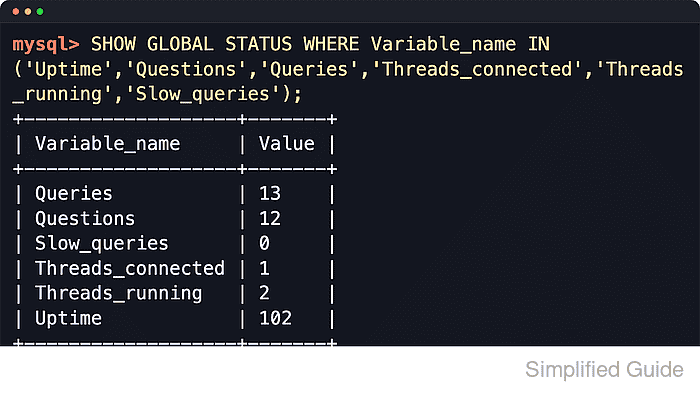
MySQL and MariaDB expose most runtime monitoring data through SHOW GLOBAL STATUS, while SHOW ENGINE INNODB STATUS\G adds a deeper snapshot of InnoDB internals such as semaphore waits, transaction backlog, buffer-pool activity, and row operations. If performance_schema is enabled, it adds statement and wait summaries, but the status counters remain the most portable cross-product baseline.
Use GLOBAL scope for monitoring, because plain SHOW STATUS defaults to the current session and a fresh connection often shows many zeros for workload counters. Most values are cumulative from startup, so a single snapshot is less useful than two samples taken at the same interval. MySQL defaults performance_schema to ON, while MariaDB commonly leaves it OFF unless it was enabled when the server started.
Steps to monitor MySQL or MariaDB performance metrics:
- Open a SQL client session that will stay available for repeat samples.
$ mysql -u root -p
Enter password:
Welcome to the MySQL monitor.  Commands end with ; or \g.
mysql>
- Identify the server build and whether performance_schema is available.
mysql> SELECT VERSION() AS version, @@version_comment AS version_comment;
+------------------------+------------------------------+
| version                | version_comment              |
+------------------------+------------------------------+
| 8.4.9                  | MySQL Community Server - GPL |
+------------------------+------------------------------+

mysql> SHOW VARIABLES LIKE 'performance_schema';
+--------------------+-------+
| Variable_name      | Value |
+--------------------+-------+
| performance_schema | ON    |
+--------------------+-------+
MySQL defaults performance_schema to ON. MariaDB commonly reports OFF until the feature is enabled at startup, so SHOW GLOBAL STATUS and SHOW ENGINE INNODB STATUS\G remain the safer shared baseline.
- Capture a baseline of throughput, concurrency, and slow-query counters.
mysql> SHOW GLOBAL STATUS WHERE Variable_name IN ('Uptime','Questions','Queries','Threads_connected','Threads_running','Slow_queries');
+-------------------+-------+
| Variable_name     | Value |
+-------------------+-------+
| Queries           | 18    |
| Questions         | 16    |
| Slow_queries      | 0     |
| Threads_connected | 1     |
| Threads_running   | 2     |
| Uptime            | 2     |
+-------------------+-------+
Plain SHOW STATUS defaults to the current session on both products. Use SHOW GLOBAL STATUS for workload monitoring, or a new connection can make counters such as Questions look artificially low.
Questions tracks client statements, while Threads_running is often the faster signal for CPU saturation or lock pileups.
- Check InnoDB buffer-pool read pressure.
mysql> SHOW GLOBAL STATUS WHERE Variable_name IN ('Innodb_buffer_pool_read_requests','Innodb_buffer_pool_reads');
+----------------------------------+-------+
| Variable_name                    | Value |
+----------------------------------+-------+
| Innodb_buffer_pool_read_requests | 16362 |
| Innodb_buffer_pool_reads         | 1029  |
+----------------------------------+-------+
Approximate hit rate = 1 - (Innodb_buffer_pool_reads / Innodb_buffer_pool_read_requests). Rising physical reads after the working set is warm usually mean the cache is undersized or the workload is no longer cache-friendly.
- Check buffer-pool occupancy and dirty-page pressure.
mysql> SHOW GLOBAL STATUS WHERE Variable_name IN ('Innodb_buffer_pool_pages_total','Innodb_buffer_pool_pages_free','Innodb_buffer_pool_pages_dirty');
+--------------------------------+-------+
| Variable_name                  | Value |
+--------------------------------+-------+
| Innodb_buffer_pool_pages_dirty | 209   |
| Innodb_buffer_pool_pages_free  | 7009  |
| Innodb_buffer_pool_pages_total | 8192  |
+--------------------------------+-------+
Low Innodb_buffer_pool_pages_free together with rising Innodb_buffer_pool_reads points to cache pressure. Sustained dirty-page growth can indicate checkpoint or flush backlog.
- Watch temporary-table creation and disk spills.
mysql> SHOW GLOBAL STATUS LIKE 'Created_tmp%';
+-------------------------+-------+
| Variable_name           | Value |
+-------------------------+-------+
| Created_tmp_disk_tables | 0     |
| Created_tmp_files       | 5     |
| Created_tmp_tables      | 5     |
+-------------------------+-------+
Do not over-interpret a single Created_tmp_tables snapshot. MySQL documents that every SHOW STATUS call increments that counter, and MariaDB can show the same probe effect in practice. Compare deltas across the same sampling pattern and focus on Created_tmp_disk_tables when checking real spill behavior.
- Review handler read counters for scan-heavy access paths.
mysql> SHOW GLOBAL STATUS LIKE 'Handler_read%';
+-----------------------+-------+
| Variable_name         | Value |
+-----------------------+-------+
| Handler_read_first    | 43    |
| Handler_read_key      | 1788  |
| Handler_read_last     | 0     |
| Handler_read_next     | 4065  |
| Handler_read_prev     | 0     |
| Handler_read_rnd      | 0     |
| Handler_read_rnd_next | 1365  |
+-----------------------+-------+
Fast growth in Handler_read_rnd_next is commonly associated with full scans or large range scans, while Handler_read_key growth usually reflects index lookups.
- Check transactional lock-wait counters.
mysql> SHOW GLOBAL STATUS LIKE 'Innodb_row_lock%';
+-------------------------------+-------+
| Variable_name                 | Value |
+-------------------------------+-------+
| Innodb_row_lock_current_waits | 0     |
| Innodb_row_lock_time          | 0     |
| Innodb_row_lock_time_avg      | 0     |
| Innodb_row_lock_time_max      | 0     |
| Innodb_row_lock_waits         | 0     |
+-------------------------------+-------+
Compare deltas for Innodb_row_lock_waits and Innodb_row_lock_time between samples during the same load window. Rising wait counts without higher throughput usually mean blocking, not healthy concurrency.
- Take a targeted InnoDB engine snapshot when the counters suggest contention or cache pressure.
mysql> SHOW ENGINE INNODB STATUS\G
*************************** 1. row ***************************
  Type: InnoDB
  Name:
Status:
=====================================
2026-06-06 20:16:49 281472696286976 INNODB MONITOR OUTPUT
=====================================
Per second averages calculated from the last 1 seconds
##### snipped #####
----------
SEMAPHORES
----------
OS WAIT ARRAY INFO: reservation count 10
OS WAIT ARRAY INFO: signal count 11
##### snipped #####
----------------------
BUFFER POOL AND MEMORY
----------------------
Buffer pool size   8192
Free buffers       7009
Database pages     1183
Modified db pages  209
##### snipped #####
Read SEMAPHORES for mutex or rw-lock pressure, TRANSACTIONS for active waits, BUFFER POOL AND MEMORY for cache pressure, and ROW OPERATIONS for read or write intensity. Sections such as LATEST DETECTED DEADLOCK appear only after that event has occurred.
Use SHOW ENGINE INNODB STATUS\G as a targeted snapshot rather than a tight polling loop, especially on busy systems.
- Wait a fixed interval during the workload being monitored, and resample the same core counters.
mysql> SHOW GLOBAL STATUS WHERE Variable_name IN ('Uptime','Questions','Queries','Threads_running');
+-----------------+-------+
| Variable_name   | Value |
+-----------------+-------+
| Queries         | 25    |
| Questions       | 23    |
| Threads_running | 2     |
| Uptime          | 2     |
+-----------------+-------+

mysql> SELECT SLEEP(2);
+----------+
| SLEEP(2) |
+----------+
|        0 |
+----------+

mysql> SHOW GLOBAL STATUS WHERE Variable_name IN ('Uptime','Questions','Queries','Threads_running');
+-----------------+-------+
| Variable_name   | Value |
+-----------------+-------+
| Queries         | 27    |
| Questions       | 25    |
| Threads_running | 2     |
| Uptime          | 4     |
+-----------------+-------+
Use deltas instead of single values. In this sample, Questions increased by 2 over 2 seconds, or about 1 statement per second, while Threads_running stayed flat.
For repeated shell-side deltas, MySQL exposes the same counters through mysqladmin extended-status –relative –sleep, and MariaDB does the same through mariadb-admin extended-status –relative –sleep.

Mohd Shakir Zakaria is a cloud architect with deep roots in software development and open-source advocacy. Certified in AWS, Red Hat, VMware, ITIL, and Linux, he specializes in designing and managing robust cloud and on-premises infrastructures.


