Changing a MySQL or MariaDB server variable from the wrong scope can leave active sessions, new connections, and startup defaults using different values. Checking the current runtime value first keeps troubleshooting and tuning tied to the server state that clients actually see.
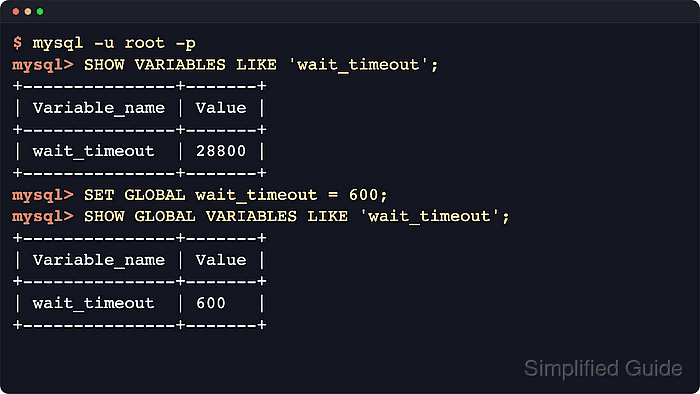
Each variable can expose a GLOBAL value, a SESSION value, or both. SHOW VARIABLES reads the session view by default, while SHOW GLOBAL VARIABLES, SHOW SESSION VARIABLES, and @@GLOBAL.variable_name or @@SESSION.variable_name make the scope explicit when checking what new connections inherit versus what the current client is using.
Runtime changes only work for dynamic variables, and a SET GLOBAL change becomes the default for new connections rather than rewriting active sessions. MySQL can persist supported global changes with SET PERSIST in mysqld-auto.cnf, while MariaDB still relies on option files for startup persistence. Startup-only variables still require a restart before they take effect, even when MySQL can store the value without a manual option-file edit.
Steps to view and set MySQL or MariaDB server variables:
- Open a privileged client session.
$ mysql -u root -p
Local administrative accounts on some Linux packages use sudo mysql or sudo mariadb instead of password authentication.
- Show the current session value of a variable.
$ mysql --table -u root -p -e "SHOW VARIABLES LIKE 'wait_timeout';"
+---------------+-------+
| Variable_name | Value |
+---------------+-------+
| wait_timeout  | 28800 |
+---------------+-------+
SHOW VARIABLES returns the session value unless the variable only has global scope. Use SHOW GLOBAL VARIABLES when the value that new sessions inherit is the value being checked.
- Search for related settings with a wildcard pattern.
$ mysql --table -u root -p -e "SHOW VARIABLES LIKE '%timeout%';"
+-----------------------------------+----------+
| Variable_name                     | Value    |
+-----------------------------------+----------+
| connect_timeout                   | 10       |
| delayed_insert_timeout            | 300      |
| have_statement_timeout            | YES      |
| innodb_flush_log_at_timeout       | 1        |
| innodb_lock_wait_timeout          | 50       |
| innodb_rollback_on_timeout        | OFF      |
| interactive_timeout               | 28800    |
| lock_wait_timeout                 | 31536000 |
##### snipped #####
| ssl_session_cache_timeout         | 300      |
| wait_timeout                      | 28800    |
+-----------------------------------+----------+
- Compare the global default with the current session value.
$ mysql --table -u root -p -e "SELECT @@GLOBAL.wait_timeout AS global_wait_timeout, @@SESSION.wait_timeout AS session_wait_timeout;"
+---------------------+----------------------+
| global_wait_timeout | session_wait_timeout |
+---------------------+----------------------+
|               28800 |                28800 |
+---------------------+----------------------+
The global value becomes the starting point for new connections, but an active session can still override it.
- Change the value only for the current connection.
$ mysql --table -u root -p -e "SET SESSION wait_timeout = 600; SELECT @@SESSION.wait_timeout AS session_wait_timeout;"
+----------------------+
| session_wait_timeout |
+----------------------+
|                  600 |
+----------------------+
SET SESSION affects only the connection that ran the statement, so reconnecting drops the override unless the client reapplies it.
- Change the server-wide runtime default for new connections.
$ mysql --table -u root -p -e "SET GLOBAL wait_timeout = 600; SHOW GLOBAL VARIABLES LIKE 'wait_timeout';"
+---------------+-------+
| Variable_name | Value |
+---------------+-------+
| wait_timeout  | 600   |
+---------------+-------+
Existing sessions keep their current session value until they reconnect or run their own SET SESSION statement.
- Inspect the current runtime source on MySQL.
$ mysql --table -u root -p -e "SELECT VARIABLE_NAME, VARIABLE_SOURCE, VARIABLE_PATH FROM performance_schema.variables_info WHERE VARIABLE_NAME = 'wait_timeout';"
+---------------+-----------------+---------------+
| VARIABLE_NAME | VARIABLE_SOURCE | VARIABLE_PATH |
+---------------+-----------------+---------------+
| wait_timeout  | DYNAMIC         |               |
+---------------+-----------------+---------------+
DYNAMIC means the running value came from a runtime SET change. After a restart from a persisted MySQL value, the source changes to PERSISTED.
- Inspect the current value origin on MariaDB.
$ mariadb --table -u root -p -e "SELECT VARIABLE_NAME, GLOBAL_VALUE, GLOBAL_VALUE_ORIGIN, GLOBAL_VALUE_PATH FROM information_schema.SYSTEM_VARIABLES WHERE VARIABLE_NAME = 'WAIT_TIMEOUT';"
+---------------+--------------+---------------------+-------------------+
| VARIABLE_NAME | GLOBAL_VALUE | GLOBAL_VALUE_ORIGIN | GLOBAL_VALUE_PATH |
+---------------+--------------+---------------------+-------------------+
| WAIT_TIMEOUT  | 600          | SQL                 | NULL              |
+---------------+--------------+---------------------+-------------------+
GLOBAL_VALUE_ORIGIN shows whether the value came from SQL, a config file, or another source, which makes MariaDB useful for tracing unexpected startup defaults.
- Persist a supported global change on MySQL without editing an option file.
$ mysql --table -u root -p -e "SET PERSIST wait_timeout = 600; SELECT VARIABLE_NAME, VARIABLE_VALUE FROM performance_schema.persisted_variables WHERE VARIABLE_NAME = 'wait_timeout';"
+---------------+----------------+
| VARIABLE_NAME | VARIABLE_VALUE |
+---------------+----------------+
| wait_timeout  | 600            |
+---------------+----------------+
SET PERSIST writes the startup value to mysqld-auto.cnf and also updates the current runtime value in the same statement.
- Persist the value for MariaDB, or for any server managed through startup config, by adding it under [mysqld] in an option file.
$ sudoedit /etc/mysql/conf.d/server-variables.cnf
[mysqld]
wait_timeout = 600
MariaDB does not support MySQL's SET PERSIST syntax, so config files remain the supported startup-persistence path there.
- Confirm the option file is visible to the server defaults reader.
$ sudo my_print_defaults mysqld
##### snipped #####
--wait_timeout=600
[mysqld] is the shared option group for MySQL and MariaDB server settings. Option-file names can use dashes or underscores, while runtime system variables use underscores.
- Restart the database service if an option file changed.
$ sudo systemctl restart mysql
The service unit is often mysql, mysqld, or mariadb depending on the package and distro. In containerized deployments, restart the specific database container instead of a host service unit.
- Reconnect and confirm what new sessions inherit.
$ mysql --table -u root -p -e "SHOW GLOBAL VARIABLES LIKE 'wait_timeout';"
+---------------+-------+
| Variable_name | Value |
+---------------+-------+
| wait_timeout  | 600   |
+---------------+-------+
- Reset the runtime default and remove any persisted MySQL copy when the change is no longer needed.
$ mysql -u root -p -e "SET GLOBAL wait_timeout = DEFAULT;"
$ mysql -u root -p -e "RESET PERSIST IF EXISTS wait_timeout;"
RESET PERSIST is MySQL-only. On MariaDB, remove or comment the option-file entry and restart the service to stop the startup override from returning.
Troubleshooting
- Use an account with enough privileges when SET GLOBAL fails.
$ mysql -u ops -p -e "SET GLOBAL wait_timeout = 600;"
ERROR 1227 (42000) at line 1: Access denied; you need (at least one of) the SUPER or SYSTEM_VARIABLES_ADMIN privilege(s) for this operation
Privilege names differ between engines and versions, but the practical fix is the same: reconnect with an administrative account allowed to change global system variables.
- Treat a read-only error as a signal that the variable cannot be changed at runtime.
$ mysql -u root -p -e "SET GLOBAL datadir = '/tmp/mysql';"
ERROR 1238 (HY000) at line 1: Variable 'datadir' is a read only variable
Read-only values usually require a startup option change, and some variables are informational only and cannot be changed at all.
- Do not use SET PERSIST syntax on MariaDB.
$ mariadb -u root -p -e "SET PERSIST wait_timeout = 600;"
ERROR 1064 (42000) at line 1: You have an error in your SQL syntax; check the manual that corresponds to your MariaDB server version for the right syntax to use near 'wait_timeout = 600' at line 1
Persist MariaDB startup defaults through the appropriate [mysqld] option file instead.

Mohd Shakir Zakaria is a cloud architect with deep roots in software development and open-source advocacy. Certified in AWS, Red Hat, VMware, ITIL, and Linux, he specializes in designing and managing robust cloud and on-premises infrastructures.


