A SQL agent answers a plain-language question about a relational database by inspecting the schema, writing a query, and reading the rows that come back. Built with LangChain, the agent can answer questions about the SQLite Chinook sample database, and a direct query against the same file shows whether its answer is right.
The model never touches the database file. It sees only what three Python tools return, which are the table names, the CREATE TABLE statements for the tables it picks, and the rows from its query. Reading the schema at run time keeps the system prompt short, and a failed statement goes back to the model as an error message.
Model-generated SQL is untrusted input, so the agent runs every statement on a connection that SQLite limits to reads. That protects the data from a bad statement but does not limit what the model may read, so a production database also needs an account scoped to the tables the agent should see. A small local model served by Ollama keeps the questions and rows on the machine and needs no API key.
Steps to build a SQL agent with LangChain:
- Install LangChain and its Ollama integration in an activated project environment.
$ python -m pip install --upgrade langchain langchain-ollama
The python -m sqlite3 checks need Python 3.12 or newer, while LangChain itself requires 3.10 or newer. Tested with LangChain 1.4.9, langchain-ollama 1.1.0, Ollama 0.40.14, and Python 3.12 on Linux.
Related: How to create a virtual environment for LangChain - Pull the lfm3:1.7b model into a running Ollama server.
$ ollama pull lfm3:1.7b
##### snipped #####
success
The download is about 1.1 GB, and the loaded model used about 1.4 GB of memory on CPU.
Related: How to install Ollama on Linux
Related: How to install Ollama on macOS - Confirm that Ollama lists tools among the capabilities of the model.
$ ollama show lfm3:1.7b
##### snipped #####
  Capabilities
    completion
    tools
    thinking
##### snipped #####
Ollama rejects tool requests for a model without tools in this list, so such a model cannot drive the agent.
- Download the Chinook sample database archive into the project folder.
$ curl -LO https://www.sqlitetutorial.net/wp-content/\
uploads/2018/03/chinook.zip
- Extract chinook.db from the archive.
$ python -m zipfile -e chinook.zip .
- Count the albums to confirm that Python can open the database.
$ python -m sqlite3 chinook.db "SELECT COUNT(*) FROM albums"
(347,)
- Create a file named sql_agent.py in the project folder using your text editor.
- Enter the following imports.
- sql_agent.py
import sqlite3
import sys
import textwrap

from langchain.agents import create_agent
from langchain.tools import tool
from langchain_ollama import ChatOllama
- Add an authorizer below the imports that allows only read actions.
READ_ACTIONS = {
    sqlite3.SQLITE_SELECT,
    sqlite3.SQLITE_READ,
    sqlite3.SQLITE_FUNCTION,
    sqlite3.SQLITE_RECURSIVE,
}


def allow_reads(action, *details):
    if action in READ_ACTIONS:
        return sqlite3.SQLITE_OK
    return sqlite3.SQLITE_DENY
A read-only connection can still create other files through ATTACH and VACUUM INTO, so allow_reads denies every action except reading.
- Add the helper that opens the database and applies the authorizer below allow_reads.
DATABASE_URI = "file:chinook.db?mode=ro"


def read_rows(query, parameters=()):
    connection = sqlite3.connect(DATABASE_URI, uri=True)
    connection.set_authorizer(allow_reads)
    try:
        cursor = connection.execute(query, parameters)
        return cursor.fetchmany(20)
    finally:
        connection.close()
mode=ro opens the file read-only and raises an error if chinook.db is missing. fetchmany(20) stops a broad query from sending the whole table to the model, but rows past the 20th are dropped with no warning.
- Add the tool that lists the tables below read_rows.
@tool
def list_tables() -> str:
    """List the tables in the Chinook database."""
    rows = read_rows(
        "SELECT name FROM sqlite_master "
        "WHERE type = 'table' AND name NOT LIKE 'sqlite_%'"
    )
    return ", ".join(row[0] for row in rows)
The docstrings reach the model as tool descriptions, so they are part of the program's behavior.
- Add the tool that returns table definitions below list_tables.
@tool
def get_schema(table_names: str) -> str:
    """Return CREATE TABLE SQL for comma-separated tables."""
    names = [name.strip() for name in table_names.split(",")]
    marks = ", ".join("?" for _ in names)
    rows = read_rows(
        "SELECT sql FROM sqlite_master "
        f"WHERE name IN ({marks})",
        names,
    )
    if not rows:
        return "Error: no such table. Call list_tables."
    return "\n".join(row[0] for row in rows)
Table names pass through ? placeholders, which keeps a model-supplied name out of the SQL text.
- Add the tool that runs the model's query below get_schema.
@tool
def run_query(query: str) -> str:
    """Run one SQLite SELECT statement and return its rows."""
    try:
        return str(read_rows(query))
    except sqlite3.Error as error:
        return f"Error: {error}"
Returning the error as text keeps the agent running, and the model reads it in the next turn. Python's execute also rejects a string holding more than one statement.
- Add the system prompt and the agent below run_query.
SYSTEM_PROMPT = """
You answer questions about the Chinook SQLite database.
Call list_tables, then get_schema for the relevant tables,
then run_query. Write one SELECT statement that uses only
columns shown by get_schema. If run_query returns an error,
fix the query and call run_query again. Answer only from the
rows that run_query returns.
"""

agent = create_agent(
    ChatOllama(model="lfm3:1.7b", temperature=0),
    [list_tables, get_schema, run_query],
    system_prompt=SYSTEM_PROMPT,
)
- Add the helpers that print each tool call, tool result, and final answer at the end of the file.
def show(label, text):
    line = " ".join(f"{label}: {text}".split())
    print(textwrap.fill(line, 64))


def print_step(message):
    if message.type == "tool":
        show("Tool result", message.text)
    elif message.type == "ai" and message.tool_calls:
        for call in message.tool_calls:
            show("Tool call", f"{call['name']} {call['args']}")
    elif message.type == "ai":
        show("Answer", message.text)
- Add the code that sends the command-line question to the agent at the end of the file.
def ask(question):
    user_turn = {"role": "user", "content": question}
    inputs = {"messages": [user_turn]}
    for state in agent.stream(inputs, stream_mode="values"):
        print_step(state["messages"][-1])


if __name__ == "__main__":
    ask(sys.argv[1])
stream_mode="values" yields the agent state after each step, so the trace appears while the model works rather than after the whole run.
- Save sql_agent.py.
- Send run_query a write statement from the project folder to confirm that it is refused.
$ python -c 'from sql_agent import run_query; \
print(run_query.invoke("DELETE FROM albums"))'
Error: not authorized
The refusal comes from allow_reads. A connection relying on mode=ro alone reports attempt to write a readonly database for the same statement.
- Ask the agent a question from the project folder.
$ python sql_agent.py "Which artist has the most albums?"
Tool call: list_tables {}
Tool result: albums, artists, customers, employees, genres,
invoices, invoice_items, media_types, playlists, playlist_track,
tracks
Tool call: get_schema {'table_names': 'albums, artists'}
Tool result: CREATE TABLE "albums" ( [AlbumId] INTEGER PRIMARY
##### snipped #####
AUTOINCREMENT NOT NULL, [Name] NVARCHAR(120) )
Tool call: run_query {'query': 'SELECT ar.Name, COUNT(*) AS
album_count FROM albums AS al JOIN artists AS ar ON al.ArtistId
= ar.ArtistId GROUP BY ar.ArtistId, ar.Name ORDER BY album_count
DESC LIMIT 1;'}
Tool result: [('Iron Maiden', 21)]
Answer: Iron Maiden has the most albums with 21 entries.
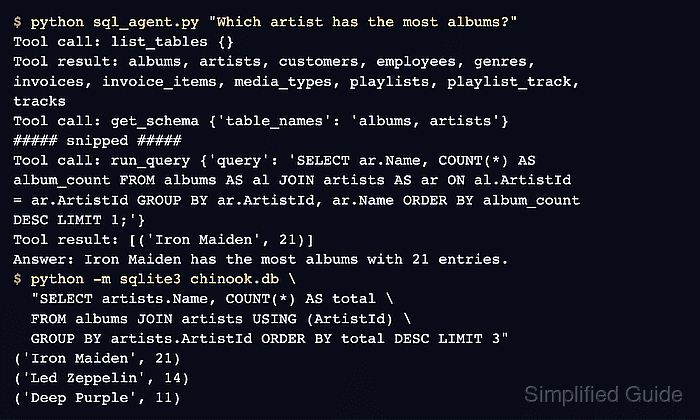
The trace shows the agent reading the table list, then the schema of the two tables it needs, before it writes the query. A trace with no run_query call means the answer did not come from the database.
- Run the same count directly against chinook.db from the project folder to confirm the answer.
$ python -m sqlite3 chinook.db \
  "SELECT artists.Name, COUNT(*) AS total \
  FROM albums JOIN artists USING (ArtistId) \
  GROUP BY artists.ArtistId ORDER BY total DESC LIMIT 3"
('Iron Maiden', 21)
('Led Zeppelin', 14)
('Deep Purple', 11)
The artist and the album count match the agent's answer, and the second row shows that the first place is not a tie. This query skips the agent's tools and model, so a wrong answer from the agent would show up as a mismatch.
Tool: SQLite Manager