A saved neural network may contain a complete model, an exported prediction function, or only its weights. In Keras 3, a File format not supported error often means that a SavedModel directory or an older TensorFlow checkpoint was passed to a loader that expects another format, and matching the artifact to the right loader gets a working model back.
The artifact's contents determine the recovery path. A whole-model file includes architecture information, whereas a weights checkpoint needs the original model-building code. Changing a filename extension does not convert the stored data or recover missing architecture.
SavedModel inference uses the TensorFlow backend and an exported endpoint. Legacy weights recovery reads the checkpoint in a Keras 2 runtime, then rebuilds the model in Keras 3 from exported weights. Prediction comparison requires fixed inputs with the original shape and preprocessing. It confirms inference behavior, but does not prove that optimizer state or training can resume unchanged.
Only load model artifacts and custom Python classes from a trusted source. Deserialization can execute code; disabling safe_mode is not a file-format repair.
Steps to fix the file format not supported error in Keras:
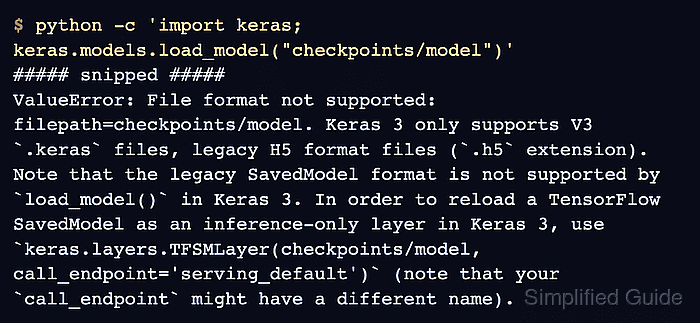
- Reproduce the error in your Keras 3 environment with your own path in place of checkpoints/model.
$ python -c 'import keras; keras.models.load_model("checkpoints/model")'
##### snipped #####
ValueError: File format not supported: filepath=checkpoints/model. Keras 3 only supports V3 `.keras` files, legacy H5 format files (`.h5` extension). Note that the legacy SavedModel format is not supported by `load_model()` in Keras 3. In order to reload a TensorFlow SavedModel as an inference-only layer in Keras 3, use `keras.layers.TFSMLayer(checkpoints/model, call_endpoint='serving_default')` (note that your `call_endpoint` might have a different name).
Keras 3 model.load_weights() also rejects legacy TensorFlow checkpoint prefixes. The SavedModel suggestion in the load_model() error does not apply to a weights checkpoint.
- List the folder that holds your rejected path.
$ ls -1 checkpoints
checkpoint
model.data-00000-of-00001
model.index
A .index file plus one or more .data-* files identifies a TensorFlow checkpoint prefix. The prefix in this listing is checkpoints/model, without .index. A SavedModel directory instead contains saved_model.pb and usually a variables directory. A native zipped .keras model contains config.json, metadata.json, and weight data; a deliberately unzipped native model has these files in its directory.
- Select the recovery route for the identified artifact.
A native .keras model or a legacy whole-model .h5 file belongs with keras.models.load_model(). A weights-only HDF5 file belongs with model.load_weights() after recreating its architecture. The .h5 suffix alone cannot distinguish those two HDF5 cases.
Related: How to save and load Keras model weightsA SavedModel needs keras.layers.TFSMLayer for inference in Keras 3 with TensorFlow. Its call_endpoint value is a signature name, commonly serve for model.export() or serving_default for older exports. This wraps an exported function rather than reconstructing the original model.
Related: How to load a SavedModel in Keras with TFSMLayer
Related: How to inspect a TensorFlow SavedModel with saved_model_cliThe remaining steps apply to checkpoints written by Keras 2 model.save_weights(). A checkpoint written with tf.train.Checkpoint needs its original matching object graph and restore API.
Related: How to save and restore a TensorFlow checkpoint - Create a recovery environment with Python 3.10 to 3.13 in the folder where you ran the first command.
$ python3.12 -m venv .venv-recovery
The tf-keras package needs TensorFlow 2.21, which has no wheels for Python 3.14. Another version in that range works the same way. Your application can stay on a newer Python, because only the exported files move between the two environments. On Windows, the environment's interpreter is .venv-recovery\Scripts\python.exe.
Related: How to create a virtual environment in Python - Install the Keras 2 package in the recovery environment.
$ .venv-recovery/bin/python -m pip install "tf-keras==2.21.0"
TensorFlow also brings in a Keras 3 package, which the recovery script does not import. The application's own environment is unchanged.
Related: How to use legacy Keras 2 with TensorFlow - Create recover_checkpoint.py with your original model-building code and tf_keras as its Keras import.
- recover_checkpoint.py
import numpy as np
import tf_keras as keras


def build_model():
    return keras.Sequential(
        [
            keras.Input(shape=(2,), name="features"),
            keras.layers.Dense(1, name="score"),
        ]
    )
A tf.keras or keras import would build a Keras 3 model and raise the same format error. The checkpoint holds weights only, so this file needs your layer configuration and any custom classes.
- Add the following lines at the end of recover_checkpoint.py, using your checkpoint prefix in place of checkpoints/model.
- recover_checkpoint.py
model = build_model()
status = model.load_weights("checkpoints/model")
- Add the following lines at the end of recover_checkpoint.py, using a few of your own preprocessed inputs in place of the sample array.
- recover_checkpoint.py
inputs = np.array([[1.0, 2.0], [3.0, 4.0]], dtype="float32")
outputs = model(inputs, training=False).numpy()
status.assert_existing_objects_matched().expect_partial()
assert_existing_objects_matched() raises AssertionError when a weight in the rebuilt model has no value in the checkpoint, which points to different model code. It cannot detect a layer left out of your code. Optimizer values left over in a checkpoint from training are expected, so assert_consumed() fails on those checkpoints even when the weights are correct, and expect_partial() silences the warnings about them. A model with several inputs stops at np.savez(), because these scripts handle one input array.
- Add the weight export lines at the end of recover_checkpoint.py.
- recover_checkpoint.py
np.savez(
    "reference_predictions.npz",
    inputs=inputs,
    outputs=outputs,
)
model.save_weights("recovered.weights.h5")
print(outputs)
The output files from this script and the next one replace any existing files with those names. New names in the scripts preserve an earlier copy.
- Save recover_checkpoint.py.
- Run the script with the recovery interpreter.
$ .venv-recovery/bin/python recover_checkpoint.py
[[0.7372317 ]
 [0.95848554]]
The printed values are your own model's predictions from the restored checkpoint. The script leaves the checkpoint unchanged.
- Create convert_to_keras3.py with the same model-building code and keras as its Keras import.
- convert_to_keras3.py
import keras
import numpy as np


def build_model():
    return keras.Sequential(
        [
            keras.Input(shape=(2,), name="features"),
            keras.layers.Dense(1, name="score"),
        ]
    )
A .keras file saved by tf_keras can fail to load in Keras 3 for Functional models and for layers such as BatchNormalization or Embedding. A .weights.h5 file carries only weights, so the Keras 3 model keeps its own configuration.
A subclassed model or a custom layer needs this line directly above its class in convert_to_keras3.py, or load_model() raises TypeError when the script reloads the file.
@keras.saving.register_keras_serializable()
A class with its own __init__() also needs this method in convert_to_keras3.py, or the script can stop at model.save() or load_model(). It returns the plain values the constructor takes, each stored on self in __init__(), or an empty dictionary when it takes none.
def get_config(self):
    return {"width": self.width}
Related: How to save and load Keras models with custom objects - Add the native model lines at the end of convert_to_keras3.py.
- convert_to_keras3.py
reference = np.load("reference_predictions.npz")
model = build_model()
model(reference["inputs"])
model.load_weights("recovered.weights.h5")
model.save("recovered.keras")
The first call creates the weights of a subclassed model or a Sequential model with no Input, because load_weights() raises ValueError on a model that has no weights yet. The Keras 3 model then writes the loaded weights to a native .keras file.
- Add the prediction comparison lines at the end of convert_to_keras3.py.
- convert_to_keras3.py
restored = keras.models.load_model("recovered.keras")
actual = keras.ops.convert_to_numpy(
    restored(reference["inputs"], training=False)
)
np.testing.assert_allclose(
    actual, reference["outputs"], rtol=1e-5, atol=1e-5
)
print(actual)
The native file is reloaded from disk and its predictions are compared with the reference. A Lambda layer built from a Python lambda raises ValueError at this reload, because safe mode blocks it.
Related: How to fix the Lambda layer safe mode error in Keras - Save convert_to_keras3.py.
- Run the script with your application's Python.
$ python convert_to_keras3.py
[[0.7372317 ]
 [0.95848554]]
The values are your own predictions and match the recovery step, or assert_allclose() raises AssertionError. load_model() now reads recovered.keras without the format error, and the original checkpoint remains available for recovery.