A Keras model can make predictions normally yet fail when its architecture is reconstructed. The Lambda layer safe mode error occurs when Keras refuses to deserialize an anonymous Python function; replacing that function with a registered custom layer removes the need to deserialize its bytecode.
Anonymous Lambda functions store Python bytecode in the model, which creates portability and code-execution risks. Safe mode blocks that bytecode during loading, and newer releases also reject it during cloning when safe mode is unset. The refusal is a security boundary rather than a sign that the model's weights are damaged.
The repair needs the source that built the model, plus a Python environment with Keras 3 and the backend the model uses. Trained weights survive the swap because load_weights() can read them from the refused file without deserializing the anonymous function. The custom layer must preserve the original transformation, shapes and any masking behavior.
Steps to fix the Lambda layer safe mode error in Keras:
- Start Python in your project's active virtual environment, replacing jax with tensorflow or torch if your model uses that backend.
$ KERAS_BACKEND=jax python
Keras reads the variable at its first import, so it belongs on the command that starts Python. Without it, Keras uses its default TensorFlow backend, and import keras raises ModuleNotFoundError in an environment that has only JAX.
Related: How to install Keras with pip
Related: How to set the Keras backend - Create a small trained sample model that contains an anonymous Lambda.
import keras
import numpy as np

def build_model():
    inputs = keras.Input(shape=(2,))
    doubled = keras.layers.Lambda(
        lambda x: x * 2, name="double"
    )(inputs)
    outputs = keras.layers.Dense(1)(doubled)
    return keras.Model(inputs, outputs)

train_x = np.array([[0.0, 1.0], [1.0, 0.0], [1.0, 1.0]])
train_y = np.array([[1.0], [-1.0], [0.0]])
trained = build_model()
trained.compile(optimizer="adam", loss="mse")
history = trained.fit(train_x, train_y, epochs=5, verbose=0)
trained.save("lambda_model.keras")
Skip this step if a file of your own already raises the error. If clone_model() refused a model that is still in memory, model.save() gives the later steps that file.
- Load the saved file with the default settings to confirm the refusal, replacing lambda_model.keras with your own file name.
import keras

keras.saving.load_model("lambda_model.keras")
Traceback (most recent call last):
##### snipped #####
ValueError: Requested the deserialization of a `Lambda` layer whose `function` is a Python lambda.
##### snipped #####
Keras 3.15.1 also raises this error for keras.models.clone_model(model); the 3.15.0 release notes document the fail-closed change.
- Restore the trained model from its source and the refused file, replacing build_model() and the file name with your own.
model = build_model()
model.load_weights("lambda_model.keras")
A rebuilt model starts with freshly initialized weights, so the trained values must come from the file. load_weights() reads those values under the default safe mode and leaves the anonymous function in the file alone.
Loading model files can execute arbitrary code, especially with safe_mode=False. If the source is lost, load_model() with that option can stand in for these two lines wherever they appear, but only for a file whose source and contents you trust, in the environment that saved it. It does not repair the anonymous function or make an unknown model safe. A global unsafe-deserialization setting is unnecessary for the replacement.
- Create scale_layer.py in the Python session's working directory using your text editor, writing your own operation in call().
- scale_layer.py
import keras


@keras.saving.register_keras_serializable(package="MyLayers")
class Scale(keras.layers.Layer):
    def __init__(self, factor=2.0, **kwargs):
        super().__init__(**kwargs)
        self.factor = factor

    def call(self, inputs, mask=None):
        return inputs * self.factor

    def get_config(self):
        config = super().get_config()
        config.update({"factor": self.factor})
        return config
This file defines the replacement for lambda x: x * 2. For a different operation, call() and the parameters in get_config() must represent that operation exactly. The mask argument stays even though the sample ignores it, because a Functional model passes the stored Lambda argument to the replacement and clone_model() raises TypeError without it.
- Save scale_layer.py before importing it into the session.
- Build the replacement model from model, replacing double and the Scale factor with your own layer name and value.
from scale_layer import Scale

def replace_lambda(layer):
    if layer.name == "double":
        return Scale(factor=2.0, name=layer.name)
    return layer.__class__.from_config(layer.get_config())

fixed = keras.models.clone_model(
    model, clone_function=replace_lambda
)
fixed.set_weights(model.get_weights())
The callback swaps the named layer and rebuilds the others from their configurations, so the anonymous function is never deserialized. model.summary() lists the layer names, and a Lambda left unnamed is usually lambda; a name that does not match leaves the original error in place. This callback reaches top-level layers only, so a nested model needs the replacement inside its own architecture.
Cloning creates new layers without trained weights, which set_weights() copies across. The stateless replacement keeps the weight list compatible; a replacement with different weights requires an explicit mapping before it can preserve predictions.
- Save the replacement model to a separate .keras file.
fixed.save("fixed_model.keras")
The original lambda_model.keras remains available while the replacement is checked. Cloning drops the compile state, so a model that will keep training needs compile() before this save.
- Compare predictions from the reloaded replacement with the trained weights in the refused file, using inputs shaped for your model.
import numpy as np

x = np.array([[1.0, -2.0], [0.5, 3.0]])
original = build_model()
original.load_weights("lambda_model.keras")
reference = original.predict(x, verbose=0)

loaded = keras.saving.load_model("fixed_model.keras")
actual = loaded.predict(x, verbose=0)
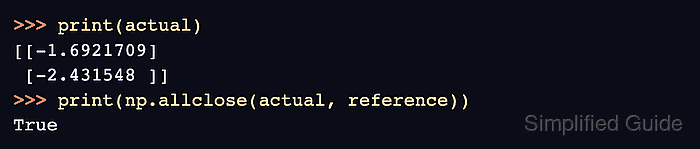
print(actual)
print(np.allclose(actual, reference))
[[-1.6921709]
 [-2.431548 ]]
True
The printed predictions differ on each run because training starts from random weights. True shows that the file reloads under the default safe mode and still holds the trained weights; False means the replacement changed the weights or the operation. A new Python process needs from scale_layer import Scale before load_model(), because a .keras file stores the layer configuration and not its code.
Related: How to save and load Keras models with custom objects
Related: Keras load_model() options - Retry the default clone on the reloaded model.
clone = keras.models.clone_model(loaded)
clone.set_weights(loaded.get_weights())
print(np.allclose(clone.predict(x, verbose=0), reference))
True
The default call succeeds because no Lambda remains, and the copied weights reproduce the trained predictions.