Upgrading DRBD 9 refreshes the userspace tools and the kernel module that runs replicated block devices. Plan the change node by node so each resource is synchronized before the node leaves service and again before the next peer is changed.
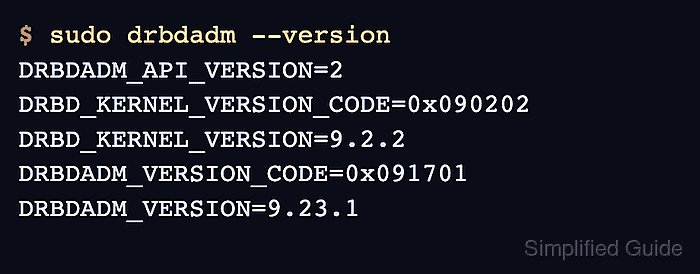
The package transaction does not replace a DRBD module that is already loaded in the running kernel. After packages are upgraded, the node must release its resources, unload the old module, load the new one, and show the intended DRBD_KERNEL_VERSION in drbdadm --version.
Within-version upgrades on manually managed nodes can use direct systemd and drbdadm control. If Pacemaker, DRBD Reactor, or LINSTOR owns the resource, place the node in that manager's maintenance or standby state instead of mixing manual systemd or drbdadm changes with the control plane.
Steps to upgrade DRBD 9:
- Check synchronization before changing the node.
$ sudo drbdadm status all
r0 role:Secondary
  disk:UpToDate
  node-a role:Primary
    replication:Established peer-disk:UpToDate
Every affected volume should show UpToDate locally and on each peer before the upgrade window starts. Resolve Inconsistent, Outdated, disconnected, or resyncing resources first.
Related: How to check DRBD resource status - Update package metadata from the configured DRBD repositories.
$ sudo apt update
Hit:1 https://packages.example.net/debian drbd-9 InRelease
Reading package lists... Done
Use the package manager that matches the node's repository source. On RPM-based systems, use the equivalent dnf upgrade step for the same maintenance window.
- Upgrade the installed DRBD packages.
$ sudo apt --assume-yes upgrade
The following packages will be upgraded:
  drbd-dkms drbd-utils
2 upgraded, 0 newly installed, 0 to remove and 0 not upgraded.
##### snipped #####
The exact package names depend on the repository. drbd-utils provides drbdadm and drbdsetup, while the kernel module comes from a matching precompiled module package or drbd-dkms on DEB-based LINBIT installs.
- Stop the application or mount that uses the DRBD device on the node being upgraded.
Do not unload the DRBD kernel module while a file system, export, loop device, device-mapper stack, or application still has the replicated device open.
- Stop the manually managed resource target on this node.
$ sudo systemctl stop drbd@r0.target
Replace r0 with the resource name. If a cluster manager owns the resource, use that manager's standby or maintenance action instead.
Related: How to manage DRBD resources with systemd - Unload the DRBD TCP transport module.
$ sudo rmmod drbd_transport_tcp
Use the loaded transport module for the resource. TCP-backed resources normally use drbd_transport_tcp; RDMA-backed resources use the matching DRBD RDMA transport module.
- Unload the main DRBD kernel module.
$ sudo rmmod drbd
If rmmod reports Module drbd is in use, a resource, mount, export, loop device, device-mapper stack, LVM physical volume, or application still holds DRBD open. Stop that owner before retrying.
- Load the new DRBD kernel module.
$ sudo modprobe drbd
- Confirm the active kernel module and userspace versions.
$ sudo drbdadm --version
DRBDADM_API_VERSION=2
DRBD_KERNEL_VERSION_CODE=0x090202
DRBD_KERNEL_VERSION=9.2.2
DRBDADM_VERSION_CODE=0x091701
DRBDADM_VERSION=9.23.1
DRBD_KERNEL_VERSION must show the intended DRBD 9 module version. A value of 0 or an old 8.4 version means the expected module is not active.
- Bring the configured DRBD resources up again on this node.
$ sudo drbdadm up all
- Start the manually managed resource target again.
$ sudo systemctl start drbd@r0.target
Use the cluster manager's online or unstandby action instead when the resource is cluster-managed.
- Check the resource state after the node returns.
$ sudo drbdadm status all
r0 role:Secondary
  disk:UpToDate
  node-a role:Primary
    replication:Established peer-disk:UpToDate
Wait for any resynchronization to finish before upgrading the next peer.
Related: How to verify DRBD synchronization state - Repeat the same node-by-node upgrade on the remaining DRBD peers after the resource is synchronized.

Mohd Shakir Zakaria is a cloud architect with deep roots in software development and open-source advocacy. Certified in AWS, Red Hat, VMware, ITIL, and Linux, he specializes in designing and managing robust cloud and on-premises infrastructures.


