Configuring a DRBD resync rate controls how aggressively a resource copies out-of-sync blocks after a new node, disk replacement, outage, or manual resync. The setting matters when the default controller is too slow for recovery, or when unrestricted synchronization would compete with application I/O on the primary node.
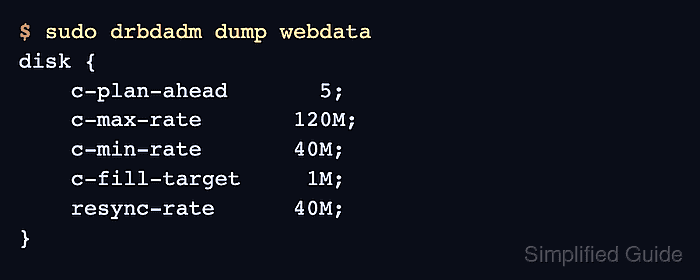
DRBD 9 normally uses the dynamic sync-rate controller. The resource settings c-plan-ahead, c-max-rate, c-min-rate, c-fill-target, and resync-rate tell the controller how quickly to adapt, the ceiling it should not exceed, and the starting rate it should use when resynchronization begins.
The resource-file method assumes a manually managed DRBD resource under /etc/drbd.d on two Linux nodes. If LINSTOR, Pacemaker, or DRBD Reactor owns the resource definition, make the equivalent change through that manager or schedule a maintenance window so generated files and promotion policy are not overwritten.
Related: How to check DRBD resource status
Related: How to validate DRBD configuration
Related: How to verify DRBD synchronization state
Steps to configure DRBD resync rate:
- Check that the resource is connected before tuning the controller.
$ sudo drbdadm status webdata
webdata role:Primary
  disk:UpToDate
  beta role:Secondary
    peer-disk:UpToDate
Do not tune resync behavior during split-brain, unknown disk state, or a disconnected peer unless a recovery plan already identifies the authoritative data source.
Related: How to check DRBD resource status
- Choose conservative sync-rate values for the resource.
Setting Example Purpose c-plan-ahead 5 Keeps the dynamic controller enabled and sets how far ahead it plans. c-max-rate 120M Caps dynamically controlled resync traffic near the measured network or disk ceiling. c-min-rate 40M Stops the controller from slowing resync below this point on purpose. c-fill-target 1M Aims to keep about this much resync data in flight. resync-rate 40M Provides the starting rate while the dynamic controller is enabled. - Back up the active resource file on the first node.
$ sudo cp /etc/drbd.d/webdata.res /etc/drbd.d/webdata.res.before-sync-rate
- Open the resource file on the first node.
$ sudoedit /etc/drbd.d/webdata.res
- Add the sync-rate options to the resource disk section.
resource "webdata" {
  disk {
    c-plan-ahead 5;
    c-max-rate 120M;
    c-min-rate 40M;
    c-fill-target 1M;
    resync-rate 40M;
  }

  device minor 1;
  disk "/dev/vg_drbd/webdata";
  meta-disk internal;
  on "alpha" {
    node-id 0;
  }
  on "beta" {
    node-id 1;
  }
  connection {
    host "alpha" address 192.0.2.10:7789;
    host "beta" address 192.0.2.11:7789;
  }
}
With c-plan-ahead set above zero, resync-rate is a starting value for the dynamic controller. A fixed-rate maintenance change uses c-plan-ahead 0; and should be planned carefully because background synchronization can take priority over application I/O.
- Copy the updated resource file to the peer node.
$ scp /etc/drbd.d/webdata.res admin@beta:/tmp/webdata.res
Configuration management can replace the copy command when it installs the same resource file on every node.
- Install the updated resource file on the peer node.
$ ssh admin@beta 'sudo install --mode=0644 /tmp/webdata.res /etc/drbd.d/webdata.res'
- Validate the parsed DRBD configuration before applying it.
$ sudo drbdadm dump webdata
# resource webdata on alpha: not ignored, not stacked
# defined at /etc/drbd.d/webdata.res:1
resource webdata {
    device               minor 1;
    disk                 /dev/vg_drbd/webdata;
    meta-disk            internal;
##### snipped #####
    disk {
        c-plan-ahead       5;
        c-max-rate       120M;
        c-min-rate       40M;
        c-fill-target     1M;
        resync-rate      40M;
    }
}
Run the same parser check on every node that has an on block for the resource.
Related: How to validate DRBD configuration - Preview the runtime change without applying it.
$ sudo drbdadm --dry-run adjust webdata
##### snipped #####
drbdsetup peer-device-options webdata 1 0 --set-defaults --c-plan-ahead=5 --c-max-rate=120M --c-min-rate=40M --c-fill-target=1M --resync-rate=40M
##### snipped #####
drbdadm translates the resource-file settings into lower-level drbdsetup peer-device-options calls for the peer device.
- Apply the resource change on the first node.
$ sudo drbdadm adjust webdata
No output is expected when drbdadm adjust applies the change successfully.
- Apply the same resource change on the peer node.
$ ssh beta sudo drbdadm adjust webdata
- Confirm that the resource remains connected after the adjustment.
$ sudo drbdadm status webdata webdata role:Primary disk:UpToDate beta role:Secondary replication:Established peer-disk:UpToDate - Check resync progress when the resource is actively synchronizing.
$ sudo drbdsetup status webdata --verbose --statistics webdata node-id:0 role:Primary suspended:no write-ordering:flush volume:0 minor:1 disk:UpToDate size:20971520 read:0 written:124 al-writes:3 bm-writes:0 upper-pending:0 lower-pending:0 beta node-id:1 connection:Connected role:Secondary congested:no ap-in-flight:0 rs-in-flight:0 volume:0 replication:SyncSource peer-disk:Inconsistent done:47.80 resync-suspended:no received:0 sent:11557952 out-of-sync:9349224 pending:0 unacked:1 dbdt1:40.00 eta:234done, out-of-sync, dbdt1, and eta appear only while synchronization is running. Some DRBD builds omit the instantaneous rate field, so compare sent or received across repeated reads when the rate is not printed.
- Verify that the resource returns to an up-to-date state after resync finishes.
$ sudo drbdsetup status webdata --verbose --statistics
webdata node-id:0 role:Primary suspended:no
    write-ordering:flush
  volume:0 minor:1 disk:UpToDate
      size:20971520 read:0 written:124 al-writes:3 bm-writes:0 upper-pending:0 lower-pending:0
  beta node-id:1 connection:Connected role:Secondary congested:no
    volume:0 replication:Established peer-disk:UpToDate resync-suspended:no
        received:0 sent:20971520 out-of-sync:0 pending:0 unacked:0
replication:Established with peer-disk:UpToDate and out-of-sync:0 confirms that the configured controller did not leave unsynchronized data behind.
Related: How to verify DRBD synchronization state

Mohd Shakir Zakaria is a cloud architect with deep roots in software development and open-source advocacy. Certified in AWS, Red Hat, VMware, ITIL, and Linux, he specializes in designing and managing robust cloud and on-premises infrastructures.


