Network latency in DRBD can appear as slow application writes, growing replication queues, or repeated peer disconnects while the local disks remain healthy. Troubleshooting starts with the affected resource because DRBD protocol C completes a write only after the peer has acknowledged the remote disk write.
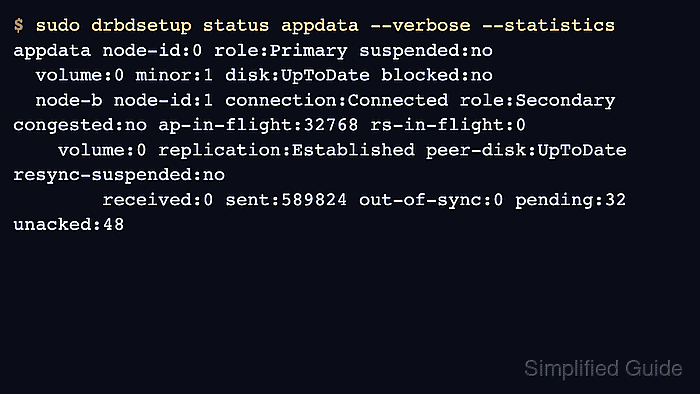
DRBD 9 exposes the quick state through drbdadm status and detailed queue counters through drbdsetup status --verbose --statistics. Fields such as ap-in-flight, pending, unacked, congested, and blocked show whether acknowledgements are backing up inside DRBD rather than only in the application.
Measure the same source and destination addresses that the resource uses for replication before changing DRBD options. Packet loss, retransmits, or high round-trip spikes should be fixed in the replication path first; widen ping-timeout and related keepalive settings only when the link is intentionally latent and the peer data state is otherwise safe.
Related: How to check DRBD resource status
Related: How to view DRBD logs
Related: How to configure DRBD resync rate
Steps to troubleshoot DRBD network latency:
- Check the affected DRBD resource and peer state.
$ sudo drbdadm status appdata
appdata role:Primary
  volume:0 disk:UpToDate
  node-b role:Secondary
    volume:0 replication:Established peer-disk:UpToDate
Replace appdata with the resource name from /etc/drbd.d/. Resolve Connecting, StandAlone, DUnknown, Inconsistent, or split-brain states before treating the problem as latency.
Related: How to check DRBD resource status - Read detailed DRBD queue counters while the slow write or resync is happening.
$ sudo drbdsetup status appdata --verbose --statistics
appdata node-id:0 role:Primary suspended:no
  volume:0 minor:1 disk:UpToDate blocked:no
  node-b node-id:1 connection:Connected role:Secondary congested:no ap-in-flight:32768 rs-in-flight:0
    volume:0 replication:Established peer-disk:UpToDate resync-suspended:no
        received:0 sent:589824 out-of-sync:0 pending:32 unacked:48
ap-in-flight is application data sent to the peer but not yet acknowledged. Growing pending or unacked values during a simple workload point to delayed peer acknowledgement, a slow peer disk, or a congested replication path.
- Check recent DRBD kernel messages for timeout or reconnect signals.
$ sudo journalctl --dmesg --grep "drbd appdata" --since "30 minutes ago" --no-pager
Jun 19 12:16:04 node-a kernel: drbd appdata node-b: PingAck did not arrive in time.
Jun 19 12:16:04 node-a kernel: drbd appdata node-b: conn( Connected -> NetworkFailure ) peer( Secondary -> Unknown )
Jun 19 12:16:05 node-a kernel: drbd appdata node-b: conn( Unconnected -> Connecting )
PingAck did not arrive in time means the peer did not answer a DRBD keepalive before ping-timeout expired. It can be caused by network delay, packet loss, CPU stalls, or a peer that cannot run the DRBD threads quickly enough.
Related: How to view DRBD logs - Confirm the replication addresses and current network options.
$ sudo drbdadm dump appdata
# resource appdata on node-a: not ignored, not stacked
##### snipped #####
    connection {
        host node-a address ipv4 192.0.2.10:7789;
        host node-b address ipv4 192.0.2.11:7789;
        net {
            protocol       C;
            ping-int      10;
            ping-timeout   5;
            sndbuf-size    0;
        }
    }
ping-timeout is measured in tenths of a second, so 5 means 0.5 seconds. sndbuf-size 0 leaves the TCP send buffer under kernel autotuning.
Related: How to validate DRBD configuration
- Measure round-trip time to the peer replication address.
$ ping -c 5 -i 0.2 192.0.2.11
PING 192.0.2.11 (192.0.2.11) 56(84) bytes of data.
64 bytes from 192.0.2.11: icmp_seq=1 ttl=64 time=0.214 ms
64 bytes from 192.0.2.11: icmp_seq=2 ttl=64 time=38.6 ms
64 bytes from 192.0.2.11: icmp_seq=3 ttl=64 time=81.2 ms
64 bytes from 192.0.2.11: icmp_seq=4 ttl=64 time=0.231 ms
64 bytes from 192.0.2.11: icmp_seq=5 ttl=64 time=42.7 ms

--- 192.0.2.11 ping statistics ---
5 packets transmitted, 5 received, 0% packet loss, time 816ms
rtt min/avg/max/mdev = 0.214/32.589/81.203/30.287 ms
ICMP can be handled differently from DRBD traffic, but large spikes on the same peer address are enough to inspect the switch, VLAN, bond, route, firewall, or virtualization layer before changing storage settings.
- Inspect the live TCP session for retransmits and send-queue buildup.
$ ss -tin dst 192.0.2.11
State Recv-Q Send-Q Local Address:Port Peer Address:Port
ESTAB 0      262144 192.0.2.10:7789  192.0.2.11:43162
     cubic wscale:7,7 rto:204 rtt:18.6/30.7 ato:40 mss:1448 pmtu:1500 retrans:0/14
A nonzero Send-Q with retransmits while DRBD counters are also backing up ties the symptom to the replication path. If ss shows a clean socket, compare peer disk latency and CPU scheduling before changing network options.
- Check the replication interface counters for drops or errors.
$ ip -s link show dev ens10
4: ens10: <BROADCAST,MULTICAST,UP,LOWER_UP> mtu 1500 qdisc mq state UP mode DEFAULT group default qlen 1000
    link/ether 02:00:00:00:10:01 brd ff:ff:ff:ff:ff:ff
    RX: bytes  packets  errors  dropped missed  mcast
    1837283019 1259011  0       1842    0       0
    TX: bytes  packets  errors  dropped carrier collsns
    1928104420 1304482  0       0       0       0
Use the interface that owns the DRBD source address. Drops, carrier changes, MTU mismatches, or queueing on this path should be fixed before treating DRBD as the root cause.
- Back up the resource file before changing timeout values.
$ sudo cp /etc/drbd.d/appdata.res /etc/drbd.d/appdata.res.before-latency
Change timeout values only after the authoritative peer state is clear. Do not mask split brain, a failed peer disk, or a broken replication network by making failure detection slower.
- Increase DRBD keepalive tolerance for a known latent link.
resource "appdata" {
  connection {
    net {
      protocol C;
      timeout 90;
      ping-int 15;
      ping-timeout 20;
      connect-int 10;
      sndbuf-size 0;
    }
  }
}
timeout and ping-timeout use tenths of a second. The values above allow a longer acknowledgement window while keeping protocol C and TCP buffer autotuning unchanged.
- Copy the same resource file to the peer node.
$ scp /etc/drbd.d/appdata.res admin@node-b:/tmp/appdata.res
appdata.res                                     100%  842   410.0KB/s   00:00
Use configuration management instead of scp when it owns /etc/drbd.d/. The resource definition should stay identical on every node that has an on block for the resource.
- Install the updated resource file on the peer node.
$ ssh admin@node-b 'sudo install --mode=0644 /tmp/appdata.res /etc/drbd.d/appdata.res'
- Validate the updated DRBD configuration on the first node.
$ sudo drbdadm dump appdata
# resource appdata on node-a: not ignored, not stacked
##### snipped #####
        net {
            protocol       C;
            timeout       90;
            ping-int      15;
            ping-timeout  20;
            connect-int   10;
            sndbuf-size    0;
        }
Run the same drbdadm dump check on node-b before applying the change.
Related: How to validate DRBD configuration - Preview the runtime adjustment before applying it.
$ sudo drbdadm --dry-run adjust appdata
##### snipped #####
drbdsetup net-options appdata 1 --protocol=C --timeout=90 --connect-int=10 --ping-int=15 --ping-timeout=20 --sndbuf-size=0
##### snipped #####
--dry-run shows the lower-level drbdsetup call that drbdadm adjust would run. Stop if the preview would detach disks, remove peers, or change addresses unexpectedly.
- Apply the resource adjustment on the first node.
$ sudo drbdadm adjust appdata
No output is expected when drbdadm adjust applies the changed network options successfully.
- Apply the resource adjustment on the peer node.
$ ssh node-b sudo drbdadm adjust appdata
- Retest the original DRBD latency signal.
$ sudo drbdsetup status appdata --verbose --statistics
appdata node-id:0 role:Primary suspended:no
  volume:0 minor:1 disk:UpToDate blocked:no
  node-b node-id:1 connection:Connected role:Secondary congested:no ap-in-flight:0 rs-in-flight:0
    volume:0 replication:Established peer-disk:UpToDate resync-suspended:no
        received:0 sent:606208 out-of-sync:0 pending:0 unacked:0
The retest is complete when the original workload no longer produces new PingAck log entries, the peer remains Connected, and pending plus unacked return to zero after the write burst.

Mohd Shakir Zakaria is a cloud architect with deep roots in software development and open-source advocacy. Certified in AWS, Red Hat, VMware, ITIL, and Linux, he specializes in designing and managing robust cloud and on-premises infrastructures.


