Testing a login flow with Detox exercises the email field, password field, submit control, and signed-in screen that a user reaches in the mobile app. It is useful before releasing authentication changes because a passing end-to-end test proves that the app can move from the login screen to the authenticated state on the selected simulator or emulator.
The test uses stable testID selectors for controls and assertions, not visible labels that can change with copy or localization. Detox actions such as typeText() and tap() operate the controls, while expect() assertions confirm the signed-in screen that proves the credentials worked.
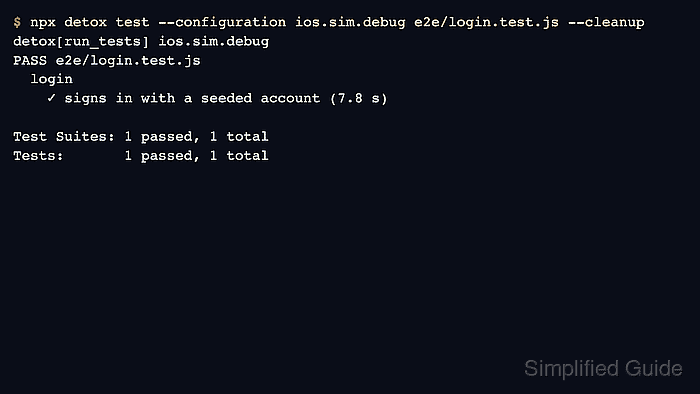
Use a seeded test account, mock response, or resettable test backend rather than a personal or production login. The focused spec launches a fresh app instance, enters the credentials, submits the form, and finishes with a passing detox test result for the login file.
Related: How to write a first Detox test
Related: How to stabilize selectors in Detox tests
Related: How to run Detox tests locally
Steps to test a login flow with Detox:
- Open the project root that contains the Detox configuration and e2e/ folder.
- Expose stable IDs on the login controls and signed-in screen.
- LoginScreen.jsx
export function LoginScreen() {
  return (
    <View testID="AUTH.LOGIN.SCREEN">
      <TextInput
        testID="AUTH.LOGIN.EMAIL_INPUT"
        autoCapitalize="none"
        keyboardType="email-address"
      />
      <TextInput
        testID="AUTH.LOGIN.PASSWORD_INPUT"
        secureTextEntry
      />
      <TouchableOpacity testID="AUTH.LOGIN.SUBMIT_BUTTON">
        <Text>Sign in</Text>
      </TouchableOpacity>
    </View>
  );
}
Match controls with by.id() so the test survives wording and localization changes.
Related: How to stabilize selectors in Detox tests - Expose a stable ID on the screen that appears after sign-in.
- AccountHomeScreen.jsx
export function AccountHomeScreen({ user }) {
  return (
    <View testID="ACCOUNT.HOME.SCREEN">
      <Text testID="ACCOUNT.HOME.USER_EMAIL">{user.email}</Text>
    </View>
  );
}
Assert a post-login screen or account marker that appears only after authentication succeeds.
- Create a sanitized fixture for the test account.
- e2e/fixtures/loginUser.js
const loginUser = {
  email: 'e2e-user@example.net',
  password: 'ExamplePassw0rd!'
};

module.exports = { loginUser };
Keep real credentials out of the repository. Seed this account in the test backend or mock it in the app's E2E environment before the login spec runs.
Related: How to reset test data before Detox tests
Related: network-response-mock - Create the focused Detox login spec.
- e2e/login.test.js
const { loginUser } = require('./fixtures/loginUser');

describe('login', () => {
  beforeEach(async () => {
    await device.launchApp({
      newInstance: true,
      resetAppState: true
    });
  });

  it('signs in with a seeded account', async () => {
    await expect(element(by.id('AUTH.LOGIN.SCREEN'))).toBeVisible();

    await element(by.id('AUTH.LOGIN.EMAIL_INPUT')).typeText(loginUser.email);
    await element(by.id('AUTH.LOGIN.PASSWORD_INPUT')).typeText(loginUser.password);
    await element(by.id('AUTH.LOGIN.SUBMIT_BUTTON')).tap();

    await expect(element(by.id('ACCOUNT.HOME.SCREEN'))).toBeVisible();
    await expect(element(by.id('ACCOUNT.HOME.USER_EMAIL'))).toHaveText(loginUser.email);
  });
});
resetAppState clears app-local state before launch. Use the project's backend reset or mock layer as well when login depends on server-side data.
Related: How to reset test data before Detox tests - Start Metro in a second terminal when the selected React Native configuration is a debug build.
$ npm start
> my-app@1.0.0 start
> react-native start

Welcome to Metro
- Run only the login spec against the local configuration.
$ npx detox test --configuration ios.sim.debug e2e/login.test.js --cleanup
detox[run_tests] ios.sim.debug
PASS e2e/login.test.js
  login
    ✓ signs in with a seeded account (7.8 s)

Test Suites: 1 passed, 1 total
Tests:       1 passed, 1 total
Replace ios.sim.debug with the project's configuration name. --cleanup shuts down the simulator after the focused run.
Related: How to run Detox tests locally - Fix the first failed matcher or assertion before adding retries.
Test Failed: No elements found for matcher: by.id("ACCOUNT.HOME.SCREEN")If the login request succeeded but the signed-in screen is missing, check the app's auth response handling, navigation state, and post-login selector before increasing timeouts.
Related: How to debug flaky Detox tests

Mohd Shakir Zakaria is a cloud architect with deep roots in software development and open-source advocacy. Certified in AWS, Red Hat, VMware, ITIL, and Linux, he specializes in designing and managing robust cloud and on-premises infrastructures.


