A flaky Detox test needs evidence before an AI agent can suggest a safe change. Capturing the failing run with trace logs and failing-test artifacts gives the agent enough context to separate app synchronization issues from weak selectors, test data drift, or simulator noise.
A small artifact set is enough for first-pass triage: the failing test name, the Detox or Jest failure line, the synchronization log lines, and the screenshot or video state from the same run. Redact secrets, production URLs, tokens, user data, and private device logs before sending artifact text to a hosted or local model.
An AI suggestion is a triage note, not a patch to merge without review. Apply one change that matches the captured signal, rerun the same failing spec, and keep the original and fixed artifacts until the failure signature is gone from the validation run.
Related: How to debug flaky Detox tests
Related: How to debug Detox synchronization timeouts
Related: How to run Codex exec with a prompt
Steps to triage flaky Detox tests with an AI agent:
- Re-run the failing spec with failing-test artifacts and synchronization logging.
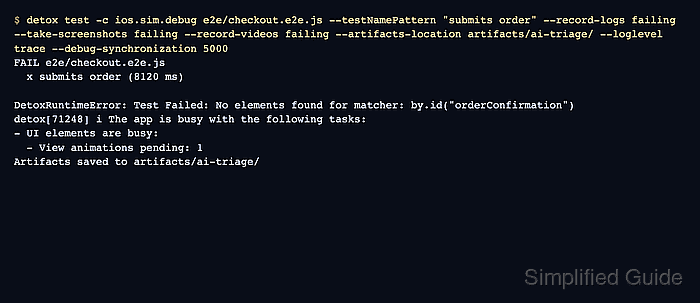
$ detox test -c ios.sim.debug e2e/checkout.e2e.js --testNamePattern "submits order" --record-logs failing --take-screenshots failing --video-records failing --artifacts-location artifacts/ai-triage/ --loglevel trace --debug-synchronization 5000
FAIL e2e/checkout.e2e.js
  x submits order (8120 ms)

DetoxRuntimeError: Test Failed: No elements found for matcher: by.id("orderConfirmation")
detox[71248] i The app is busy with the following tasks:
- UI elements are busy:
  - View animations pending: 1
Artifacts saved to artifacts/ai-triage/
The trailing slash on --artifacts-location keeps this one triage run in that directory instead of adding a timestamped subdirectory.
Related: How to debug flaky Detox tests
- Locate the failure signature in the saved artifacts.
$ grep -R -n "No elements found" artifacts/ai-triage/
artifacts/ai-triage/detox.log:214:DetoxRuntimeError: Test Failed: No elements found for matcher: by.id("orderConfirmation")
If the Detox log points at a server error, parser error, or app crash, inspect the app or device log from the same artifact run before asking the AI agent for a fix.
- Prepare a sanitized evidence block for the AI agent.
- sanitized-detox-evidence.txt
Test: e2e/checkout.e2e.js - submits order
Failure: No elements found for matcher by.id("orderConfirmation")
Synchronization signal:
- UI elements are busy
- View animations pending: 1
Screenshot state: checkout screen remains on the loading spinner
Do not paste raw access tokens, customer emails, private API hosts, production order IDs, or full device logs into a hosted AI agent.
- Ask the AI agent for a triage note tied to the artifact evidence.
$ codex exec "Classify this Detox failure as synchronization, selector, test data, app error, or simulator control. Use only this sanitized evidence: Test e2e/checkout.e2e.js - submits order. Failure: No elements found for matcher by.id('orderConfirmation'). Synchronization signal: UI elements are busy; View animations pending: 1. Screenshot: checkout screen remains on the loading spinner. Return the likely cause, one smallest code change, and the exact rerun command." Likely cause: synchronization. The checkout screen starts an animation or delayed render before orderConfirmation is visible. Smallest change: wait for the orderConfirmation element after tapping submitOrder, and remove the loader animation from the test build if the same signal repeats. Rerun: detox test -c ios.sim.debug e2e/checkout.e2e.js --testNamePattern "submits order" - Apply one reviewed stabilization change that matches the evidence.
- e2e/checkout.e2e.js
await element(by.id('submitOrder')).tap();
await waitFor(element(by.id('orderConfirmation')))
  .toBeVisible()
  .withTimeout(8000);
await expect(element(by.id('orderConfirmation'))).toBeVisible();
Do not add a blind timeout when the artifacts point at a server error, long-polling request, or app crash; fix that source instead.
Related: How to wait for UI elements in Detox
Related: How to disable animations for Detox - Re-run the same spec and confirm that the failure signature is gone.
$ detox test -c ios.sim.debug e2e/checkout.e2e.js --testNamePattern "submits order" --record-logs failing --take-screenshots failing --artifacts-location artifacts/ai-triage-fixed/
PASS e2e/checkout.e2e.js
  PASS submits order (6421 ms)
- Save the accepted triage note beside the pull request or issue.
- detox-ai-triage-note.txt
Failure signature: No elements found for by.id("orderConfirmation")
Evidence: artifacts/ai-triage/detox.log and checkout loading screenshot
Accepted change: wait for orderConfirmation after submitOrder
Validation: e2e/checkout.e2e.js - submits order passed in artifacts/ai-triage-fixed/
Leave unrelated AI suggestions out of the patch; the passing rerun only proves this failure signature was removed for the selected spec.

Mohd Shakir Zakaria is a cloud architect with deep roots in software development and open-source advocacy. Certified in AWS, Red Hat, VMware, ITIL, and Linux, he specializes in designing and managing robust cloud and on-premises infrastructures.


