Detox waits for app work to settle before it continues a test, and active animations are part of that synchronization. Disabling app animations for an E2E build keeps looping loaders, carousel transitions, and decorative motion from making a screen look busy forever during a Detox run.
Detox 20.x does not provide an animation blacklist like its URL blacklist for network calls. The durable fix is to make the app read a test-only launch argument and route animation durations, transitions, or looping components through a no-animation branch.
Jest-based Detox suites can pass a neutral launch argument through device.launchApp(), and React Native apps can read it with the official launch-arguments integration or with native platform code. A visible test marker such as animationMode lets the test prove the no-animation branch loaded before it interacts with the animated screen.
Steps to disable animations for Detox:
- Choose one test-only launch argument and one visible proof point in the app.
Use a project-specific name such as disableAnimations or e2eDisableAnimations, and expose a small text or state marker only in E2E builds when the test needs a direct assertion.
- Read the launch argument during app startup.
- animationMode.ts
import { LaunchArguments } from 'react-native-launch-arguments';

type E2ELaunchArgs = {
  disableAnimations?: boolean | string;
};

const launchArgs = LaunchArguments.value<E2ELaunchArgs>();

export const animationsEnabled =
  launchArgs.disableAnimations !== true &&
  launchArgs.disableAnimations !== 'true';

export const animationDuration = (normalDuration: number) =>
  animationsEnabled ? normalDuration : 0;
Detox passes launch arguments to iOS as process arguments and to Android as activity intent extras. For React Native, the Detox docs recommend react-native-launch-arguments for reading those values in JavaScript.
- Route app animation timing through the E2E flag.
- AnimatedPanel.tsx
import React from 'react';
import { Animated, Text } from 'react-native';
import { animationDuration, animationsEnabled } from './animationMode';

export function AnimationModeLabel() {
  return (
    <Text testID="animationMode">
      {animationsEnabled ? 'Animations enabled' : 'Animations disabled'}
    </Text>
  );
}

export function fadeIn(opacity: Animated.Value) {
  return Animated.timing(opacity, {
    toValue: 1,
    duration: animationDuration(250),
    useNativeDriver: true,
  });
}
Keep the production animation path unchanged. The Detox branch should remove delays, loops, and decorative transitions without hiding controls or changing the screen state being tested.
- Launch the app with animations disabled before testing the animated screen.
- e2e/animation-mode.e2e.js
describe('animation mode', () => {
  beforeEach(async () => {
    await device.launchApp({
      newInstance: true,
      launchArgs: { disableAnimations: 'true' },
    });
  });

  it('runs with app animations disabled', async () => {
    await expect(element(by.id('animationMode')))
      .toHaveText('Animations disabled');
    await element(by.id('open-settings')).tap();
    await expect(element(by.id('settings-screen'))).toBeVisible();
  });
});
String values are easy to compare across iOS, Android, JavaScript, and native code. Keep the argument name out of production user settings.
- Use manual synchronization only around a screen the app cannot make idle.
await device.disableSynchronization();

await element(by.id('open-carousel')).tap();
await waitFor(element(by.id('carousel-screen')))
  .toBeVisible()
  .withTimeout(4000);

await device.enableSynchronization();
Skip this fallback when the launch argument removes the animation. Re-enable synchronization only after returning to a screen that can become idle, because device.enableSynchronization() can block until Detox times out.
- Run the focused Detox test.
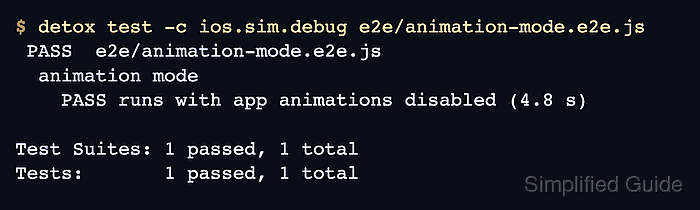
$ detox test -c ios.sim.debug e2e/animation-mode.e2e.js
 PASS  e2e/animation-mode.e2e.js
  animation mode
    PASS runs with app animations disabled (4.8 s)

Test Suites: 1 passed, 1 total
Tests:       1 passed, 1 total
Use the real configuration name from the project, such as ios.sim.debug or android.emu.debug. A passing run with the animationMode assertion proves the app received the launch argument before the animated screen was exercised.

Mohd Shakir Zakaria is a cloud architect with deep roots in software development and open-source advocacy. Certified in AWS, Red Hat, VMware, ITIL, and Linux, he specializes in designing and managing robust cloud and on-premises infrastructures.


