HTTP response headers show what a URL actually returned before the response body, retry logic, or application parsing hides the details. A quick header check is often enough to confirm the status line, content type, redirects, cache policy, cookies, and other metadata that explains why a request behaved the way it did.
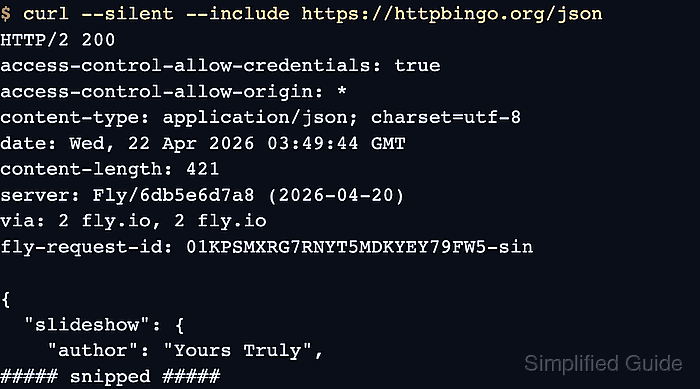
For a normal GET request, curl can place the received header block before the body with -i, the short form of the current --show-headers option. The older --include long option remains accepted, and --dump-header writes the same received headers to a file when the body should stay separate.
Header inspection is different from sending a HEAD request. --head or -I asks the server for metadata without a response body, which can be rejected or handled differently from GET. Use the response-header options below when the question is which headers a normal request received, especially after redirects or authenticated API calls. Saved header files can contain cookies, redirect targets, and other sensitive values, so redact them before sharing.
Related: How to send HEAD requests with cURL
Related: How to view HTTP request headers with cURL
Tool: HTTP Header Checker
Steps to show HTTP response headers with cURL:
- Run a normal request with -i to print the response headers before the response body.
$ curl --silent --show-error -i https://api.example.net/headers
HTTP/1.1 200 OK
Server: ExampleHTTP/1.0
Date: Sat, 06 Jun 2026 00:00:00 GMT
Content-Type: application/json
Cache-Control: no-store
X-Request-Trace: sg-response-header-demo
Content-Length: 53

{"status":"ready","trace":"sg-response-header-demo"}
-i is the short form of --show-headers. Current curl documentation names the long option --show-headers, while older documentation and existing scripts may still use --include.
- Add --location when the URL can redirect before the final response.
$ curl --silent --show-error -i --location https://api.example.net/redirect
HTTP/1.1 302 Found
Server: ExampleHTTP/1.0
Date: Sat, 06 Jun 2026 00:00:00 GMT
Location: /headers
Cache-Control: no-store
Content-Length: 0

HTTP/1.1 200 OK
Server: ExampleHTTP/1.0
Date: Sat, 06 Jun 2026 00:00:00 GMT
Content-Type: application/json
Cache-Control: no-store
X-Request-Trace: sg-response-header-demo
Content-Length: 53

{"status":"ready","trace":"sg-response-header-demo"}
With --location, curl shows each response block in order, so the last header block is the final response after the redirect chain.
- Write the response headers to a separate file with --dump-header when the body should stay out of the terminal.
$ curl --silent --show-error --dump-header response-headers.txt --output /dev/null https://api.example.net/headers
--output /dev/null discards the response body while --dump-header saves only the received headers.
Related: How to save cURL output to a file
- Read the saved header file to confirm the exact headers that curl received.
$ cat response-headers.txt
HTTP/1.1 200 OK
Server: ExampleHTTP/1.0
Date: Sat, 06 Jun 2026 00:00:00 GMT
Content-Type: application/json
Cache-Control: no-store
X-Request-Trace: sg-response-header-demo
Content-Length: 53
Header files from authenticated requests can contain cookies, redirect targets, and other sensitive values, so redact them before sharing the file.
- Remove the temporary header file after the check is complete.
$ rm response-headers.txt

Mohd Shakir Zakaria is a cloud architect with deep roots in software development and open-source advocacy. Certified in AWS, Red Hat, VMware, ITIL, and Linux, he specializes in designing and managing robust cloud and on-premises infrastructures.


