Viewing the headers sent by cURL confirms the exact HTTP request that left the command line before server logs, proxy rules, or application code are checked. The sent block shows the method, target host, default headers, and any extra header added with --header.
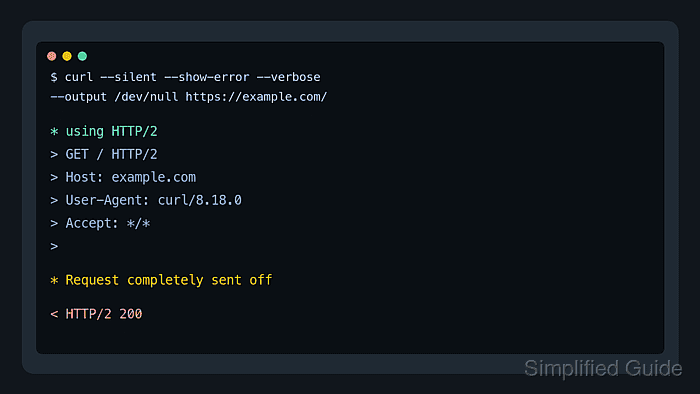
Use --verbose when the request itself needs inspection. In verbose output, > marks protocol headers sent by cURL, < marks protocol headers received from the server, and * marks diagnostic messages from cURL about DNS, TLS, protocol negotiation, and transfer state.
Response-header options solve a different job. --show-headers, its older --include spelling, --dump-header, and --head show headers received from the server, while --verbose exposes the request headers that cURL sent. Redact verbose output before sharing it because it can include Authorization headers, cookies, signed URLs, and other request secrets.
Related: How to show HTTP response headers with cURL
Related: How to debug HTTP requests with cURL
Tool: cURL Command Generator
Steps to view HTTP request headers with cURL:
- Run the request with --disable first, add --verbose, and send the response body to /dev/null.
$ curl --disable --silent --show-error --verbose --output /dev/null https://api.example.net/headers
* Host api.example.net:443 was resolved.
##### snipped #####
* using HTTP/1.x
> GET /headers HTTP/1.1
> Host: api.example.net
> User-Agent: curl/8.18.0
> Accept: */*
>
* Request completely sent off
##### snipped #####
< HTTP/1.1 200 OK
##### snipped #####
--disable must be first to keep a local curlrc file from adding hidden headers, authentication, proxy settings, or output options. --silent hides the progress meter, --show-error keeps transfer errors visible, and --output /dev/null keeps the response body out of the header check while verbose lines remain visible.
- Read only the lines that begin with > when checking what cURL sent.
The blank > line ends the request-header block. If a header is missing before that blank line, it was not sent in that request.
- Add a request header with --header and confirm it appears in the sent block.
$ curl --disable --silent --show-error --verbose --header 'X-Debug-Id: sg-request-check' --output /dev/null https://api.example.net/headers
##### snipped #####
> GET /headers HTTP/1.1
> Host: api.example.net
> User-Agent: curl/8.18.0
> Accept: */*
> X-Debug-Id: sg-request-check
>
* Request completely sent off
##### snipped #####
Use the same check for tenant, trace, feature flag, Accept, Content-Type, or Authorization headers. Replace real secret values with placeholders before saving or pasting the output.
- Inspect each sent block separately when redirects are followed.
Headers supplied with --header can be reused on redirected requests. Avoid combining sensitive headers with --location unless the redirect targets are controlled and expected.

Mohd Shakir Zakaria is a cloud architect with deep roots in software development and open-source advocacy. Certified in AWS, Red Hat, VMware, ITIL, and Linux, he specializes in designing and managing robust cloud and on-premises infrastructures.


