Many HTTP endpoints do not return the final response on the first request. They answer with a 301, 302, 307, or 308 status and a Location header that tells the client where to go next. A redirect-aware cURL request shows the final URL, status, and hop count that scripts, monitors, and handoff notes should evaluate.
In cURL, the common flag for this job is --location (or -L). Without it, cURL stops on the first redirect response and prints that response as-is. With it, cURL requests each Location target until it reaches a non-redirect response or the redirect limit. Newer curl releases also add --follow, but --location remains the portable choice and is what the examples below use.
Redirects can change the host, scheme, and request method, so treat them as part of the request path instead of a transparent detail. By default, cURL does not forward credentials or explicit Cookie: headers to a different host after a redirect; --location-trusted changes that and should only be used when every target is trusted. Redirected POST requests also switch to GET on 301, 302, and 303 unless you add the matching --post301, --post302, or --post303 option.
Steps to follow HTTP redirects with cURL:
- Request the URL once without --location so you can confirm the returned redirect status and the next target.
$ curl --silent --show-error --include "https://edge.example.test/redirects/2"
HTTP/2 302
location: /routing/us-east/1
cache-control: no-store
content-length: 0
##### snipped #####
A visible 3xx status and Location header confirm that the server expects another request before you reach the real resource.
- Add --location to follow the chain and stop on the final response.
$ curl --silent --show-error --location --include "https://edge.example.test/redirects/2"
HTTP/2 302
location: /routing/us-east/1
##### snipped #####

HTTP/2 302
location: https://api.example.test/v1/health
##### snipped #####

HTTP/2 200
content-type: application/json; charset=utf-8
cache-control: no-store
##### snipped #####
The last response block should be the non-redirect response that your script or check actually needs, not another 3xx hop.
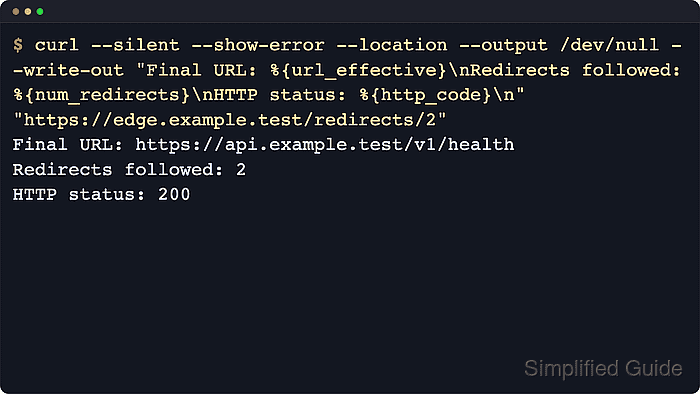
- Print only the final URL, redirect count, and final status when you do not need the body.
$ curl --silent --show-error --location --output /dev/null --write-out "Final URL: %{url_effective}\nRedirects followed: %{num_redirects}\nHTTP status: %{http_code}\n" "https://edge.example.test/redirects/2"
Final URL: https://api.example.test/v1/health
Redirects followed: 2
HTTP status: 200
This is the quickest way to prove where the request landed and how many redirect hops were used.
- Set an explicit redirect ceiling with --max-redirs before you rely on redirect following in scripts, probes, or CI jobs.
$ curl --silent --show-error --location --max-redirs 1 "https://edge.example.test/redirects/3"
curl: (47) Maximum (1) redirects followed
The default redirect limit is 50. Setting your own smaller limit makes loops and routing mistakes fail sooner and more predictably.
- Restrict redirect targets to approved schemes with --proto-redir when the destination must stay on HTTP or HTTPS.
$ curl --silent --show-error --location --proto-redir '=http,https' --output /dev/null --write-out "Final URL: %{url_effective}\nRedirects followed: %{num_redirects}\nHTTP status: %{http_code}\n" "https://edge.example.test/redirects/2"
Final URL: https://api.example.test/v1/health
Redirects followed: 2
HTTP status: 200
Current curl defaults already reject most redirect protocols, but an explicit scheme list keeps the allowed destination set obvious in saved scripts and runbooks.
- Use --verbose when you need to see each follow-up request and the response that triggered it.
$ curl --silent --show-error --verbose --location --output /dev/null "https://edge.example.test/redirects/1"
* Host edge.example.test:443 was resolved.
> GET /redirects/1 HTTP/2
< HTTP/2 302
< location: https://api.example.test/v1/health
* Issue another request to this URL: 'https://api.example.test/v1/health'
> GET /v1/health HTTP/2
< HTTP/2 200
##### snipped #####
Verbose output should show both the original request and the follow-up request that reached the final URL.
Related: How to debug HTTP requests with cURL
- Keep a redirected POST as POST only when the target is expected to receive the original body.
$ curl --silent --show-error --location --post302 --data "mode=validate&profile=nightly" "https://edge.example.test/redirect-to?url=https://api.example.test/v1/jobs/validate&status_code=302"
{
  "method": "POST",
  "url": "https://api.example.test/v1/jobs/validate",
  "form": {
    "mode": "validate",
    "profile": "nightly"
  }
##### snipped #####
}
Without --post302, the redirected request becomes GET and the body is dropped. Use --post301 or --post303 for those status codes when the redirect target must keep the original POST semantics.

Mohd Shakir Zakaria is a cloud architect with deep roots in software development and open-source advocacy. Certified in AWS, Red Hat, VMware, ITIL, and Linux, he specializes in designing and managing robust cloud and on-premises infrastructures.


