Use a HEAD request when the status and headers matter but the response body does not. It fits endpoint checks, redirect checks, cache validation, and content metadata checks where downloading the page or API payload would add noise.
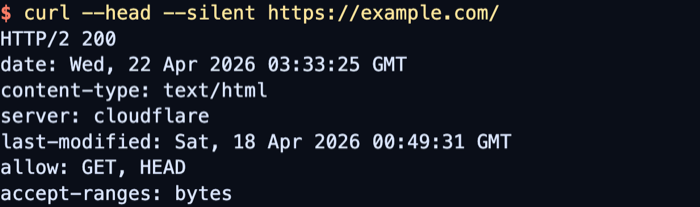
In cURL, --head or -I switches the HTTP transfer to HEAD and prints the response headers to standard output. A HEAD response should match the headers from a comparable GET request without sending the response body, so Content-Length can still appear even when no payload bytes are downloaded.
HEAD support is endpoint behavior, not a guarantee. Some applications reject it with 405 Method Not Allowed or return a smaller header set than GET, especially behind gateways. Use --location when redirect hops matter, and use --head instead of --request HEAD because --request changes only the method word and does not make curl treat the transfer as bodyless.
Related: How to show HTTP response headers with cURL
Related: How to view HTTP request headers with cURL
Tool: HTTP Header Checker
Steps to send HEAD requests with cURL:
- Send a basic HEAD request with --head to print the status line and response headers without the body.
$ curl --head --silent https://api.example.net/health
HTTP/1.1 200 OK
Date: Sat, 06 Jun 2026 00:00:00 GMT
Content-Type: application/json
Content-Length: 28
Cache-Control: no-store
X-Guide-State: ready
##### snipped #####
-I is the short form of --head. A HEAD response may still show fields such as Content-Length because those describe the matching GET response, not downloaded body bytes.
- Add --location when the first URL can redirect before the final resource.
$ curl --head --silent --location https://api.example.net/redirect
HTTP/1.1 301 Moved Permanently
Date: Sat, 06 Jun 2026 00:00:00 GMT
Location: /health
Content-Length: 0
##### snipped #####

HTTP/1.1 200 OK
Date: Sat, 06 Jun 2026 00:00:00 GMT
Content-Type: application/json
Content-Length: 28
Cache-Control: no-store
X-Guide-State: ready
##### snipped #####
Each response block stays visible, so the last status line and header set show the final resource that curl reached.
- Print only the values a script needs with --output /dev/null and --write-out.
$ curl --head --silent --output /dev/null --write-out 'status=%{response_code}\nheaders=%{size_header}\nbody=%{size_download}\n' https://api.example.net/health
status=200
headers=196
body=0
body=0 confirms that no response payload bytes were transferred, while headers gives a compact size check for alerting or regression tests.
- Treat a 405 Method Not Allowed response as proof that the endpoint rejected HEAD.
$ curl --head --silent https://api.example.net/post-only
HTTP/1.1 405 Method Not Allowed
Date: Sat, 06 Jun 2026 00:00:00 GMT
Allow: POST, OPTIONS
Content-Length: 0
##### snipped #####
Use a normal GET request only when the application actually expects GET semantics. curl's own documentation warns against replacing --head with --request HEAD, because --request changes only the method token and not the rest of curl's transfer behavior.

Mohd Shakir Zakaria is a cloud architect with deep roots in software development and open-source advocacy. Certified in AWS, Red Hat, VMware, ITIL, and Linux, he specializes in designing and managing robust cloud and on-premises infrastructures.


