Monitoring Podman containers with Checkmk uses the mk_podman.py agent plug-in on the Podman host. The plug-in adds Podman host and container data to the Linux agent output, so the Checkmk site can discover services for the runtime and the containers it runs.
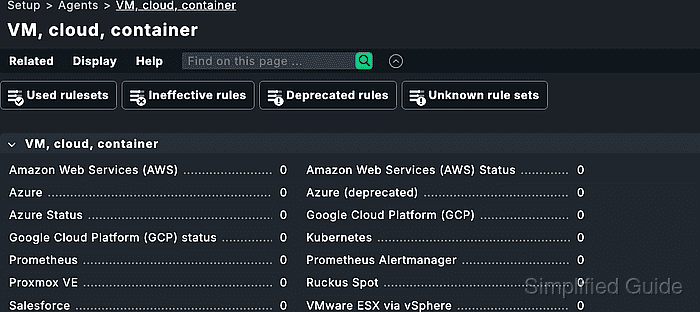
The manual setup path copies the plug-in to /usr/lib/check_mk_agent/plugins and uses /etc/check_mk/mk_podman.cfg only when automatic socket detection is not enough. Commercial editions can deploy the same plug-in through the Agent Bakery instead of copying the file by hand.
Container services arrive through piggyback data. The Podman host is monitored through its normal Linux agent, while each container needs a matching host object whose name follows the piggyback name produced by the plug-in.
Steps to monitor Podman containers with Checkmk:
- Confirm that the Checkmk Linux agent runs on the Podman host.
$ sudo check_mk_agent
<<<check_mk>>>
Version: 2.5.0p7
AgentOS: linux
Hostname: podman01
AgentDirectory: /etc/check_mk
PluginsDirectory: /usr/lib/check_mk_agent/plugins
##### snipped #####
The host should already be added to Checkmk and registered with the Agent Controller before the Podman plug-in is installed.
- Copy mk_podman.py into the agent plug-in directory on the Podman host.
$ sudo install -m 0755 mk_podman.py /usr/lib/check_mk_agent/plugins/
Download the plug-in from Setup → Agents → Linux → Plug-ins in Checkmk Community. In commercial editions, use Setup → Agents → Windows, Linux, Solaris, AIX → Related → Linux, Solaris, AIX files when not using the Agent Bakery.
- Create a Podman plug-in configuration only when the host should use the podman command instead of the Podman API socket.
$ sudoedit /etc/check_mk/mk_podman.cfg
- /etc/check_mk/mk_podman.cfg
[PODMAN]
connection_method: cli
Leave piggyback_name_method unset to keep the default container host names that combine the Podman host name and container name. Set it only when another naming scheme is required.
- Run the plug-in directly on the Podman host.
$ sudo python3 /usr/lib/check_mk_agent/plugins/mk_podman.py
<<<podman_errors:sep(0)>>>
<<<podman_containers:sep(0)>>>
<<<podman_disk_usage:sep(0)>>>
<<<podman_engine:sep(0)>>>
<<<podman_pods:sep(0)>>>
##### snipped #####
If the output says Does not seem to be a podman host, install or start Podman first, or adjust /etc/check_mk/mk_podman.cfg so the plug-in can reach the correct socket or CLI.
- Confirm that the full agent output includes the Podman sections.
$ sudo check_mk_agent
<<<check_mk>>>
##### snipped #####
<<<podman_containers:sep(0)>>>
##### snipped #####
<<<podman_engine:sep(0)>>>
##### snipped #####
- Discover services for the Podman host from the Checkmk site shell.
OMD[mysite]:~$ cmk -IIv podman01
Discovering services and host labels on: podman01
podman01:
+ FETCHING DATA
+ EXECUTING DISCOVERY PLUGINS (4)
  1 podman_engine
  1 podman_disk_usage
  1 podman_pods
  3 podman_containers
SUCCESS - Found 6 services, 1 host labels
Replace podman01 with the Checkmk host name of the Podman host. The web interface can run the same discovery from Setup → Hosts → the Podman host → Services.
Related: How to run Checkmk service discovery - List the piggyback container host names created from the Podman data.
OMD[mysite]:~$ cmk-piggyback list piggybacked
podman01_web
podman01_db
The names are case-sensitive and must match the Checkmk host objects exactly. Containers whose names begin with a dot are not processed as piggyback hosts.
- Create a Checkmk host for each container name that should be monitored.
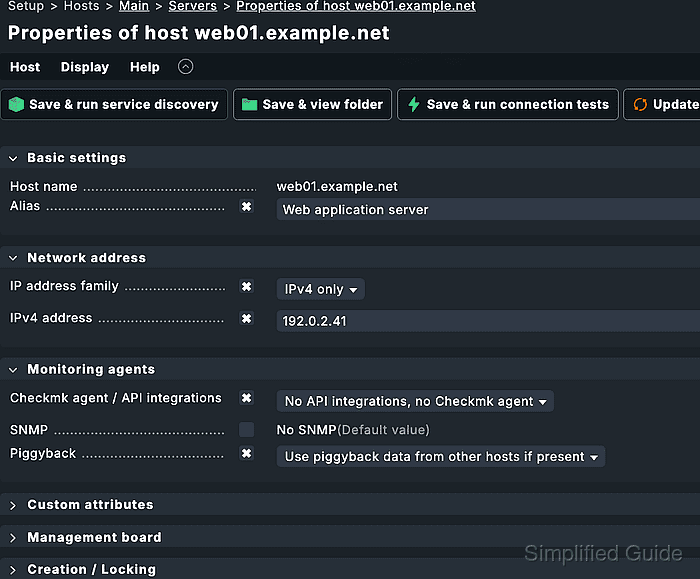
For a normal Podman container without its own address, set IP address family to No IP and set Checkmk agent / API integrations to No API integrations, no Checkmk agent. Set Parents to the Podman host when the container should inherit that topology relationship.
Related: How to create a Checkmk piggyback host - Discover services for the container host.
OMD[mysite]:~$ cmk -IIv podman01_web
Discovering services and host labels on: podman01_web
podman01_web:
+ FETCHING DATA
+ EXECUTING DISCOVERY PLUGINS (2)
  1 podman_container_status
  3 podman_container_stats
SUCCESS - Found 4 services, 3 host labels
The container host should use piggyback data only. A missing or mismatched piggyback name leaves service discovery with no container services.
- Activate the discovered Podman changes.
OMD[mysite]:~$ cmk -O
Generating configuration for core...
Reloading monitoring core...OK
- Run the container host check from the Checkmk site shell.
OMD[mysite]:~$ cmk -nv podman01_web
+ FETCHING DATA
Status                running
Memory usage          64.00 MB
CPU utilization       0.3%
[piggyback] Success, execution time 0.1 sec
The container is monitored when the Status service reports the running state and the check ends with a piggyback success result.

Mohd Shakir Zakaria is a cloud architect with deep roots in software development and open-source advocacy. Certified in AWS, Red Hat, VMware, ITIL, and Linux, he specializes in designing and managing robust cloud and on-premises infrastructures.


