Installing the Checkmk agent on Linux adds the check_mk_agent script and the Agent Controller to a host so a Checkmk site can collect operating system, service, and hardware data. Use this package install path when adding a new Linux server to monitoring or replacing an older manually installed agent.
The agent package comes from the Checkmk site that will monitor the host. DEB packages are used on Debian and Ubuntu systems, while RPM packages are used on RHEL, SLES, Fedora, openSUSE, and similar distributions. The exact file name changes with the Checkmk version and CPU architecture.
On systemd hosts, the package enables the Agent Controller daemon and the agent socket. A first install can still expose unencrypted legacy pull mode until the host is registered with the Checkmk site, so restrict TCP port 6556 to the monitoring server and register the agent before treating the host as finished monitoring inventory.
Related: How to add a host in Checkmk
Related: How to register a Checkmk agent host
Related: How to troubleshoot a Checkmk agent connection
Steps to install the Checkmk Linux agent:
- Open a terminal on the Linux host with sudo privileges.
- Confirm that systemd is available for the Agent Controller.
$ systemctl --version
systemd 259 (259.5-0ubuntu3)
##### snipped #####
The Agent Controller needs systemd 219 or newer. Hosts without a usable systemd service manager must use the legacy Linux agent mode.
- Check the host CPU architecture.
$ uname -m
aarch64
Use an arm64 or aarch64 agent package on 64-bit ARM hosts. Use the all or noarch package on x86_64 hosts so the Agent Controller matches the CPU architecture.
- Download the matching agent package from the Checkmk site.
$ curl --output check-mk-agent.deb https://monitor.example.com/mysite/check_mk/agents/check-mk-agent_2.5.0p7-1_arm64.deb
Copy the exact Linux package URL from Setup → Agents → Linux, from the host agent slideout, or from the equivalent Checkmk REST API download command. The sample URL uses a neutral host name, site name, version, and ARM package.
- Install the DEB package on Debian or Ubuntu.
$ sudo dpkg --install check-mk-agent.deb
Selecting previously unselected package check-mk-agent.
Preparing to unpack check-mk-agent.deb ...
Unpacking check-mk-agent (2.5.0p7-1) ...
Setting up check-mk-agent (2.5.0p7-1) ...
Deploying agent controller: /usr/bin/cmk-agent-ctl
Deploying systemd units: cmk-agent-ctl-daemon.service check-mk-agent-async.service check-mk-agent.socket check-mk-agent@.service
Deployed systemd
Creating/updating 'cmk-agent' user account ...
WARNING: The agent controller is operating in an insecure mode! To secure the connection run `cmk-agent-ctl register`.
Activating systemd unit 'cmk-agent-ctl-daemon.service'...
Created symlink /etc/systemd/system/multi-user.target.wants/cmk-agent-ctl-daemon.service -> /usr/lib/systemd/system/cmk-agent-ctl-daemon.service.
On an RPM based host, download the matching .rpm package and install it with sudo rpm -U check-mk-agent.rpm. The -U mode handles both first installs and later package updates.
- Confirm that the Agent Controller binary runs.
$ cmk-agent-ctl --version
cmk-agent-ctl-lib 2.5.0p7
If the shell reports an Exec format error, the installed package does not match the host CPU architecture.
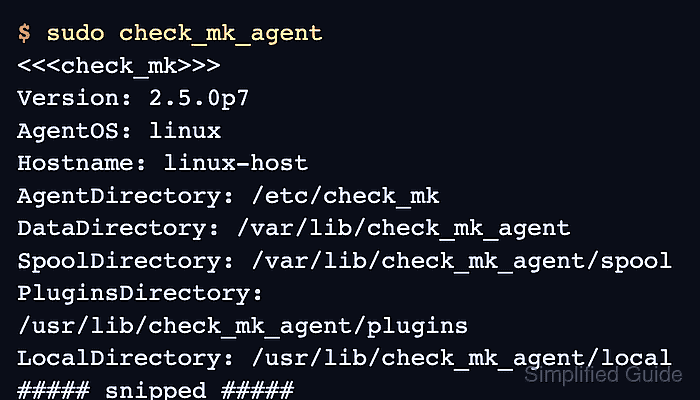
- Check the local agent output.
$ sudo check_mk_agent
<<<check_mk>>>
Version: 2.5.0p7
AgentOS: linux
Hostname: linux-host
AgentDirectory: /etc/check_mk
DataDirectory: /var/lib/check_mk_agent
SpoolDirectory: /var/lib/check_mk_agent/spool
PluginsDirectory: /usr/lib/check_mk_agent/plugins
LocalDirectory: /usr/lib/check_mk_agent/local
##### snipped #####
- Confirm that the agent socket is listening on TCP port 6556.
$ sudo ss --tcp --listening --processes 'sport = :6556'
State  Recv-Q Send-Q Local Address:Port Peer Address:Port Process
LISTEN 0      1024   0.0.0.0:6556      0.0.0.0:*     users:(("cmk-agent-ctl",pid=1861810,fd=9))
Before registration, legacy pull mode can expose unencrypted agent output on port 6556. Allow inbound access only from the Checkmk server and register the agent promptly.
Related: How to register a Checkmk agent host - Test agent retrieval from the Checkmk site shell.
OMD[mysite]:~$ cmk -d linux-host
<<<check_mk>>>
Version: 2.5.0p7
AgentOS: linux
Hostname: linux-host
##### snipped #####
A working cmk -d result proves the site can retrieve agent data for the host. Continue with service discovery and activation after the host is registered.
Related: How to run Checkmk service discovery
Related: How to activate Checkmk pending changes

Mohd Shakir Zakaria is a cloud architect with deep roots in software development and open-source advocacy. Certified in AWS, Red Hat, VMware, ITIL, and Linux, he specializes in designing and managing robust cloud and on-premises infrastructures.


