Running service discovery in Checkmk turns data collected from a host into monitored services. It belongs after a host is created, an agent or special agent is working, or a local check starts publishing new service data.
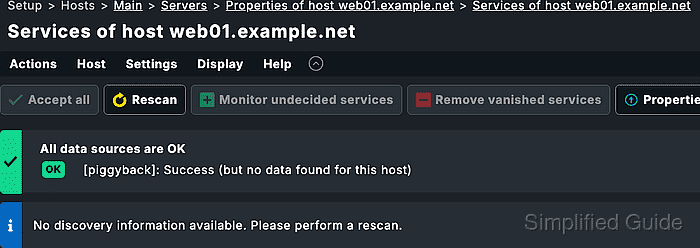
The service discovery page compares what Checkmk can currently detect with what is already configured for the host. New services appear as undecided or missing, existing services stay monitored, and disappeared items appear as vanished services that need review before removal.
Accept only the services and labels that should enter monitoring, then activate pending changes so the monitoring core uses the updated service set. The host's monitored service list and the Check_MK Discovery service state are the proof that discovery has been handled.
Related: How to add a host in Checkmk
Related: How to register a Checkmk agent host
Related: How to create a Checkmk local check
Steps to run Checkmk service discovery:
- Sign in to the Checkmk site with an account that can change host service configuration.
- Open Setup → Hosts → Hosts.
- Open the folder or search result that contains the target host.
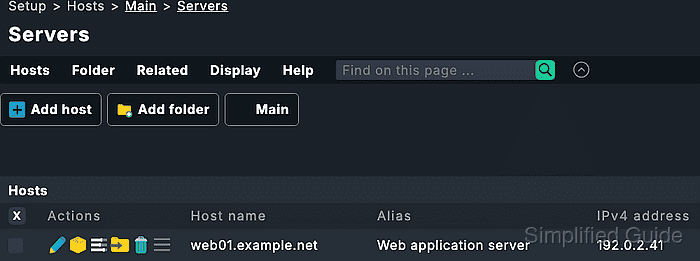
- Open the target host's properties page.
- Open Host → Run service discovery.
For a host that was just created or edited, click Save & run service discovery instead so Checkmk saves the host properties before scanning for services.
- Wait for the discovery result to finish loading.
- Review the service sections before accepting anything.
Undecided services are detected but not monitored, Monitored services are already configured, and Vanished services were monitored before but are no longer detected.
- Click Accept all when every newly detected service and host label should enter monitoring.
If Vanished services are listed, confirm that each disappeared service is expected before using Accept all because accepted vanished services are removed from monitoring.
- Move individual services to monitoring when only part of the discovery result should be accepted.
Use the row action for Move to monitored services instead of Accept all when test databases, temporary filesystems, lab interfaces, or other optional items should stay out of monitoring.
- Open Actions → Host labels → Update host labels or Actions → Services → Update service labels when discovery reports only label changes.
- Leave unwanted services undecided or move them to Disabled services when they should stay excluded.
Use Setup → Services → Discovery rules for repeatable exclusions instead of manually disabling the same service on many hosts.
- Open the Changes menu.
- Activate the pending Checkmk changes.
Activation moves the accepted service configuration from Setup into the running monitoring environment.
Related: How to activate Checkmk pending changes - Open the host from Monitor and check its service list.
- Confirm the accepted services appear on the host and the Check_MK Discovery service no longer reports the accepted items as unmonitored.

Mohd Shakir Zakaria is a cloud architect with deep roots in software development and open-source advocacy. Certified in AWS, Red Hat, VMware, ITIL, and Linux, he specializes in designing and managing robust cloud and on-premises infrastructures.


