When several public hostnames reach the same TLS service, separate certificates can leave aliases renewing on different dates or pointing at different key files. A multi-domain Certbot certificate keeps the primary name and aliases such as www or api in one certificate lineage so the saved paths and future renewals stay together.
The webroot authenticator proves control of each requested name by writing an ACME HTTP-01 challenge file below the webroot of an already running site. Certbot then saves one lineage under /etc/letsencrypt/live/ and records the webroot and domain set for later renewal.
The example uses one Debian or Ubuntu webroot for all requested names. Every name must resolve to this server, reach port 80, and serve the same /.well-known/acme-challenge/ path; use a DNS challenge for wildcard names or for hosts that cannot expose HTTP validation. When names use different document roots, place the matching -w option before the -d entries that use that root.
Related: Expand a Certbot certificate
Related: Use a webroot challenge with Certbot
Related: Issue a wildcard certificate with Certbot
Steps to issue a multi-domain certificate with Certbot:
- Confirm that Certbot can use the webroot plugin.
$ sudo certbot plugins
Saving debug log to /var/log/letsencrypt/letsencrypt.log

* webroot
Description: Saves the necessary validation files to a
.well-known/acme-challenge/ directory within the nominated webroot path.
Interfaces: Authenticator, Plugin
##### snipped #####
The webroot plugin obtains the certificate but does not install it into Nginx, Apache, a load balancer, or another TLS service.
- Confirm that every requested name resolves to this server.
$ getent ahosts example.net www.example.net api.example.net
203.0.113.10    STREAM example.net
203.0.113.10    DGRAM
203.0.113.10    RAW
203.0.113.10    STREAM www.example.net
203.0.113.10    DGRAM
203.0.113.10    RAW
203.0.113.10    STREAM api.example.net
203.0.113.10    DGRAM
203.0.113.10    RAW
If any name also has an .AAAA record, the IPv6 address must reach the same webroot path or Let's Encrypt validation can fail over IPv6.
- Create the HTTP-01 challenge directory in the webroot.
$ sudo install -d -m 755 /var/www/example.net/.well-known/acme-challenge
Use the real webroot served by the site. The webroot plugin writes challenge files into the same directory during issuance.
- Create a temporary probe file in the challenge directory.
$ printf 'challenge-ok\n' | sudo tee /var/www/example.net/.well-known/acme-challenge/sg-probe
challenge-ok
The response body should be only the probe text. An HTML page, redirect target, cached response, or authentication page means the challenge path is not ready.
- Check the challenge path through the primary name.
$ curl -sS http://example.net/.well-known/acme-challenge/sg-probe
challenge-ok
- Check the challenge path through the first alias.
$ curl -sS http://www.example.net/.well-known/acme-challenge/sg-probe
challenge-ok
- Check the challenge path through the second alias.
$ curl -sS http://api.example.net/.well-known/acme-challenge/sg-probe
challenge-ok
Fix DNS, firewall, virtual host, CDN, cache, authentication, redirect, or IPv6 differences before requesting the certificate. Every requested name must serve the current challenge body during validation.
- Remove the temporary probe file.
$ sudo rm /var/www/example.net/.well-known/acme-challenge/sg-probe
- Test the multi-domain request against the Let's Encrypt staging service.
$ sudo certbot certonly --webroot -w /var/www/example.net \
  --cert-name example.net \
  --dry-run \
  --non-interactive \
  --agree-tos \
  --email admin@example.net \
  --no-eff-email \
  -d example.net \
  -d www.example.net \
  -d api.example.net
Saving debug log to /var/log/letsencrypt/letsencrypt.log
Simulating a certificate request for example.net and 2 more domains

The dry run was successful.
--dry-run uses the staging service and does not save a production certificate. Fix validation failures before removing the flag.
Related: Use the Certbot staging environment
- Request the production certificate with the same domain set.
$ sudo certbot certonly --webroot -w /var/www/example.net \
  --cert-name example.net \
  --non-interactive \
  --agree-tos \
  --email admin@example.net \
  --no-eff-email \
  -d example.net \
  -d www.example.net \
  -d api.example.net
Saving debug log to /var/log/letsencrypt/letsencrypt.log
Requesting a certificate for example.net and 2 more domains

Successfully received certificate.
Certificate is saved at: /etc/letsencrypt/live/example.net/fullchain.pem
Key is saved at:         /etc/letsencrypt/live/example.net/privkey.pem
This certificate expires on 2026-09-10.
A live issuance spends Let's Encrypt production rate-limit budget. Keep all intended names in one command so the saved lineage and future renewals contain the complete set.
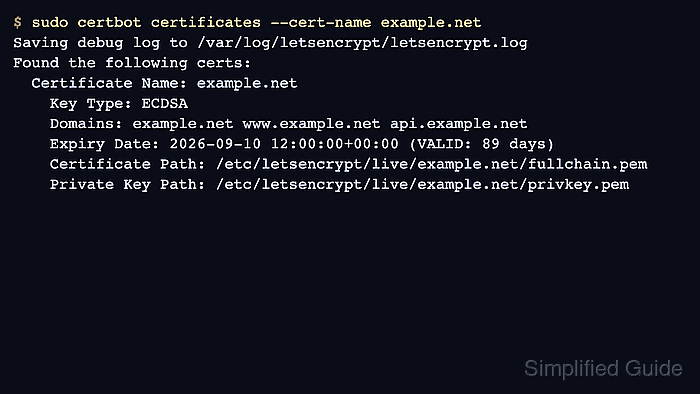
- List the saved lineage and confirm the Domains row.
$ sudo certbot certificates --cert-name example.net
Saving debug log to /var/log/letsencrypt/letsencrypt.log
Found the following certs:
  Certificate Name: example.net
    Key Type: ECDSA
    Domains: example.net www.example.net api.example.net
    Expiry Date: 2026-09-10 12:00:00+00:00 (VALID: 89 days)
    Certificate Path: /etc/letsencrypt/live/example.net/fullchain.pem
    Private Key Path: /etc/letsencrypt/live/example.net/privkey.pem
The certificate name controls Certbot housekeeping and file paths. It does not change the names inside the certificate.
Related: List Certbot certificates
- Inspect the certificate subject alternative names.
$ sudo openssl x509 -in /etc/letsencrypt/live/example.net/fullchain.pem -noout -subject -issuer -dates -ext subjectAltName
subject=CN=example.net
issuer=C=US, O=Let's Encrypt, CN=E8
notBefore=Jun 12 12:00:00 2026 GMT
notAfter=Sep 10 12:00:00 2026 GMT
X509v3 Subject Alternative Name:
    DNS:example.net, DNS:www.example.net, DNS:api.example.net
Use the fullchain.pem and privkey.pem paths in the web server, load balancer, mail server, or other TLS service that will present the certificate.
Tool: SSL Certificate Chain Checker - Test renewal for the multi-domain lineage.
$ sudo certbot renew --cert-name example.net --dry-run
Saving debug log to /var/log/letsencrypt/letsencrypt.log
Processing /etc/letsencrypt/renewal/example.net.conf
Simulating renewal of an existing certificate for example.net and 2 more domains

Congratulations, all simulated renewals succeeded:
  /etc/letsencrypt/live/example.net/fullchain.pem (success)
Renewal reuses the saved webroot authenticator settings and domain set unless the lineage is later changed.
Related: Test Certbot certificate renewal

Mohd Shakir Zakaria is a cloud architect with deep roots in software development and open-source advocacy. Certified in AWS, Red Hat, VMware, ITIL, and Linux, he specializes in designing and managing robust cloud and on-premises infrastructures.


