Expanding a Certbot certificate adds another hostname to an existing certificate lineage so the same renewed certificate covers the original names and the new name. Use this when a site gains names such as www, api, or another virtual-host alias and those names should renew together instead of becoming separate certificates.
Certbot tracks each managed certificate as a named lineage. Expanding that lineage requests a replacement certificate with the old domains and the added domain, then keeps the live certificate path pointing at the newest version.
The example below uses a webroot HTTP-01 lineage, tests the expanded request against staging, and then replaces the production certificate. Use the same authenticator that already works for the lineage, and list every domain that must remain on the certificate because omitted names are not part of the new requested set.
Related: List Certbot certificates
Related: Issue a multi-domain certificate with Certbot
Related: Test Certbot certificate renewal
Steps to expand a Certbot certificate:
- List the existing certificates and confirm the lineage name.
$ sudo certbot certificates
Saving debug log to /var/log/letsencrypt/letsencrypt.log

- - - - - - - - - - - - - - - - - - - - - - - - - - - - - - - - - - - - - - - -
Found the following certs:
  Certificate Name: host.example.net
    Domains: host.example.net www.host.example.net
    Expiry Date: 2026-09-02 20:24:51+00:00 (VALID: 82 days)
    Certificate Path: /etc/letsencrypt/live/host.example.net/fullchain.pem
    Private Key Path: /etc/letsencrypt/live/host.example.net/privkey.pem
- - - - - - - - - - - - - - - - - - - - - - - - - - - - - - - - - - - - - - - -
The certificate name is the value to pass to --cert-name. Do not guess it from the first domain when the host has older lineages such as host.example.net-0001.
Related: List Certbot certificates
- Confirm that the new hostname resolves to this server.
$ getent ahosts api.host.example.net
203.0.113.10    STREAM api.host.example.net
203.0.113.10    DGRAM
203.0.113.10    RAW
If the name has an .AAAA record, the IPv6 address must also reach the same validation path or Let's Encrypt can validate over IPv6 and fail.
- Confirm that the new hostname reaches the existing HTTP site on port 80.
$ curl -I http://api.host.example.net
HTTP/1.1 200 OK
Server: nginx/1.28.0
##### snipped #####
This webroot example uses HTTP-01 validation. Use the already proven DNS plugin instead when the certificate contains wildcard names or the site cannot expose HTTP on port 80.
- Back up the Certbot configuration tree before replacing the lineage.
$ sudo tar -C /etc -czf /root/letsencrypt-before-host-example-net-expand.tgz letsencrypt
The backup contains certificate private keys and ACME account material. Store it with the same access controls as /etc/letsencrypt.
- Test the expanded domain set against the Let's Encrypt staging service.
$ sudo certbot certonly --webroot -w /var/www/html --cert-name host.example.net --expand --dry-run -d host.example.net -d www.host.example.net -d api.host.example.net
Saving debug log to /var/log/letsencrypt/letsencrypt.log
Simulating a certificate request for host.example.net and 2 more domains

The dry run was successful.
--dry-run checks the validation path without replacing the active production certificate. Fix DNS, firewall, virtual host, or webroot problems before running the live command.
Related: Use the Certbot staging environment
- Request the production replacement certificate with the same domain set.
$ sudo certbot certonly --webroot -w /var/www/html --cert-name host.example.net --expand -d host.example.net -d www.host.example.net -d api.host.example.net
Saving debug log to /var/log/letsencrypt/letsencrypt.log
Requesting a certificate for host.example.net and 2 more domains

Successfully received certificate.
Certificate is saved at: /etc/letsencrypt/live/host.example.net/fullchain.pem
Key is saved at:         /etc/letsencrypt/live/host.example.net/privkey.pem
This certificate expires on 2026-09-16.
Include every name that should stay on the certificate. The dry run does not consume production issuance limits, but this live command does.
For Apache or Nginx plugin lineages, use the matching --apache or --nginx form instead of certonly --webroot -w so Certbot uses the same validation and installer path.
- Reload the TLS service that reads the Certbot live certificate path.
$ sudo systemctl reload nginx
Use the service that terminates TLS for this certificate, such as apache2, nginx, haproxy, or an application-specific reload command.
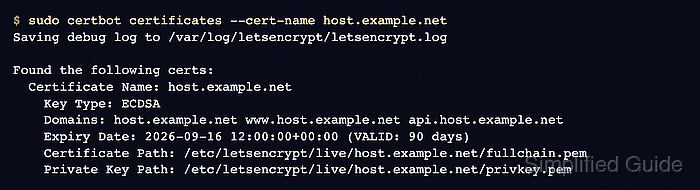
- List the lineage again and confirm that the new hostname appears in Domains.
$ sudo certbot certificates --cert-name host.example.net Saving debug log to /var/log/letsencrypt/letsencrypt.log - - - - - - - - - - - - - - - - - - - - - - - - - - - - - - - - - - - - - - - - Found the following certs: Certificate Name: host.example.net Key Type: ECDSA Domains: host.example.net www.host.example.net api.host.example.net Expiry Date: 2026-09-16 12:00:00+00:00 (VALID: 90 days) Certificate Path: /etc/letsencrypt/live/host.example.net/fullchain.pem Private Key Path: /etc/letsencrypt/live/host.example.net/privkey.pem - - - - - - - - - - - - - - - - - - - - - - - - - - - - - - - - - - - - - - - - - Confirm that the new hostname works over HTTPS.
$ curl -I https://api.host.example.net
HTTP/2 200
server: nginx/1.28.0
##### snipped #####
curl verifies the certificate name by default. A certificate that does not cover api.host.example.net fails this request before the HTTP response is shown.
Tool: SSL Certificate Chain Checker - Test renewal for the expanded lineage.
$ sudo certbot renew --dry-run --cert-name host.example.net
Saving debug log to /var/log/letsencrypt/letsencrypt.log
Processing /etc/letsencrypt/renewal/host.example.net.conf
Simulating renewal of an existing certificate for host.example.net and 2 more domains

Congratulations, all simulated renewals succeeded:
  /etc/letsencrypt/live/host.example.net/fullchain.pem (success)
--dry-run uses the Let's Encrypt staging service and does not replace the active production certificate.
Related: Test Certbot certificate renewal

Mohd Shakir Zakaria is a cloud architect with deep roots in software development and open-source advocacy. Certified in AWS, Red Hat, VMware, ITIL, and Linux, he specializes in designing and managing robust cloud and on-premises infrastructures.


