A public Apache site on CentOS Stream or Red Hat Enterprise Linux needs three pieces aligned before certbot can turn it into an HTTPS site. DNS has to point at the server, HTTP on port 80 has to reach the right httpd virtual host, and the certbot install path must include the Apache plugin.
Current certbot upstream instructions recommend the classic snap package on Linux systems that support snapd. On Enterprise Linux hosts, keep Apache in the distro packages, install snapd through EPEL, install certbot from snap, and run certbot --apache against the public hostname.
The Apache plugin normally uses the HTTP-01 challenge, which asks Let’s Encrypt to fetch a token over plain HTTP. Use a DNS-01 challenge instead when issuing wildcard certificates, when port 80 cannot be public, or when a CDN or load balancer cannot forward the challenge to the origin host. The sequence uses an EL 9-family system, with CRB on CentOS-compatible rebuilds and CodeReady Builder on subscribed RHEL hosts.
Steps to configure Let’s Encrypt SSL for Apache on CentOS or Red Hat Enterprise Linux:
- Open a terminal with sudo privileges on the Apache server.
- Confirm that the hostname resolves to the server public address.
$ getent ahosts host.example.net
203.0.113.10   STREAM host.example.net
203.0.113.10   DGRAM
203.0.113.10   RAW
If the name also has an .AAAA record, that IPv6 address must reach the same Apache virtual host or validation can fail from validators that choose IPv6.
- Confirm that Apache answers over plain HTTP for the hostname.
$ curl --head http://host.example.net
HTTP/1.1 200 OK
Server: Apache/2.4.62 (Rocky Linux)
##### snipped #####
The HTTP-01 challenge uses port 80. Use DNS-01 when the origin is private, blocked, or reachable only through a path that cannot serve /.well-known/acme-challenge/ files.
- Check that the httpd virtual host selection matches the certificate names.
$ sudo httpd -S
VirtualHost configuration:
*:80                   host.example.net (/etc/httpd/conf.d/host.example.net.conf:1)
ServerRoot: "/etc/httpd"
##### snipped #####
Overlapping ServerName or ServerAlias entries can make certbot edit a different virtual host than the one users reach.
- Install the DNF helper plugin and EPEL release package.
$ sudo dnf install --assumeyes dnf-plugins-core epel-release
On subscribed RHEL hosts, install the official EPEL release RPM for the major version when epel-release is not available from enabled repositories.
- Enable the CRB repository on CentOS Stream, Rocky Linux, or AlmaLinux.
$ sudo dnf config-manager --set-enabled crb
On subscribed RHEL 9, enable CodeReady Builder instead, using the matching repository ID from subscription-manager repos with --list.
- Install snapd and the Apache SSL packages.
$ sudo dnf install --assumeyes snapd httpd mod_ssl
Dependencies resolved.
================================================================================
 Package                      Arch    Version                   Repo       Size
================================================================================
Installing:
 httpd                        x86_64  2.4.62-13.el9_8.1        appstream  45 k
 mod_ssl                      x86_64  1:2.4.62-13.el9_8.1      appstream 104 k
 snapd                        x86_64  2.76-0.el9               epel       18 M
##### snipped #####
Complete!
mod_ssl provides the SSL module for httpd. snapd provides the package manager used by the upstream certbot instructions.
- Remove older certbot packages if they were installed from DNF or YUM.
$ sudo dnf remove --assumeyes certbot python3-certbot-apache
Removing the old packages keeps /etc/letsencrypt certificate data in place, but it changes which certbot binary runs when automated jobs call the command.
- Enable the snapd socket.
$ sudo systemctl enable --now snapd.socket
Created symlink /etc/systemd/system/sockets.target.wants/snapd.socket -> /usr/lib/systemd/system/snapd.socket.
Run systemctl status snapd.socket if this step does not return cleanly. snapd needs a normal systemd host, not a minimal non-systemd container.
- Create the classic snap path when /snap is missing.
$ sudo ln -s /var/lib/snapd/snap /snap
Skip this command if /snap already exists. Some hosts need a new login session before /snap/bin appears in the shell path.
- Install certbot from snap.
$ sudo snap install --classic certbot
certbot 5.6.0 from Certbot Project (certbot-eff) installed
- Create the certbot command symlink when it is not already present.
$ sudo ln -s /snap/bin/certbot /usr/local/bin/certbot
The upstream instructions use /usr/local/bin/certbot so sudo sessions find the snap binary before any older package-manager copy.
- Confirm that the Apache plugin is available.
$ sudo certbot plugins
Saving debug log to /var/log/letsencrypt/letsencrypt.log

- - - - - - - - - - - - - - - - - - - - - - - - - - - - - - - - - - - - - - - -
* apache
Description: Apache Web Server plugin
Interfaces: Authenticator, Installer, Plugin
##### snipped #####
* webroot
Description: Saves the necessary validation files to a .well-known/acme-challenge/ directory within the nominated webroot path.
##### snipped #####
- Test the existing Apache configuration before requesting the certificate.
$ sudo apachectl configtest
AH00558: httpd: Could not reliably determine the server's fully qualified domain name, using 203.0.113.10. Set the 'ServerName' directive globally to suppress this message
Syntax OK
The AH00558 line is a hostname warning, not a syntax failure. Syntax OK confirms Apache can parse the current configuration.
Related: How to test Apache configuration
- Request and install the certificate with the Apache plugin.
$ sudo certbot --apache -d host.example.net -d www.host.example.net --email admin@example.net --agree-tos --no-eff-email
Saving debug log to /var/log/letsencrypt/letsencrypt.log
Requesting a certificate for host.example.net and www.host.example.net
Successfully received certificate.
Certificate is saved at: /etc/letsencrypt/live/host.example.net/fullchain.pem
Key is saved at:         /etc/letsencrypt/live/host.example.net/privkey.pem
Deploying certificate
Successfully deployed certificate for host.example.net to /etc/httpd/conf.d/host.example.net-le-ssl.conf
Congratulations! You have successfully enabled HTTPS.
Current certbot install and run modes enable HTTP-to-HTTPS redirects by default. Add --no-redirect when another layer handles redirects or when HTTP must stay reachable during rollout. Use --test-cert during a staging rehearsal before requesting a production certificate for a new or risky virtual host.
Do not request wildcard names with this command. Wildcards require a DNS-01 challenge and DNS provider credentials.
- Validate the Apache configuration after certbot edits the virtual host.
$ sudo apachectl configtest
Syntax OK
Reloading with a broken SSL virtual host can take HTTPS offline for every site handled by the same httpd process.
Related: How to test Apache configuration
- Reload httpd to apply the certificate configuration.
$ sudo systemctl reload httpd
- Confirm that httpd stayed active after the reload.
$ sudo systemctl is-active httpd
active
If this command does not return active, inspect the journal and /var/log/httpd/error_log before retrying because the certificate paths, permissions, or virtual host selection may still be wrong.
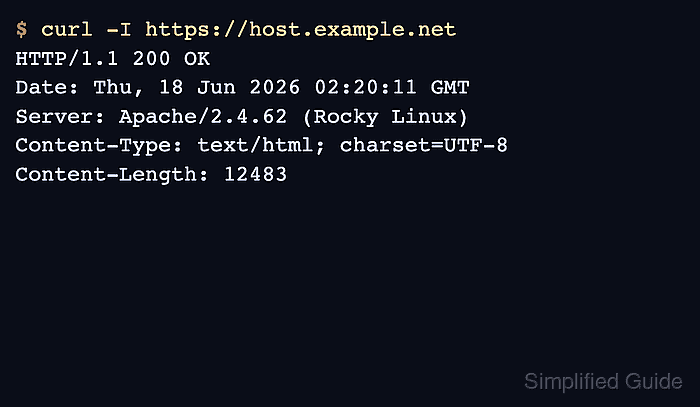
- Verify the HTTPS response from the public hostname.
$ curl --head https://host.example.net
HTTP/1.1 200 OK
Server: Apache/2.4.62 (Rocky Linux)
##### snipped #####
Tool: SSL Checker
- Verify that HTTP redirects to HTTPS when redirects are enabled.
$ curl --head http://host.example.net
HTTP/1.1 301 Moved Permanently
Location: https://host.example.net/
##### snipped #####
- Check the served certificate subject, issuer, and validity dates.
$ echo | openssl s_client -servername host.example.net -connect host.example.net:443 2>/dev/null | openssl x509 -noout -issuer -subject -dates
issuer=C=US,O=Let's Encrypt,CN=E7
subject=CN=host.example.net
notBefore=Jun 18 02:14:12 2026 GMT
notAfter=Sep 16 02:14:11 2026 GMT
The intermediate name can vary by issuance profile and key type. The important checks are that the subject covers the hostname, the issuer is expected, and the served dates match the certificate just issued.
- Confirm that the snap renewal timer exists.
$ systemctl list-timers snap.certbot.renew.timer --no-pager
NEXT                        LEFT LAST PASSED UNIT                     ACTIVATES
Thu 2026-06-18 14:40:00 UTC 5h   -    -      snap.certbot.renew.timer snap.certbot.renew.service

1 timers listed.
snap manages its own renewal timer. Older distro packages may use a different timer or a cron entry, so check the install method before changing renewal automation.
- Run a renewal dry run.
$ sudo certbot renew --dry-run
Saving debug log to /var/log/letsencrypt/letsencrypt.log
Processing /etc/letsencrypt/renewal/host.example.net.conf
##### snipped #####
Congratulations, all simulated renewals succeeded:
  /etc/letsencrypt/live/host.example.net/fullchain.pem (success)
--dry-run uses the Let’s Encrypt staging service and does not replace the active production certificate.

Mohd Shakir Zakaria is a cloud architect with deep roots in software development and open-source advocacy. Certified in AWS, Red Hat, VMware, ITIL, and Linux, he specializes in designing and managing robust cloud and on-premises infrastructures.


