How to fix HTTPS redirect loop in WordPress behind a load balancer
An HTTPS redirect loop in WordPress behind a load balancer, reverse proxy, or CDN usually means the browser reached the public site securely while the origin still saw the request as plain HTTP. The repeated redirect often appears on /wp-admin/, /wp-login.php/, or the front page until the client stops with a too-many-redirects error.
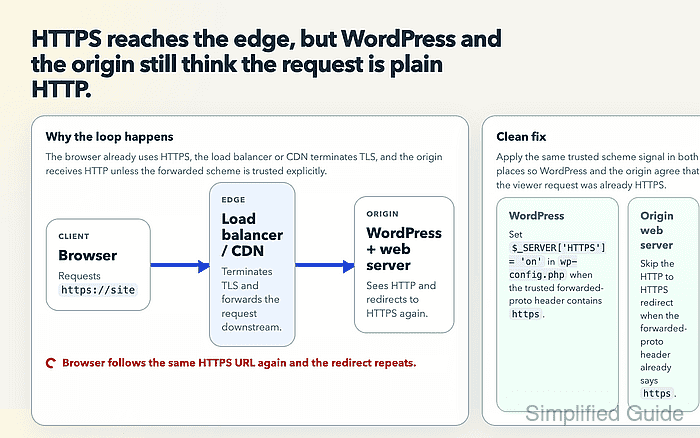
WordPress checks whether the current request is secure through is_ssl(), which reads $_SERVER['HTTPS'] or port 443 early in the bootstrap process. When TLS terminates upstream, /wp-config.php/ must translate the trusted forwarded-protocol header before WordPress loads, otherwise admin and canonical redirect logic can keep asking for HTTPS even though the visitor already used it.
The origin web server also has to agree with the same proxy signal. A local HTTP to HTTPS redirect that only checks the origin connection will keep redirecting requests that arrived over HTTPS at the edge, so the redirect rule must skip requests whose trusted forwarded scheme is already https. Trust only headers injected or overwritten by infrastructure you control, and block direct public access to the origin before using a forwarded header for security decisions.
Steps to fix HTTPS redirect loop in WordPress behind a load balancer:
- Confirm that the public HTTPS URL redirects back to itself.
$ curl -sS -I --location --max-redirs 5 https://www.example.com/wp-admin/
HTTP/2 302
location: https://www.example.com/wp-admin/
##### snipped #####
curl: (47) Maximum (5) redirects followed
A repeated secure URL points to proxy scheme handling. A single upgrade from http:// to https://, or a loop between different hostnames, points to canonical-host or stored-URL rules instead.
- Confirm the forwarded-protocol header that the edge sends to the WordPress origin.
Application Load Balancer sends X-Forwarded-Proto: https for secure viewer requests. CloudFront removes X-Forwarded-Proto and does not add CloudFront-Forwarded-Proto unless the behavior is configured to forward that CloudFront request header.
- Back up the active /wp-config.php/ file.
$ sudo cp /var/www/example.com/public_html/wp-config.php /var/www/example.com/public_html/wp-config.php.bak-before-https-loop-fix
- Check for existing SSL or forwarded-protocol lines before adding a new block.
$ sudo grep -nE "FORCE_SSL_ADMIN|HTTP_X_FORWARDED_PROTO|HTTP_CLOUDFRONT_FORWARDED_PROTO|HTTPS" /var/www/example.com/public_html/wp-config.php
82:define( 'FORCE_SSL_ADMIN', true );
No output means none of those patterns were found. Update an existing FORCE_SSL_ADMIN definition or proxy mapping in place instead of adding duplicate constants.
- Open /wp-config.php/ in a plain text editor.
$ sudoedit /var/www/example.com/public_html/wp-config.php
- Add the trusted forwarded-HTTPS mapping above the final require_once ABSPATH . 'wp-settings.php'; line.
- wp-config.php
define( 'FORCE_SSL_ADMIN', true );

if ( isset( $_SERVER['HTTP_X_FORWARDED_PROTO'] ) && false !== strpos( $_SERVER['HTTP_X_FORWARDED_PROTO'], 'https' ) ) {
    $_SERVER['HTTPS'] = 'on';
}
Replace HTTP_X_FORWARDED_PROTO with the PHP server variable for the real trusted header, such as HTTP_CLOUDFRONT_FORWARDED_PROTO when CloudFront-Forwarded-Proto is the header forwarded to the origin. Do not trust a client-supplied forwarded header on an origin that can be reached directly from the internet.
- Validate the /wp-config.php/ syntax after saving.
$ php -l /var/www/example.com/public_html/wp-config.php
No syntax errors detected in /var/www/example.com/public_html/wp-config.php
The mapping applies on the next PHP request. Clear an opcode cache only when the hosting stack keeps old PHP files in memory.
- Edit the origin Apache HTTPS redirect so it skips requests whose trusted forwarded scheme is already HTTPS.
RewriteEngine On
RewriteCond %{HTTPS} !=on
RewriteCond %{HTTP:X-Forwarded-Proto} !^https$ [NC]
RewriteRule ^ https://%{HTTP_HOST}%{REQUEST_URI} [R=301,L]
Change the redirect rule that already controls the site instead of stacking a second redirect. When the edge uses CloudFront-Forwarded-Proto, change the second condition to RewriteCond %{HTTP:CloudFront-Forwarded-Proto} !^https$ [NC]. For Nginx origins, apply the same condition with the trusted forwarded-protocol header before returning the HTTPS redirect.
Related: How to redirect HTTP to HTTPS in Nginx - Test the Apache configuration.
$ sudo apache2ctl -t
Syntax OK
Use sudo httpd -t on RHEL-family systems.
Related: How to test Apache configuration - Reload Apache after the syntax test passes.
$ sudo systemctl reload apache2
Use sudo systemctl reload httpd when the service is named httpd.
Related: How to manage the Apache web server service - Probe the origin with the trusted HTTPS header.
$ curl -sS -I -H 'Host: www.example.com' -H 'X-Forwarded-Proto: https' http://origin.example.net/wp-admin/
HTTP/1.1 302 Found
Location: https://www.example.com/wp-login.php?redirect_to=https%3A%2F%2Fwww.example.com%2Fwp-admin%2F&reauth=1
A redirect to /wp-login.php/ is normal for an unauthenticated admin request. A redirect back to the same /wp-admin/ URL means WordPress or the origin redirect still does not trust the forwarded HTTPS signal.
- Verify the public HTTPS admin URL no longer hits the redirect limit.
$ curl -sS -I --location --max-redirs 5 https://www.example.com/wp-admin/
HTTP/2 302
location: https://www.example.com/wp-login.php?redirect_to=https%3A%2F%2Fwww.example.com%2Fwp-admin%2F&reauth=1
HTTP/2 200
If the loop is gone but pages still contain http:// links or the wrong hostname, update the stored WordPress URLs separately.
Related: How to update WordPress URLs from HTTP to HTTPS
Tool: HTTP Redirect Checker