Serving WordPress through Amazon CloudFront over HTTPS keeps the visitor-facing hostname, edge certificate, admin redirects, and generated URLs on the same secure address. It is useful when CloudFront sits in front of a custom WordPress origin and browsers must never be sent back to the origin hostname or plain HTTP.
CloudFront and WordPress make separate protocol decisions. CloudFront uses the distribution certificate, Viewer protocol policy, Origin protocol policy, origin request policies, and optional origin custom headers, while WordPress uses WP_HOME, WP_SITEURL, FORCE_SSL_ADMIN, and the request variables checked by is_ssl().
The starting point is an existing CloudFront distribution with a custom WordPress origin. Keep the public hostname in CloudFront, DNS, WordPress URL settings, origin Host handling, and the trusted forwarded-protocol signal aligned before testing redirects. URL rewriting for old post content and cache invalidation for stale edge responses remain separate follow-up tasks.
Steps to serve WordPress behind CloudFront over HTTPS:
- Add the public hostname to the CloudFront distribution as an Alternate domain name (CNAME) and select a custom SSL certificate that covers that hostname.
CloudFront viewer certificates from AWS Certificate Manager must be requested or imported in US East (N. Virginia), us-east-1. Do not delete the certificate while any deployed distribution still uses it.
- Point the public DNS record for the hostname at the CloudFront distribution.
Use a Route 53 alias record for apex domains or Route 53-managed subdomains. With another DNS provider, use its supported CNAME, ALIAS, or ANAME equivalent for the CloudFront distribution domain name.
- Set the public WordPress URL to the final HTTPS hostname.
<?php
define( 'WP_HOME', 'https://www.example.com' );
define( 'WP_SITEURL', 'https://www.example.com' );
If /wp-config.php/ already defines WP_HOME or WP_SITEURL, update the constants there; otherwise update the stored site URLs separately so WordPress stops generating the old origin hostname or plain HTTP links.
- Set the CloudFront cache behavior Viewer protocol policy to Redirect HTTP to HTTPS.
Redirect HTTP to HTTPS upgrades legacy HTTP GET and HEAD requests at the edge before the request reaches WordPress. Use HTTPS Only only when plain-HTTP callers should receive a hard failure instead of a redirect.
- Set the custom origin Origin protocol policy to HTTPS Only when the origin has a valid certificate.
Match Viewer is acceptable only when the behavior already redirects or restricts viewers to HTTPS, because CloudFront uses the viewer protocol choice when it contacts the origin.
When CloudFront connects to a custom origin over HTTPS, the origin certificate must match the Origin domain. If an origin request policy forwards the viewer Host header, the origin certificate must also match that viewer hostname or CloudFront can return 502 Bad Gateway.
- Forward the public Host header to the origin when the CloudFront origin domain differs from the visitor hostname.
Attach an origin request policy that includes the viewer Host header so WordPress, the web server virtual host, and origin-side redirects see www.example.com instead of an internal load balancer or origin DNS name.
- Add a trusted origin custom header for the viewer scheme.
If every matching behavior already redirects or restricts viewers to HTTPS, add X-Forwarded-Proto: https as an origin custom header. CloudFront overwrites a same-named viewer header before forwarding the request to the origin.
If one origin must handle both HTTP and HTTPS viewer behaviors, forward CloudFront-Forwarded-Proto with an origin request policy instead of hard-coding https.
- Map the trusted forwarded-protocol header to $_SERVER['HTTPS'] before the line that says /* That's all, stop editing! */ in /wp-config.php/.
<?php
if (
    ( isset( $_SERVER['HTTP_X_FORWARDED_PROTO'] ) && strpos( $_SERVER['HTTP_X_FORWARDED_PROTO'], 'https' ) !== false ) ||
    ( isset( $_SERVER['HTTP_CLOUDFRONT_FORWARDED_PROTO'] ) && strpos( $_SERVER['HTTP_CLOUDFRONT_FORWARDED_PROTO'], 'https' ) !== false )
) {
    $_SERVER['HTTPS'] = 'on';
}

define( 'FORCE_SSL_ADMIN', true );
WordPress checks $_SERVER['HTTPS'] when deciding whether the current request is secure. The forwarded header must be set by CloudFront or another trusted proxy before WordPress loads.
Trust forwarded protocol headers only when the origin is reachable exclusively through CloudFront or another controlled proxy. A directly reachable origin must not accept client-supplied forwarded-protocol headers as proof of HTTPS.
- Wait until the CloudFront distribution status is Deployed.
CloudFront can serve old cached redirects until the behavior change deploys or the cached response expires. Invalidate affected paths only when waiting for TTL expiry would leave users on stale redirects.
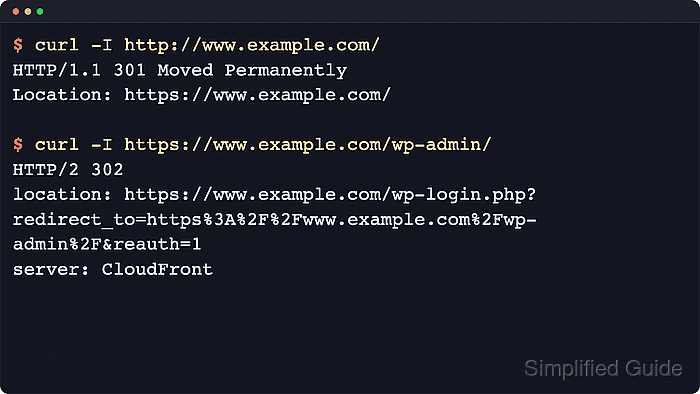
- Check the edge HTTP to HTTPS redirect.
$ curl -I http://www.example.com/
HTTP/1.1 301 Moved Permanently
Location: https://www.example.com/
Server: CloudFront
A redirect to the public HTTPS hostname proves the viewer protocol policy is handling the first browser hop at CloudFront.
- Check the WordPress admin redirect through CloudFront.
$ curl -I https://www.example.com/wp-admin/
HTTP/2 302
location: https://www.example.com/wp-login.php?redirect_to=https%3A%2F%2Fwww.example.com%2Fwp-admin%2F&reauth=1
server: CloudFront
A redirect back to http://, to the origin hostname, or to a mixed-scheme wp-admin URL means the public URL, forwarded Host header, or trusted scheme mapping is still misaligned.

Mohd Shakir Zakaria is a cloud architect with deep roots in software development and open-source advocacy. Certified in AWS, Red Hat, VMware, ITIL, and Linux, he specializes in designing and managing robust cloud and on-premises infrastructures.


