How to test a Snort rule
Snort rules need parser validation and packet evidence before they belong in a live detection policy. A rule can load without syntax errors and still miss traffic because the packet direction, variables, buffers, service binding, or checksum handling does not match the traffic being inspected.
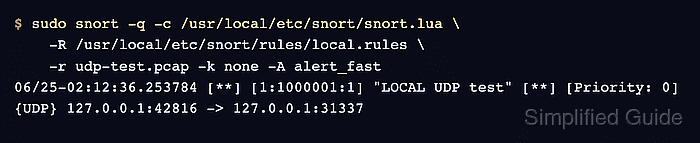
Snort 3 can test a local rule file against the active Lua configuration with -T before any packets are processed. The same rule file can then be passed with -R while -r reads a saved pcap and alert_fast prints the matching alert line.
A local UDP content rule and a loopback pcap provide a controlled target without sending test traffic onto a shared network. Keep -k none limited to loopback or lab captures that contain checksum metadata; captures from real interfaces should use the checksum behavior expected by the sensor.
Related: How to run Snort against a packet capture
Related: How to test Snort with pcap replay
Steps to test a Snort rule:
- Create a rules directory for the test file.
$ sudo install -d -m 0755 /usr/local/etc/snort/rules
- Add the rule under test to a local rules file.
alert udp any any -> any 31337 (msg:"LOCAL UDP test"; content:"SNORTTEST"; sid:1000001; rev:1;)
Use a private sid at or above 1000000 for local tests and increment rev when the detection logic changes.
Related: How to create a local Snort rule - Validate the rule against the active Snort configuration.
$ sudo snort -c /usr/local/etc/snort/snort.lua \
    -R /usr/local/etc/snort/rules/local.rules -T
--------------------------------------------------
o")~   Snort++ 3.12.2.0
--------------------------------------------------
Loading /usr/local/etc/snort/snort.lua:
##### snipped #####
Loading rule args:
Loading /usr/local/etc/snort/rules/local.rules:
Finished /usr/local/etc/snort/rules/local.rules:
##### snipped #####
rule counts
       total rules loaded: 220
               text rules: 220
            option chains: 220
            chain headers: 2
##### snipped #####
pcap DAQ configured to passive.

Snort successfully validated the configuration (with 0 warnings).
o")~   Snort exiting
-T proves that the configuration and rule compile. It does not prove that a packet can match the rule.
Related: How to test Snort configuration - Capture one UDP packet for the test port.
$ sudo tcpdump -i lo -w udp-test.pcap -c 1 'udp and port 31337'
tcpdump: listening on lo, link-type EN10MB (Ethernet), snapshot length 262144 bytes
1 packet captured
2 packets received by filter
0 packets dropped by kernel
Leave the capture running in one terminal, then send the matching payload from another terminal.
- Send the matching payload from another terminal.
$ printf 'SNORTTEST\n' | nc -u -w1 127.0.0.1 31337
- Confirm that the pcap contains the expected payload.
$ tcpdump -nn -XX -r udp-test.pcap
reading from file udp-test.pcap, link-type EN10MB (Ethernet), snapshot length 262144
02:12:36.253784 IP 127.0.0.1.42816 > 127.0.0.1.31337: UDP, length 10
	0x0000:  0000 0000 0000 0000 0000 0000 0800 4500  ..............E.
	0x0010:  0026 1398 4000 4011 292d 7f00 0001 7f00  .&..@.@.)-......
	0x0020:  0001 a740 7a69 0012 fe25 534e 4f52 5454  ...@zi...%SNORTT
	0x0030:  4553 540a                                EST.
- Replay the pcap through Snort and check for the expected alert.
$ sudo snort -q -c /usr/local/etc/snort/snort.lua \
    -R /usr/local/etc/snort/rules/local.rules \
    -r udp-test.pcap -k none -A alert_fast
06/25-02:12:36.253784 [**] [1:1000001:1] "LOCAL UDP test" [**] [Priority: 0] {UDP} 127.0.0.1:42816 -> 127.0.0.1:31337
-r selects pcap readback. Use -k none only for loopback or lab captures with checksum metadata; if the syntax test passes but no alert appears, review rule direction, HOME_NET, content placement, and service binding.
- Run Snort without quiet mode to confirm packet and detection counters.
$ sudo snort -c /usr/local/etc/snort/snort.lua \
    -R /usr/local/etc/snort/rules/local.rules \
    -r udp-test.pcap -k none -A alert_fast
##### snipped #####
pcap DAQ configured to read-file.
Commencing packet processing
++ [0] udp-test.pcap
06/25-02:12:36.253784 [**] [1:1000001:1] "LOCAL UDP test" [**] [Priority: 0] {UDP} 127.0.0.1:42816 -> 127.0.0.1:31337
-- [0] udp-test.pcap
--------------------------------------------------
Packet Statistics
--------------------------------------------------
daq
                    pcaps: 1
                 received: 1
                 analyzed: 1
                    allow: 1
                 rx_bytes: 52
##### snipped #####
detection
                 analyzed: 1
             raw_searches: 1
             pkt_searches: 1
                   alerts: 1
             total_alerts: 1
                   logged: 1
--------------------------------------------------
ips_actions
                    alert: 1
##### snipped #####
o")~   Snort exiting
The received and analyzed counters should be 1, and alerts plus logged should also be 1.
Related: How to read Snort run statistics - Remove the temporary pcap after recording the test evidence.
$ rm -f udp-test.pcap