A Snort sensor can validate its rules and still miss packets when the monitored interface, tap, or replay path is wrong. Pcap replay sends known traffic across the live capture interface so packet acquisition, DAQ selection, rule matching, and alert logging are tested together.
A separate replay host or separate test interface keeps tcpreplay traffic distinct while Snort listens on the sensor interface. A small pcap that should trigger one known local rule is enough for the first pass, and a low replay rate keeps the result easy to inspect.
Direct pcap readback with snort -r belongs to rule-only tests. Replay is the better check when the interface name, cabling, SPAN or TAP feed, capture filter, checksum handling, or alert-log path is part of the change.
Steps to test Snort with pcap replay:
- Install tcpreplay on the replay host.
$ sudo apt install tcpreplay
- List the replay host interfaces.
$ sudo tcpreplay --listnics
Available network interfaces:
eth0
any
##### snipped #####
Choose the interface connected to the sensor test link. The eth0 examples below assume the replay host and sensor each use eth0 for that link.
- Validate the Snort configuration and local rule file on the sensor.
$ sudo snort -c /usr/local/etc/snort/snort.lua \
    -R /usr/local/etc/snort/rules/local.rules -T
Loading /usr/local/etc/snort/snort.lua:
##### snipped #####
Snort successfully validated the configuration (with 0 warnings).
o")~   Snort exiting
Related: How to test Snort configuration
- Create the Snort log directory for saved replay evidence.
$ sudo install -d -m 0755 -o root -g root /var/log/snort
- Start a finite live Snort test on the sensor interface.
$ sudo snort -c /usr/local/etc/snort/snort.lua \
    -R /usr/local/etc/snort/rules/local.rules \
    -i eth0 --bpf 'udp and port 31337' \
    -n 1 -k none -A alert_fast \
    --lua 'alert_fast = { file = true }' \
    -l /var/log/snort
Replace eth0 and the BPF filter with the sensor interface and traffic selector that match the pcap. Remove -n 1 after the replay path is proven. alert_fast.file writes events to /var/log/snort/alert_fast.txt.
Related: How to monitor a live interface with Snort - Replay the pcap from the replay host at a controlled rate.
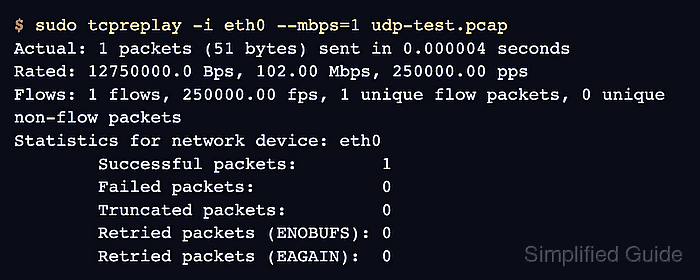
$ sudo tcpreplay -i eth0 --mbps=1 udp-test.pcap
Actual: 1 packets (51 bytes) sent in 0.000004 seconds
Rated: 12750000.0 Bps, 102.00 Mbps, 250000.00 pps
Flows: 1 flows, 250000.00 fps, 1 unique flow packets, 0 unique non-flow packets
Statistics for network device: eth0
        Successful packets:        1
        Failed packets:            0
        Truncated packets:         0
        Retried packets (ENOBUFS): 0
        Retried packets (EAGAIN):  0
Do not replay exploit pcaps or high-volume captures onto shared networks without authorization, isolation, and rate limits.
- Read the fast alert log on the sensor.
$ sudo cat /var/log/snort/alert_fast.txt
06/25-02:10:23.000000 [**] [1:1000004:1] "LOCAL replay UDP test" [**] [Priority: 0] {UDP} 192.0.2.10:40000 -> 192.0.2.20:31337
The Snort terminal should also show received and analyzed packet counters after the finite run exits. Use those counters when tcpreplay reports sent packets but the alert file stays empty.
Related: How to view Snort alert logs
Related: How to read Snort run statistics - Run direct pcap readback only when the rule must be separated from the live replay path.
$ sudo snort -q -c /usr/local/etc/snort/snort.lua \
    -R /usr/local/etc/snort/rules/local.rules \
    -r udp-test.pcap -k none -A alert_fast
06/25-02:10:23.000000 [**] [1:1000004:1] "LOCAL replay UDP test" [**] [Priority: 0] {UDP} 192.0.2.10:40000 -> 192.0.2.20:31337
If readback alerts but live replay does not, inspect the replay interface, sensor interface, SPAN or TAP path, capture filter, and link direction before changing the rule.
Related: How to run Snort against a packet capture

Mohd Shakir Zakaria is a cloud architect with deep roots in software development and open-source advocacy. Certified in AWS, Red Hat, VMware, ITIL, and Linux, he specializes in designing and managing robust cloud and on-premises infrastructures.


