How to create a Scrapy spider
Creating a Scrapy spider turns a project from shared settings into a crawler that can request pages, parse responses, and export items under one reusable spider name. That is the point where selector tests become a repeatable crawl that can be run again with scrapy crawl.
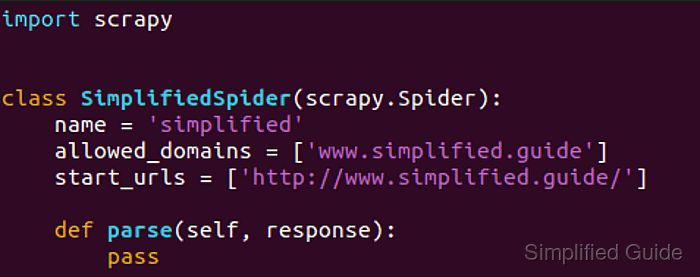
Inside a project, scrapy genspider writes a new spider class into the module named by NEWSPIDER_MODULE and seeds the file with name, allowed_domains, start_urls, and an empty parse() callback. Running it from the directory that contains scrapy.cfg keeps the new spider under the same settings, middleware, export defaults, and throttling rules as the rest of the project.
The spider name must stay unique inside the project, and the generated file is only a starting point until parse() yields items or follow-up requests. Current project templates still enable ROBOTSTXT_OBEY = True, so the first crawl may request /robots.txt before the target page and skip paths that the site disallows.
Related: How to create a Scrapy project
Related: How to run a standalone spider file in Scrapy
Steps to create a Scrapy spider with scrapy genspider:
- Change to the Scrapy project root that contains scrapy.cfg.
$ cd /home/user/quotesbot
If the project does not exist yet, create it first. Related: How to create a Scrapy project
- Read the configured spider module path so the new file lands in the expected package.
$ scrapy settings --get NEWSPIDER_MODULE
quotesbot.spiders
scrapy genspider writes the spider class into this module when the command runs from the project root.
- Generate the spider scaffold with a unique name and the first target URL.
$ scrapy genspider quotes https://quotes.toscrape.com/
Created spider 'quotes' using template 'basic' in module:
  quotesbot.spiders.quotes
scrapy genspider accepts either a bare domain or a full URL. Use -t crawl only when the new spider should start as a CrawlSpider template instead of the default basic spider.
- List the project spiders to confirm that Scrapy registered the new spider name.
$ scrapy list
quotes
- Edit the generated spider file so the parse() callback yields the fields that matter for the target page.
$ vi quotesbot/spiders/quotes.py
import scrapy


class QuotesSpider(scrapy.Spider):
    name = "quotes"
    allowed_domains = ["quotes.toscrape.com"]
    start_urls = ["https://quotes.toscrape.com/"]

    def parse(self, response):
        for quote in response.css("div.quote"):
            yield {
                "text": quote.css("span.text::text").get(),
                "author": quote.css("small.author::text").get(),
                "tags": quote.css("div.tags a.tag::text").getall(),
            }
Keep start_urls when one fixed seed is enough. Switch to async def start() when the first requests must be built dynamically at crawl time. Related: How to use Scrapy shell
Related: How to use CSS selectors in Scrapy - Run the spider and overwrite the current JSON Lines export.
$ scrapy crawl quotes -O quotes.jsonl
2026-04-22 11:08:05 [scrapy.utils.log] INFO: Scrapy 2.15.0 started (bot: quotesbot)
##### snipped #####
2026-04-22 11:08:06 [scrapy.core.engine] DEBUG: Crawled (404) <GET https://quotes.toscrape.com/robots.txt> (referer: None)
2026-04-22 11:08:07 [scrapy.core.engine] DEBUG: Crawled (200) <GET https://quotes.toscrape.com/> (referer: None)
2026-04-22 11:08:07 [scrapy.extensions.feedexport] INFO: Stored jsonl feed (10 items) in: quotes.jsonl
2026-04-22 11:08:07 [scrapy.core.engine] INFO: Spider closed (finished)
-O replaces any existing quotes.jsonl file, and the first crawl can still request /robots.txt because generated projects keep ROBOTSTXT_OBEY enabled.
- Read the saved feed to confirm that the spider yielded the expected items.
$ cat quotes.jsonl
{"text": "“The world as we have created it is a process of our thinking. It cannot be changed without changing our thinking.”", "author": "Albert Einstein", "tags": ["change", "deep-thoughts", "thinking", "world"]}
{"text": "“It is our choices, Harry, that show what we truly are, far more than our abilities.”", "author": "J.K. Rowling", "tags": ["abilities", "choices"]}
{"text": "“There are only two ways to live your life. One is as though nothing is a miracle. The other is as though everything is a miracle.”", "author": "Albert Einstein", "tags": ["inspirational", "life", "live", "miracle", "miracles"]}
##### snipped #####
Each line in a .jsonl export is one JSON object. Use -o quotes.jsonl instead when repeated runs should append to the existing file. Related: How to export a feed as JSON Lines in Scrapy