Scrapy shell opens one response in an interactive Python session, which makes it the quickest place to test selectors, link handling, and follow-up requests before that logic is copied into a spider callback. It reduces guesswork by showing exactly what the scraper received for one URL.
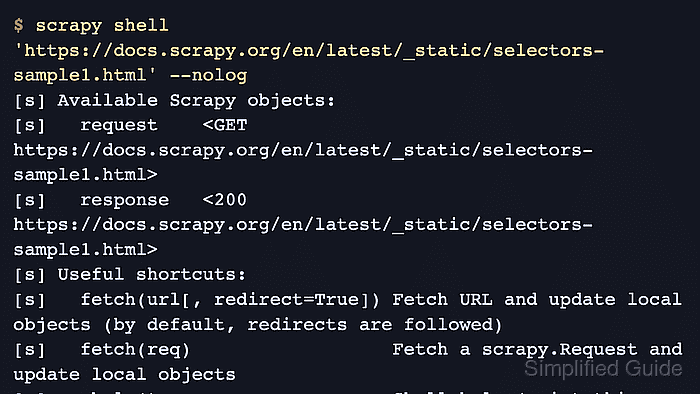
The scrapy shell command sends the request through Scrapy's downloader and preloads objects such as response, request, settings, and spider. That makes it practical to try response.css(), response.xpath(), response.urljoin(), and fetch() against the same response object a callback would handle.
When the shell starts inside a project it reuses that project's settings, so middleware, cookies, headers, throttling, and proxy rules can change what appears in response. Quote URLs on the command line when they contain &, use explicit local paths such as ./page.html or ../page.html for saved files, and remember that JavaScript-heavy pages can still look empty because the shell sees the downloaded response body rather than a browser-rendered DOM.
Steps to use Scrapy shell:
- Open Scrapy shell against a stable sample page and suppress crawler log noise while testing selectors.
$ scrapy shell 'https://docs.scrapy.org/en/latest/_static/selectors-sample1.html' --nolog
[s] Available Scrapy objects:
[s]   request    <GET https://docs.scrapy.org/en/latest/_static/selectors-sample1.html>
[s]   response   <200 https://docs.scrapy.org/en/latest/_static/selectors-sample1.html>
[s] Useful shortcuts:
[s]   fetch(url[, redirect=True]) Fetch URL and update local objects (by default, redirects are followed)
##### snipped #####
>>>
Start from the project directory when the request should reuse that project's settings, and keep the URL in quotes when it contains query arguments.
- Confirm the preloaded response contains the expected page title before building selectors around it.
>>> response.css("title::text").get()
'Example website'
The prompt can appear as >>> or as an IPython-style prompt if IPython is installed.
- Extract repeated link targets with a CSS selector.
>>> response.css("a::attr(href)").getall()
['image1.html', 'image2.html', 'image3.html', 'image4.html', 'image5.html']
Scrapy adds the non-standard ::text and ::attr(name) pseudo-elements, so those selectors work here even though they are not part of normal browser CSS.
- Resolve a relative link to an absolute URL before reusing it in an item or another request.
>>> response.urljoin("image1.html")
'http://example.com/image1.html'
Related: How to create a Scrapy spider
Tool: URL Parser - Cross-check the same response with XPath when the selector depends on document structure rather than CSS matching.
>>> response.xpath('//a[contains(@href, "image")]/img/@src').getall()
['image1_thumb.jpg', 'image2_thumb.jpg', 'image3_thumb.jpg', 'image4_thumb.jpg', 'image5_thumb.jpg']
Related: How to use XPath selectors in Scrapy
- Fetch another page and confirm that response has been replaced with the new response.
>>> fetch("https://docs.scrapy.org/en/latest/topics/selectors.html")
>>> response.url
'https://docs.scrapy.org/en/latest/topics/selectors.html'
fetch() sends a real request and follows redirects by default, so use fetch(url, redirect=False) or start the shell with –no-redirect when the redirect target itself needs to be inspected.

Mohd Shakir Zakaria is a cloud architect with deep roots in software development and open-source advocacy. Certified in AWS, Red Hat, VMware, ITIL, and Linux, he specializes in designing and managing robust cloud and on-premises infrastructures.


