How to increase the PHP file upload limit
Large uploads can fail before the application code ever handles the request, which breaks media libraries, backup restores, plugin installers, and bulk imports that depend on normal multipart form submissions. Raising the effective PHP upload limit lets the application accept the larger request instead of rejecting it at the runtime boundary.
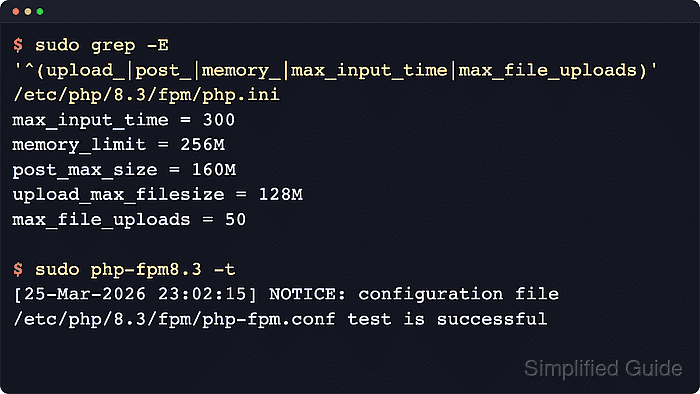
The main pair is upload_max_filesize for each file and post_max_size for the full request body. The PHP manual notes that post_max_size must stay larger than upload_max_filesize, and memory_limit should generally stay larger than post_max_size. When the body exceeds post_max_size, $_POST and $_FILES arrive empty instead of containing the submitted upload data.
The example flow uses packaged PHP-FPM on Ubuntu or Debian because that layout is common, but the same limit chain applies elsewhere once the active web-facing runtime is identified. A PHP-FPM pool override, per-directory .user.ini file, Apache php_value override, or smaller request-body limit in Apache, Nginx, or a reverse proxy can still win over the base php.ini, so the final check must come through the same URL path that handles uploads.
Related: How to limit request body size in Apache
Related: How to limit request sizes in Nginx
Tool: Nginx Server Block Generator
Steps to increase the PHP file upload limit:
- Create a temporary diagnostic script in the same site path that handles uploads.
$ sudo tee /var/www/app.example.test/public/upload-check.php >/dev/null <<'PHP'
<?php
header('Content-Type: text/plain');

printf("SAPI=%s\n", PHP_SAPI);
printf("Loaded php.ini=%s\n", php_ini_loaded_file() ?: 'none');
printf("upload_max_filesize=%s\n", ini_get('upload_max_filesize'));
printf("post_max_size=%s\n", ini_get('post_max_size'));
printf("memory_limit=%s\n", ini_get('memory_limit'));
printf("max_input_time=%s\n", ini_get('max_input_time'));
printf("max_file_uploads=%s\n", ini_get('max_file_uploads'));

if ($_SERVER['REQUEST_METHOD'] === 'POST') {
    $file = $_FILES['upload'] ?? null;
    if (!$file) {
        echo "upload_status=missing\n";
    } elseif ($file['error'] !== UPLOAD_ERR_OK) {
        printf("upload_error=%d\n", $file['error']);
    } else {
        printf("upload_error=0\n");
        printf("upload_name=%s\n", $file['name']);
        printf("upload_size=%d\n", $file['size']);
    }
}
PHP
Keep the diagnostic file temporary because it exposes runtime configuration details to anyone who can reach the URL.
- Request the diagnostic script through the same site, virtual host, or pool that handles uploads.
$ curl -sS https://app.example.test/upload-check.php
SAPI=fpm-fcgi
Loaded php.ini=/etc/php/8.5/fpm/php.ini
upload_max_filesize=2M
post_max_size=8M
memory_limit=128M
max_input_time=60
max_file_uploads=20
If the response shows apache2handler, inspect Apache overrides before changing the global php.ini. If it shows fpm-fcgi, inspect the matching PHP-FPM pool and any nearby .user.ini files before assuming the main file is the last active layer.
Related: How to find PHP configuration files
- Search PHP-FPM pool files for upload-related overrides when the diagnostic request reports fpm-fcgi.
$ sudo grep -R "upload_max_filesize\|post_max_size\|memory_limit\|max_input_time\|max_file_uploads" /etc/php/8.5/fpm/pool.d
No output means the pool files are not currently overriding these directives. If the command returns a matching line, change that pool file instead because the pool value wins for requests handled by that pool. On many RHEL-family packages, search /etc/php-fpm.d instead.
Related: How to find PHP configuration files
- Search Apache configuration for upload-related overrides when the diagnostic request reports apache2handler.
$ sudo grep -R "php_value\|php_admin_value" /etc/apache2
Change the matching virtual host or directory context instead of the global php.ini when this command returns an active override for upload_max_filesize, post_max_size, memory_limit, max_input_time, or max_file_uploads. On many RHEL-family packages, search /etc/httpd instead.
- Search the application tree for per-directory .user.ini files when the site runs through CGI or FastCGI.
$ find /var/www/app.example.test -name .user.ini -print
/var/www/app.example.test/public/.user.ini
The default per-directory filename is .user.ini, and PHP re-reads it on the default user_ini.cache_ttl interval of 300 seconds instead of on every request. Apache mod_php ignores this file.
- Back up the file that currently controls the effective upload limit.
$ sudo cp /etc/php/8.5/fpm/php.ini /etc/php/8.5/fpm/php.ini.bak-$(date +%Y%m%d%H%M%S)
Back up the discovered pool file or the existing .user.ini file instead when an earlier step shows that layer is setting the live value.
A timestamped backup shortens rollback time if a malformed edit prevents new PHP-FPM workers from loading.
- Open the file that controls the effective limit in a text editor.
$ sudoedit /etc/php/8.5/fpm/php.ini
Open the discovered PHP-FPM pool file or .user.ini file instead when an earlier step shows that layer owns the active value.
Related: How to find PHP configuration files
- Set the per-file and full-request limits high enough for the largest legitimate upload.
; php.ini or .user.ini
upload_max_filesize = 128M
post_max_size = 160M

; PHP-FPM pool file
php_value[upload_max_filesize] = 128M
php_value[post_max_size] = 160M
post_max_size must stay larger than upload_max_filesize so the full multipart request can reach PHP.
Use php_admin_value[] only when the pool should prevent a lower layer from changing the value. These directives are INI_PERDIR, so raising them with ini_set() inside the application does not lift the upload ceiling for the current request.
- Increase memory_limit only when the application must parse, unpack, or transform the larger upload after it arrives.
memory_limit = 256M
The PHP manual recommends keeping memory_limit larger than post_max_size. Image processing, archive extraction, and large import jobs often need more headroom than the upload size alone suggests.
Related: How to increase PHP memory limit
- Increase max_input_time only when large or slow uploads time out while PHP is still receiving the request body.
max_input_time = 300
max_input_time covers input parsing and file uploads. max_execution_time applies after script execution begins.
- Raise max_file_uploads only when one submission legitimately carries many files.
max_file_uploads = 50
PHP counts only populated upload fields toward this limit, so blank upload inputs do not consume the quota.
- Test the PHP-FPM configuration before reloading the service when the change lives in php.ini or a PHP-FPM pool file.
$ sudo php-fpm8.5 -t
NOTICE: configuration file /etc/php/8.5/fpm/php-fpm.conf test is successful
Use the matching binary name on the host, such as php-fpm or php-fpm8.4. Skip this syntax test when the only change lives in .user.ini or an Apache override.
Do not reload the runtime until the configuration test succeeds.
- Reload the runtime that serves the application, or wait for the .user.ini cache interval when that is the only layer that changed.
$ sudo systemctl reload php8.5-fpm
Use the versioned unit that matches the host package, or php-fpm on systems that ship the unversioned service. Reload Apache instead when PHP runs as an Apache module, and wait for user_ini.cache_ttl when only .user.ini changed.
- Request the same diagnostic script again and confirm the higher live values from the web-facing runtime.
$ curl -sS https://app.example.test/upload-check.php
SAPI=fpm-fcgi
Loaded php.ini=/etc/php/8.5/fpm/php.ini
upload_max_filesize=128M
post_max_size=160M
memory_limit=256M
max_input_time=300
max_file_uploads=50
If smaller values still appear, check for a later PHP-FPM pool override, a nearer .user.ini file, an Apache php_value or php_admin_value override, or a smaller request-body limit in Apache, Nginx, or the reverse proxy.
Related: How to find PHP configuration files
- Create a temporary file larger than the old limit but smaller than the new limit.
$ truncate -s 32M /tmp/upload-smoke.bin
Use a test size that proves the new limit without stressing the application, disk, or network path.
- Post the temporary file through the diagnostic script and confirm upload_error=0.
$ curl -sS -F 'upload=@/tmp/upload-smoke.bin' https://app.example.test/upload-check.php
SAPI=fpm-fcgi
Loaded php.ini=/etc/php/8.5/fpm/php.ini
upload_max_filesize=128M
post_max_size=160M
memory_limit=256M
max_input_time=300
max_file_uploads=50
upload_error=0
upload_name=upload-smoke.bin
upload_size=33554432
If the response is an HTTP 413 before PHP output appears, raise the request-body limit in Nginx, Apache, a load balancer, or another reverse proxy. If upload_status=missing or upload_error=1 appears, recheck post_max_size and upload_max_filesize in the active PHP layer.
- Remove the temporary upload test file.
$ rm /tmp/upload-smoke.bin
- Remove the temporary diagnostic script after the check.
$ sudo rm /var/www/app.example.test/public/upload-check.php
Leaving the file reachable keeps the active SAPI, loaded configuration path, and runtime limits exposed to anyone who can request the URL.