How to configure Nginx reverse proxy for Open WebUI
An Open WebUI instance that starts on a private port still needs a public edge when users access it through a real hostname. Nginx can terminate HTTPS, keep the backend port off the public interface, and pass the request details that Open WebUI needs for logins, callbacks, chat streaming, and browser sessions.
Open WebUI traffic is more than a static web page. The browser loads the app, calls backend API routes, keeps realtime channels open, and streams model responses. The proxy block therefore needs HTTP/1.1 upstream proxying, WebSocket upgrade headers, long read timeouts, forwarded scheme and host headers, and disabled proxy buffering for streaming responses.
Start with an Open WebUI backend that already answers from the Nginx host and a certificate for the public hostname. Replace the example hostname, certificate path, and backend address with values from your deployment, then verify both the raw backend and the public HTTPS route before testing a chat response in the browser.
Steps to configure Nginx reverse proxy for Open WebUI:
- Confirm that the Open WebUI backend answers from the Nginx host.
$ curl -i --silent --show-error http://127.0.0.1:3000/health
HTTP/1.1 200 OK
server: uvicorn
content-type: application/json
content-length: 15
x-process-time: 0

{"status":true}
Use the backend address that Nginx can reach. For a host-level Nginx service in front of a Docker container published as 3000:8080, http://127.0.0.1:3000 is typical. For Nginx running as another container on the same network, use a service name such as http://open-webui:8080.
Related: How to run Open WebUI with Docker
- Set the public HTTPS origin in the Open WebUI runtime environment.
WEBUI_URL=https://openwebui.example.com
CORS_ALLOW_ORIGIN=https://openwebui.example.com
WEBUI_SESSION_COOKIE_SECURE=true
CORS_ALLOW_ORIGIN must match every origin users actually use. Separate multiple origins with semicolons only when users legitimately reach the same instance through more than one public URL.
- Open a new Nginx configuration file for the public hostname.
$ sudoedit /etc/nginx/conf.d/openwebui.example.com.conf
On systems that use /etc/nginx/sites-available and /etc/nginx/sites-enabled, save the same block as a site file and enable it according to the local packaging pattern.
- Add the Open WebUI reverse proxy server block.
map $http_upgrade $connection_upgrade {
    default upgrade;
    '' close;
}

upstream openwebui_backend {
    server 127.0.0.1:3000;
    keepalive 64;
}

server {
    listen 80;
    server_name openwebui.example.com;

    return 301 https://$host$request_uri;
}

server {
    listen 443 ssl;
    server_name openwebui.example.com;

    ssl_certificate /etc/letsencrypt/live/openwebui.example.com/fullchain.pem;
    ssl_certificate_key /etc/letsencrypt/live/openwebui.example.com/privkey.pem;
    ssl_protocols TLSv1.2 TLSv1.3;

    client_max_body_size 100M;
    proxy_buffer_size 128k;
    proxy_buffers 4 256k;
    proxy_busy_buffers_size 256k;
    large_client_header_buffers 4 32k;

    location / {
        proxy_pass http://openwebui_backend;
        proxy_http_version 1.1;
        proxy_set_header Upgrade $http_upgrade;
        proxy_set_header Connection $connection_upgrade;
        proxy_set_header Host $host;
        proxy_set_header X-Forwarded-Host $host;
        proxy_set_header X-Real-IP $remote_addr;
        proxy_set_header X-Forwarded-For $proxy_add_x_forwarded_for;
        proxy_set_header X-Forwarded-Proto $scheme;

        proxy_read_timeout 1800s;
        proxy_send_timeout 1800s;
        proxy_connect_timeout 60s;
        proxy_buffering off;
        proxy_request_buffering off;
        proxy_cache off;
        add_header X-Accel-Buffering "no" always;
    }
}
The map block belongs in the http context. Files under /etc/nginx/conf.d/ are normally included there by packaged Nginx builds.
If browser-facing HTTP/2 is enabled, keep proxy_http_version 1.1 for the upstream connection so WebSocket upgrades and streaming routes do not depend on backend HTTP/2 support.
Review changed proxy headers and streaming directives before deployment.
Tool: NGINX Proxy Headers Checker - Test the Nginx configuration.
$ sudo nginx -t
nginx: the configuration file /etc/nginx/nginx.conf syntax is ok
nginx: configuration file /etc/nginx/nginx.conf test is successful
Related: How to test Nginx configuration
- Reload Nginx to apply the validated proxy block.
$ sudo systemctl reload nginx
Use sudo nginx -s reload when Nginx is running in a container or another environment without systemd.
Related: How to manage the Nginx service - Request the Open WebUI health endpoint through the public HTTPS hostname.
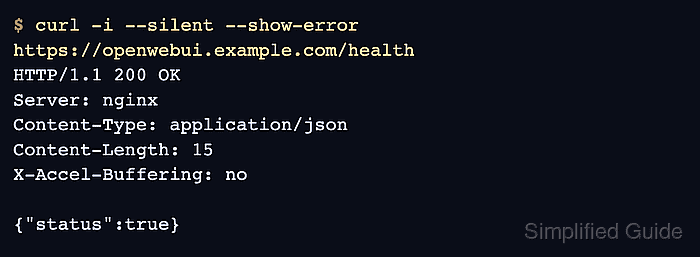
$ curl -i --silent --show-error https://openwebui.example.com/health
HTTP/1.1 200 OK
Server: nginx
Content-Type: application/json
Content-Length: 15
X-Accel-Buffering: no

{"status":true}
A 200 response with the Open WebUI health body proves the request reached the backend through Nginx. If the response is a default Nginx page, retest with the public hostname and check server_name matching.
- Sign in through the public HTTPS hostname and send one short chat prompt.
The reply should stream without broken markdown, stalled tokens, browser console CORS errors, or WebSocket connection failures. If the login page works but streaming fails, recheck CORS_ALLOW_ORIGIN, Upgrade and Connection forwarding, proxy_buffering off, and the backend address that Nginx uses.