How to configure TLS ciphers in Nginx
TLS scanner findings against Nginx often come from old protocol versions or weak cipher strings left in an HTTPS server block. Setting one active cipher policy keeps new handshakes on TLSv1.2 and TLSv1.3 suites that match the site certificate and the OpenSSL library used by Nginx.
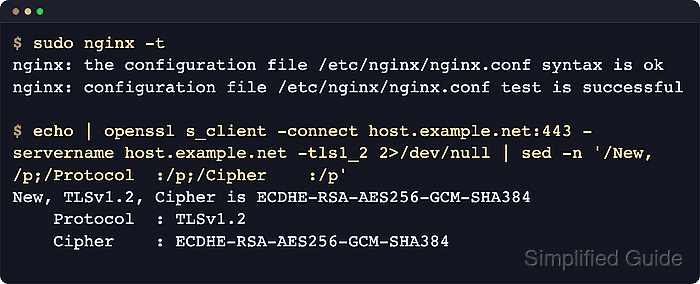
Nginx handles TLSv1.2 and TLSv1.3 cipher selection through different paths. ssl_ciphers controls the OpenSSL cipher string for TLSv1.2 and older handshakes, while ssl_conf_command Ciphersuites … can set the TLSv1.3 ciphersuite list when the packaged build supports that OpenSSL command.
Examples below use packaged Nginx on Debian or Ubuntu, where the main file is /etc/nginx/nginx.conf and site blocks commonly live under /etc/nginx/sites-available/. Start with the assembled output from nginx -T so existing http-level directives are updated instead of duplicated; success is a passing syntax test, a reload that leaves nginx active, and openssl s_client handshakes that negotiate only the intended protocols and ciphers.
Related: How to improve Nginx security
Related: How to enable OCSP stapling in Nginx
Tool: TLS Handshake Trace
Steps to configure TLS ciphers in Nginx:
- Inspect the loaded HTTPS configuration and note any existing TLS directives before editing.
$ sudo nginx -T
nginx: the configuration file /etc/nginx/nginx.conf syntax is ok
nginx: configuration file /etc/nginx/nginx.conf test is successful
# configuration file /etc/nginx/nginx.conf:
##### snipped #####
    ssl_protocols TLSv1.2 TLSv1.3;
    ssl_prefer_server_ciphers off;
##### snipped #####
# configuration file /etc/nginx/sites-enabled/host.example.net.conf:
server {
    listen 443 ssl;
    server_name host.example.net;
##### snipped #####
}
Do not add a second ssl_protocols or ssl_prefer_server_ciphers line in the same http or server block. Update the existing directive or keep the policy at one configuration level only.
- List the TLSv1.2 cipher names supported by the local OpenSSL library so the configured string uses valid suite names.
$ openssl ciphers -s -v -tls1_2 'ECDHE-ECDSA-AES256-GCM-SHA384:ECDHE-RSA-AES256-GCM-SHA384:ECDHE-ECDSA-CHACHA20-POLY1305:ECDHE-RSA-CHACHA20-POLY1305:ECDHE-ECDSA-AES128-GCM-SHA256:ECDHE-RSA-AES128-GCM-SHA256'
ECDHE-ECDSA-AES256-GCM-SHA384  TLSv1.2 Kx=ECDH     Au=ECDSA Enc=AESGCM(256)            Mac=AEAD
ECDHE-RSA-AES256-GCM-SHA384    TLSv1.2 Kx=ECDH     Au=RSA   Enc=AESGCM(256)            Mac=AEAD
ECDHE-ECDSA-CHACHA20-POLY1305  TLSv1.2 Kx=ECDH     Au=ECDSA Enc=CHACHA20/POLY1305(256) Mac=AEAD
ECDHE-RSA-CHACHA20-POLY1305    TLSv1.2 Kx=ECDH     Au=RSA   Enc=CHACHA20/POLY1305(256) Mac=AEAD
ECDHE-ECDSA-AES128-GCM-SHA256  TLSv1.2 Kx=ECDH     Au=ECDSA Enc=AESGCM(128)            Mac=AEAD
ECDHE-RSA-AES128-GCM-SHA256    TLSv1.2 Kx=ECDH     Au=RSA   Enc=AESGCM(128)            Mac=AEAD
ssl_ciphers applies to TLSv1.2 and older. TLSv1.3 uses a separate ciphersuite list.
The negotiated TLSv1.2 suite must match the certificate type in use. An RSA certificate will negotiate the ECDHE-RSA-… entries, not the ECDHE-ECDSA-… entries.
- Open the active HTTPS server block file.
$ sudoedit /etc/nginx/sites-available/host.example.net.conf
When the same TLS policy must apply to every HTTPS virtual host, place the directives once in the http context inside /etc/nginx/nginx.conf instead of repeating them in multiple server blocks.
- Set or update the protocol and cipher policy inside the active server block.
server {
    listen 443 ssl;
    server_name host.example.net;

    ssl_certificate /etc/nginx/ssl/host.example.net.crt;
    ssl_certificate_key /etc/nginx/ssl/host.example.net.key;

    ssl_protocols TLSv1.2 TLSv1.3;
    ssl_prefer_server_ciphers on;
    ssl_ciphers ECDHE-ECDSA-AES256-GCM-SHA384:ECDHE-RSA-AES256-GCM-SHA384:ECDHE-ECDSA-CHACHA20-POLY1305:ECDHE-RSA-CHACHA20-POLY1305:ECDHE-ECDSA-AES128-GCM-SHA256:ECDHE-RSA-AES128-GCM-SHA256;
    ssl_conf_command Ciphersuites TLS_AES_256_GCM_SHA384:TLS_CHACHA20_POLY1305_SHA256:TLS_AES_128_GCM_SHA256;
}
ssl_prefer_server_ciphers affects pre-TLSv1.3 negotiation. TLSv1.3 uses the Ciphersuites list passed through ssl_conf_command, when that directive and OpenSSL command are available.
The default ssl_ecdh_curve auto is usually enough unless a policy or certificate curve requirement says otherwise.
If nginx -t reports an unknown ssl_conf_command or rejects the Ciphersuites command, remove that line and keep the library default TLSv1.3 suites instead of forcing an unsupported OpenSSL path.
- Test the updated configuration before reloading Nginx.
$ sudo nginx -t
nginx: the configuration file /etc/nginx/nginx.conf syntax is ok
nginx: configuration file /etc/nginx/nginx.conf test is successful
Related: How to test Nginx configuration
- Reload Nginx so new connections use the updated cipher policy.
$ sudo systemctl reload nginx
Use sudo nginx -s reload on systems where systemd is not managing the service.
Related: How to manage the Nginx service
- Confirm the service stayed active after the reload.
$ sudo systemctl is-active nginx
active
If the unit reports anything other than active, inspect sudo journalctl --unit=nginx.service --no-pager --lines=20 before retrying the reload.
Related: How to manage the Nginx service
- Confirm that the assembled configuration now contains the intended TLS directives.
$ sudo nginx -T
nginx: the configuration file /etc/nginx/nginx.conf syntax is ok
nginx: configuration file /etc/nginx/nginx.conf test is successful
##### snipped #####
# configuration file /etc/nginx/sites-enabled/host.example.net.conf:
server {
    listen 443 ssl;
    server_name host.example.net;

    ssl_certificate /etc/nginx/ssl/host.example.net.crt;
    ssl_certificate_key /etc/nginx/ssl/host.example.net.key;
    ssl_protocols TLSv1.2 TLSv1.3;
    ssl_prefer_server_ciphers on;
    ssl_ciphers ECDHE-ECDSA-AES256-GCM-SHA384:ECDHE-RSA-AES256-GCM-SHA384:ECDHE-ECDSA-CHACHA20-POLY1305:ECDHE-RSA-CHACHA20-POLY1305:ECDHE-ECDSA-AES128-GCM-SHA256:ECDHE-RSA-AES128-GCM-SHA256;
    ssl_conf_command Ciphersuites TLS_AES_256_GCM_SHA384:TLS_CHACHA20_POLY1305_SHA256:TLS_AES_128_GCM_SHA256;
##### snipped #####
nginx -T is useful when the active configuration is assembled through several include directives and symlinked site files.
- Confirm a TLSv1.2 handshake negotiates one of the configured TLSv1.2 suites.
$ openssl s_client -connect host.example.net:443 -servername host.example.net -tls1_2 -brief </dev/null
Connecting to 203.0.113.10
CONNECTION ESTABLISHED
Protocol version: TLSv1.2
Ciphersuite: ECDHE-RSA-AES256-GCM-SHA384
Peer certificate: CN=host.example.net
Hash used: SHA256
Signature type: rsa_pss_rsae_sha256
Verification: OK
##### snipped #####
DONE
With an RSA certificate, seeing an ECDHE-RSA-… suite is expected even when ECDHE-ECDSA-… appears earlier in the configured list. Internal or self-signed certificates may show a verification warning even when the negotiated protocol and cipher are correct.
- Confirm a TLSv1.3 handshake succeeds with an allowed TLSv1.3 ciphersuite.
$ openssl s_client -connect host.example.net:443 -servername host.example.net -tls1_3 -brief -ciphersuites 'TLS_AES_256_GCM_SHA384' </dev/null
Connecting to 203.0.113.10
CONNECTION ESTABLISHED
Protocol version: TLSv1.3
Ciphersuite: TLS_AES_256_GCM_SHA384
Peer certificate: CN=host.example.net
Hash used: SHA256
Signature type: rsa_pss_rsae_sha256
Verification: OK
##### snipped #####
DONE
TLSv1.3 ciphersuites use the standard TLS_AES_* and TLS_CHACHA20_* names exposed by the linked OpenSSL library.
- Confirm disabled legacy protocols no longer complete the handshake.
$ openssl s_client -connect host.example.net:443 -servername host.example.net -tls1_1 -brief -cipher 'DEFAULT:@SECLEVEL=0' </dev/null
Connecting to 203.0.113.10
E09C319AFFFF0000:error:0A00042E:SSL routines:ssl3_read_bytes:tlsv1 alert protocol version:../ssl/record/rec_layer_s3.c:918:SSL alert number 70
The temporary DEFAULT:@SECLEVEL=0 client cipher policy lets modern OpenSSL send a TLSv1.1 probe. Without it, the client may stop locally with no protocols available before testing the Nginx listener.
If a TLSv1.0 or TLSv1.1 test still negotiates a session, another server block, reverse proxy, or TLS terminator is likely answering the request instead of the updated Nginx block.