How to configure CORS headers in Nginx
Browser applications fail cross-origin API calls when the API response does not name the requesting origin in its CORS headers. Setting those headers at the Nginx edge lets the browser accept the response while keeping unrelated sites from reading data that should stay same-origin.
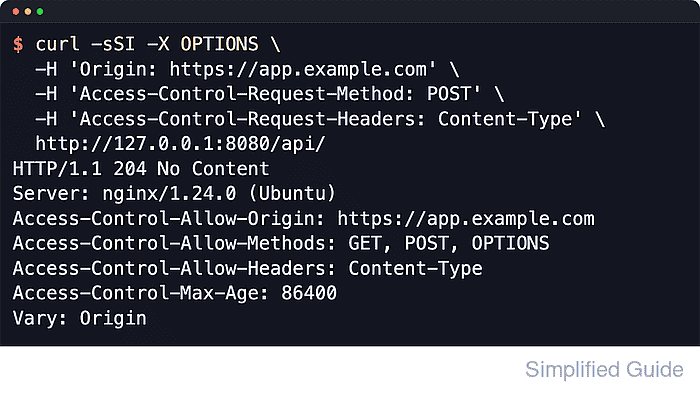
Browsers evaluate CORS with HTTP headers rather than a server-side switch. When a request includes an Origin header, Nginx can return headers such as Access-Control-Allow-Origin, and requests that use non-simple methods, JSON payloads, or custom headers commonly trigger a preflight OPTIONS request before the real request is sent.
Use an explicit origin when the response should be shared with one application rather than every site, add Vary: Origin so caches keep origin-specific responses separate, and return Access-Control-Allow-Credentials: true only when the browser must send cookies or HTTP authentication. Examples below use the common Linux layout with /etc/nginx/sites-available/default and the nginx systemd unit, but the same directives work in other packaged layouts.
Related: How to improve Nginx security
Related: How to add custom response headers in Nginx
Tool: CORS Policy Risk Checker
Steps to configure CORS headers in Nginx:
- Decide the exact allowed origin, methods, headers, and whether the browser must send credentials.
The origin must match scheme, host, and port, such as https://app.example.com or http://localhost:3000. If the browser must send cookies or HTTP authentication, use an explicit origin instead of *.
- Open the target Nginx virtual host or API configuration file in a text editor.
$ sudoedit /etc/nginx/sites-available/default
Common configuration locations include /etc/nginx/sites-available, /etc/nginx/conf.d/, and files included from /etc/nginx/nginx.conf depending on the distribution.
- Add the CORS headers in the API location block and return a no-content response for preflight requests.
location /api/ {
    add_header Access-Control-Allow-Origin "https://app.example.com" always;
    add_header Access-Control-Allow-Methods "GET, POST, OPTIONS" always;
    add_header Access-Control-Allow-Headers "Content-Type" always;
    add_header Access-Control-Max-Age "86400" always;
    add_header Vary "Origin" always;

    if ($request_method = OPTIONS) {
        return 204;
    }

    proxy_pass http://127.0.0.1:9000;
}
Add add_header Access-Control-Allow-Credentials "true" always; only when the browser must send cookies or HTTP authentication. Browsers reject that header when Access-Control-Allow-Origin is *.
If a child location or if-inside-location context defines any add_header directive, older Nginx builds stop inheriting the parent header set. Repeat the full CORS header set there, or use add_header_inherit merge; only on Nginx 1.29.3 or newer.
- Test the Nginx configuration for syntax errors.
$ sudo nginx -t
nginx: the configuration file /etc/nginx/nginx.conf syntax is ok
nginx: configuration file /etc/nginx/nginx.conf test is successful
Related: How to test Nginx configuration
- Reload Nginx to apply the changes.
$ sudo systemctl reload nginx
On non-systemd hosts, use sudo nginx -s reload to signal the running master process.
Related: How to manage the Nginx service
- Verify the preflight response returns the expected CORS headers.
$ curl -sSI -X OPTIONS \
  -H 'Origin: https://app.example.com' \
  -H 'Access-Control-Request-Method: POST' \
  -H 'Access-Control-Request-Headers: Content-Type' \
  http://127.0.0.1/api/
HTTP/1.1 204 No Content
Server: nginx/1.28.3 (Ubuntu)
Date: Sat, 06 Jun 2026 03:39:44 GMT
Connection: keep-alive
Access-Control-Allow-Origin: https://app.example.com
Access-Control-Allow-Methods: GET, POST, OPTIONS
Access-Control-Allow-Headers: Content-Type
Access-Control-Max-Age: 86400
Vary: Origin
If the browser sends additional request headers such as Authorization, add those names to Access-Control-Allow-Headers or the preflight fails.
- Verify a normal request still returns the same origin-specific CORS headers.
$ curl -si -H 'Origin: https://app.example.com' http://127.0.0.1/api/
HTTP/1.1 200 OK
Server: nginx/1.28.3 (Ubuntu)
Date: Sat, 06 Jun 2026 03:39:44 GMT
Content-Type: application/json
Content-Length: 15
Connection: keep-alive
##### snipped #####
Access-Control-Allow-Origin: https://app.example.com
Access-Control-Allow-Methods: GET, POST, OPTIONS
Access-Control-Allow-Headers: Content-Type
Access-Control-Max-Age: 86400
Vary: Origin

{"status":"ok"}
When the frontend must send cookies or HTTP authentication, add Access-Control-Allow-Credentials: true and keep Access-Control-Allow-Origin set to one explicit origin instead of *.