How to test RecyclerView items with Espresso
A RecyclerView can keep most rows outside the visible view hierarchy while its adapter binds only the cells currently on screen. Espresso tests need list-aware actions for that screen shape so a row can be found by content after scrolling, clicked, and asserted without depending on its starting position.
The espresso-contrib artifact provides RecyclerViewActions for scrolling to item matchers, acting on matched items, and using positions when an adapter index is the actual behavior under test. onData() belongs to AdapterView lists, not RecyclerView, so the test should target the list view and match a descendant view inside the row.
Use row content or a stable view ID when possible, because position-only checks can pass against the wrong data after sorting, filtering, or paging changes. The Kotlin test source belongs in the app module's androidTest source set and should finish with a connected test run on a device or emulator.
Related: How to write a first Espresso test
Related: How to wait for UI elements in Espresso
Steps to test RecyclerView items with Espresso:
- Add espresso-contrib to the app module's instrumented test dependencies.
- build.gradle.kts
val espressoVersion = "3.7.0"

dependencies {
    androidTestImplementation(
        "androidx.test.espresso:" +
            "espresso-core:$espressoVersion"
    )
    androidTestImplementation(
        "androidx.test.espresso:" +
            "espresso-contrib:$espressoVersion"
    )
}
Use the project's existing version catalog if it already manages AndroidX Test versions. Keep espresso-core and espresso-contrib on the same release.
- Create a RecyclerView test class under src/androidTest.
- OrderListTest.kt
package com.example.orders

import android.view.View
import androidx.recyclerview.widget.RecyclerView
import androidx.test.espresso.Espresso.onView
import androidx.test.espresso.action.ViewActions.click
import androidx.test.espresso.assertion.ViewAssertions.matches
import androidx.test.espresso.contrib.RecyclerViewActions
import androidx.test.espresso.matcher.ViewMatchers.hasDescendant
import androidx.test.espresso.matcher.ViewMatchers.isDescendantOfA
import androidx.test.espresso.matcher.ViewMatchers.isDisplayed
import androidx.test.espresso.matcher.ViewMatchers.withId
import androidx.test.espresso.matcher.ViewMatchers.withText
import androidx.test.ext.junit.rules.ActivityScenarioRule
import androidx.test.ext.junit.runners.AndroidJUnit4
import org.hamcrest.Matcher
import org.hamcrest.Matchers.allOf
import org.junit.Rule
import org.junit.Test
import org.junit.runner.RunWith

@RunWith(AndroidJUnit4::class)
class OrderListTest {

    @get:Rule
    val activityRule =
        ActivityScenarioRule(OrderListActivity::class.java)

    private fun orderRow(orderNumber: String): Matcher<View> =
        hasDescendant(withText(orderNumber))

    @Test
    fun opensOrderFromRecyclerView() {
        onView(withId(R.id.ordersRecyclerView))
            .perform(
                RecyclerViewActions.scrollTo<RecyclerView.ViewHolder>(
                    orderRow("Order #1042")
                )
            )

        onView(
            allOf(
                withText("Order #1042"),
                isDescendantOfA(withId(R.id.ordersRecyclerView))
            )
        ).check(matches(isDisplayed()))

        onView(withId(R.id.ordersRecyclerView))
            .perform(
                RecyclerViewActions.actionOnItem<RecyclerView.ViewHolder>(
                    orderRow("Order #1042"),
                    click()
                )
            )

        onView(withId(R.id.orderTitle))
            .check(matches(withText("Order #1042")))
    }
}
The matcher selects a row by its bound child text, and the detail assertion checks the record opened after the click.
- Replace the sample activity, RecyclerView ID, row text, and detail assertion with values from the app.
ActivityScenarioRule(MainActivity::class.java)

withId(R.id.productsRecyclerView)

orderRow("Espresso beans")

onView(withId(R.id.productTitle))
    .check(matches(withText("Espresso beans")))
If the row content appears only after paging, a network request, or a repository call finishes, synchronize that work before running the row action.
Related: How to add an Espresso IdlingResource - Use a position action only when the adapter position is the behavior being tested.
onView(withId(R.id.ordersRecyclerView))
    .perform(
        RecyclerViewActions.actionOnItemAtPosition<RecyclerView.ViewHolder>(
            3,
            click()
        )
    )
Position-based checks can hide regressions when search, sorting, filtering, or paging changes the adapter order. Prefer a row-content matcher when the user-facing record matters.
- Run the connected Espresso test task on an emulator or device.
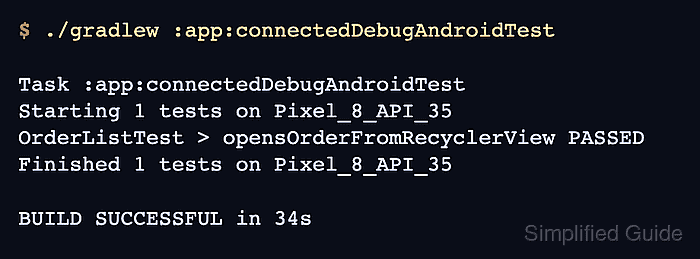
$ ./gradlew :app:connectedDebugAndroidTest

Task :app:connectedDebugAndroidTest
Starting 1 tests on Pixel_8_API_35
OrderListTest > opensOrderFromRecyclerView PASSED
Finished 1 tests on Pixel_8_API_35

BUILD SUCCESSFUL in 34s
The module and variant control the task name. A successful connected run also writes an HTML report such as app/build/reports/androidTests/connected/debug/index.html.
Related: How to run Espresso tests locally