Asynchronous Android screens often finish work after Espresso has already found a view, which can leave assertions racing network, database, or coroutine state. An IdlingResource gives Espresso a named busy-or-idle signal for app-owned work so the test waits for the screen to become assertable instead of sleeping blindly.
A debug-only wrapper keeps the Espresso idling dependency out of the release APK. The app code calls that wrapper around the asynchronous operation, the debug variant exposes a CountingIdlingResource, and the release variant keeps the same app-facing function as a no-op.
Register the resource in the instrumentation test before the action that starts the work, and unregister it after the test finishes. A missing decrement leaves Espresso waiting until its idling timeout, so the final connected test run should pass without any fixed Thread.sleep guard.
Related: How to wait for UI elements in Espresso
Related: How to debug a flaky Espresso test
Related: How to set Espresso idling timeouts
Steps to add an Espresso IdlingResource:
- Add the Espresso dependencies to the app module.
- build.gradle.kts
dependencies {
    androidTestImplementation(
        "androidx.test.espresso:espresso-core:3.7.0"
    )
    debugImplementation(
        "androidx.test.espresso:espresso-idling-resource:3.7.0"
    )
}
Use the project version catalog if the build already manages AndroidX Test versions there. The debugImplementation dependency keeps CountingIdlingResource out of release builds.
- Create the debug idling wrapper.
- OrderIdlingResource.kt
package com.example.orders.testing

import androidx.test.espresso.IdlingResource
import androidx.test.espresso.idling.CountingIdlingResource

object OrderIdlingResource {
    private val counter = CountingIdlingResource("OrderRepository")

    val idlingResource: IdlingResource = counter

    suspend fun <T> track(
        block: suspend () -> T
    ): T {
        counter.increment()

        return try {
            block()
        } finally {
            counter.decrement()
        }
    }
}
Place this file under src/debug/kotlin. Name the counter after the app component that owns the asynchronous work because that name appears in Espresso timeout diagnostics.
- Add the release no-op wrapper with the same app-facing function.
- OrderIdlingResource.kt
package com.example.orders.testing

object OrderIdlingResource {
    suspend fun <T> track(
        block: suspend () -> T
    ): T = block()
}
Place this file under src/release/kotlin. Keep the package, object name, and track function signature identical across build variants so main source compiles for both debug and release.
- Wrap the asynchronous app work with the idling tracker.
- OrderRepository.kt
package com.example.orders

import com.example.orders.testing.OrderIdlingResource

class OrderRepository(private val api: OrderApi) {
    suspend fun refreshStatus(orderId: String): OrderStatus =
        OrderIdlingResource.track {
            api.fetchStatus(orderId)
        }
}
For callback-based code, increment before starting the request and decrement in the success, error, or cancellation callback. Decrementing immediately after scheduling the request marks the resource idle too early.
- Register the resource in the instrumentation test.
- OrderStatusTest.kt
package com.example.orders

import androidx.test.espresso.Espresso.onView
import androidx.test.espresso.IdlingRegistry
import androidx.test.espresso.action.ViewActions.click
import androidx.test.espresso.assertion.ViewAssertions.matches
import androidx.test.espresso.matcher.ViewMatchers.*
import androidx.test.ext.junit.runners.AndroidJUnit4
import com.example.orders.testing.OrderIdlingResource
import org.junit.After
import org.junit.Before
import org.junit.Test
import org.junit.runner.RunWith

@RunWith(AndroidJUnit4::class)
class OrderStatusTest {
    @Before
    fun registerIdlingResource() {
        IdlingRegistry.getInstance().register(
            OrderIdlingResource.idlingResource
        )
    }

    @After
    fun unregisterIdlingResource() {
        IdlingRegistry.getInstance().unregister(
            OrderIdlingResource.idlingResource
        )
    }

    @Test
    fun refreshShowsReadyStatus() {
        onView(withId(R.id.refreshButton)).perform(click())

        onView(withId(R.id.status)).check(matches(withText("Ready")))
    }
}
Always unregister the resource in @After. A registered resource that keeps state between tests can make an unrelated test wait or time out.
- Delete the fixed sleep from the test.
// Remove this after the IdlingResource is registered.
Thread.sleep(5_000)
If the assertion still needs a fixed sleep, the app operation that changes the view is not fully covered by the resource. Use a bounded view wait only for view-tree state that is not controlled by background app work.
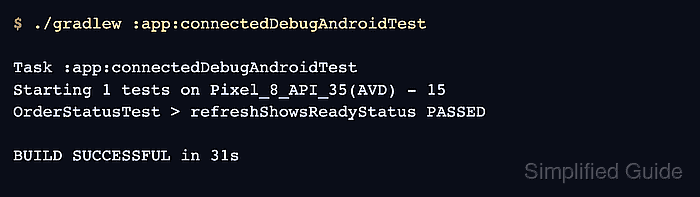
- Run the connected Espresso test task.
$ ./gradlew :app:connectedDebugAndroidTest

Task :app:connectedDebugAndroidTest
Starting 1 tests on Pixel_8_API_35(AVD) - 15
OrderStatusTest > refreshShowsReadyStatus PASSED

BUILD SUCCESSFUL in 31s
Replace :app and Debug with the module and variant used by the project. Android's command-line test workflow writes the connected test report under the module build reports directory.

Mohd Shakir Zakaria is a cloud architect with deep roots in software development and open-source advocacy. Certified in AWS, Red Hat, VMware, ITIL, and Linux, he specializes in designing and managing robust cloud and on-premises infrastructures.


