How to publish Logstash events to Elasticsearch data streams
Publishing Logstash events to an Elasticsearch data stream gives continuously arriving logs one stable write target while Elasticsearch manages hidden backing indices behind it. Pipelines, searches, and dashboards can keep using the stream name instead of following daily index names or rollover aliases.
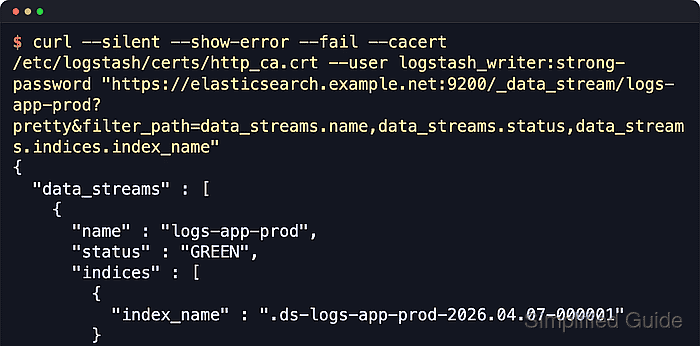
The elasticsearch output plugin writes to data streams when data_stream is enabled and ECS compatibility is active. The stream name comes from data_stream_type, data_stream_dataset, and data_stream_namespace, so the values logs, app, and prod produce the stream logs-app-prod.
Use http://localhost:9200 on a lab or local cluster so the data-stream behavior stays visible. Secured clusters should use HTTPS, a trusted CA file, and either an API key or a dedicated publishing user before the pipeline handles real log traffic.
Steps to publish Logstash events to Elasticsearch data streams:
- Choose the data stream components.
type      = logs
dataset   = app
namespace = prod
stream    = logs-app-prod
Keep dataset and namespace lowercase and avoid hyphens. Use dots or plain words when a name needs more detail, such as app.access or production.
- Create the sample source and file-input state directories for the Logstash service account.
$ sudo install -d -o logstash -g logstash /var/lib/logstash/examples /var/lib/logstash/plugins/inputs/file
- Create the data stream pipeline configuration.
input {
  file {
    path => "/var/lib/logstash/examples/data-stream.log"
    start_position => "beginning"
    sincedb_path => "/var/lib/logstash/plugins/inputs/file/data-stream-example.sincedb"
    ecs_compatibility => "v8"
  }
}

filter {
  mutate {
    add_field => {
      "[event][dataset]" => "app"
    }
  }
}

output {
  elasticsearch {
    hosts => ["http://localhost:9200"]
    ecs_compatibility => "v8"
    data_stream => "true"
    data_stream_type => "logs"
    data_stream_dataset => "app"
    data_stream_namespace => "prod"
  }
}
Save the file as /etc/logstash/conf.d/30-data-stream.conf on package-based installs. Replace the hosts value with the real Elasticsearch endpoint before using the pipeline outside a local lab.
Related: How to configure a Logstash file input
Related: How to use an Elasticsearch API key with Logstash output - Test the Logstash pipeline configuration.
$ sudo -u logstash /usr/share/logstash/bin/logstash --path.settings /etc/logstash --path.data /tmp/logstash-data-stream-test --config.test_and_exit
Using bundled JDK: /usr/share/logstash/jdk
Configuration OK
[2026-06-18T14:57:32,251][INFO ][logstash.runner          ] Using config.test_and_exit mode. Config Validation Result: OK. Exiting Logstash
The temporary --path.data directory must be writable by the logstash user. Configuration validation checks pipeline syntax and plugin settings, not remote authentication or index privileges.
Related: How to test a Logstash pipeline configuration - Restart the Logstash service.
$ sudo systemctl restart logstash
- Append a test event to the watched file.
$ printf 'GET /status 200 4ms\n' | sudo tee -a /var/lib/logstash/examples/data-stream.log
GET /status 200 4ms
The file input reads each newline-delimited record as one event. Use the real application log path after the smoke test proves the output path.
- Confirm that Elasticsearch created the data stream and a backing index.
$ curl --silent --show-error --fail "http://localhost:9200/_data_stream/logs-app-prod?pretty&filter_path=data_streams.name,data_streams.indices.index_name"
{
  "data_streams" : [
    {
      "name" : "logs-app-prod",
      "indices" : [
        {
          "index_name" : ".ds-logs-app-prod-2026.06.18-000001"
        }
      ]
    }
  ]
}
A one-node lab cluster may report the stream as YELLOW when the default replica has no second node. The stream still exists when the backing index appears and the event is searchable.
- Search the data stream for the test event.
$ curl --silent --show-error --fail "http://localhost:9200/logs-app-prod/_search?pretty&size=1&filter_path=hits.hits._source.message,hits.hits._source.data_stream"
{
  "hits" : {
    "hits" : [
      {
        "_source" : {
          "message" : "GET /status 200 4ms",
          "data_stream" : {
            "namespace" : "prod",
            "type" : "logs",
            "dataset" : "app"
          }
        }
      }
    ]
  }
}
If the search returns no hits, append a new line to the watched file and inspect journalctl –unit logstash –since “5 minutes ago” –no-pager for output, TLS, authentication, or mapping errors.