Using an API key for Logstash output keeps a pipeline from reusing a long-lived Elasticsearch user password. A separate key per Logstash host or pipeline makes rotation easier, limits the effect of a leaked configuration, and keeps output permissions scoped to the target indices the pipeline should write.
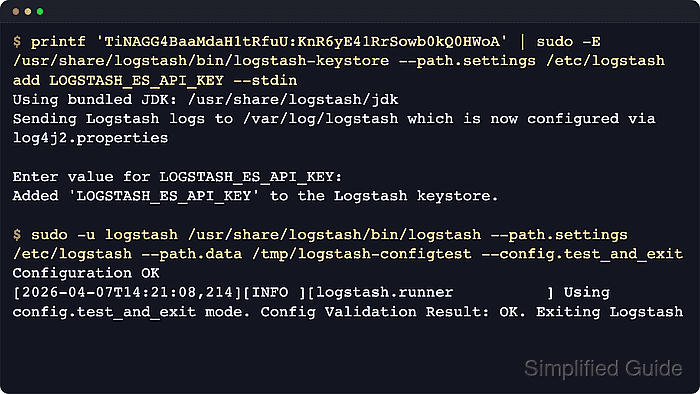
The elasticsearch output plugin sends bulk requests over HTTP(S) and authenticates with the api_key setting. The value must be the raw id:api_key pair returned by the Create API key API, not the encoded value that Elasticsearch also returns for direct Authorization: ApiKey HTTP headers.
API key authentication in the output plugin requires TLS through cloud_id, an https host, or ssl_enabled. Self-managed clusters that use Elastic's generated HTTP certificate need a trusted CA path on the Logstash host, while Elastic Cloud can use cloud_id with the same api_key value and no separate CA file.
Steps to use an Elasticsearch API key with Logstash output:
- Create an API key scoped to the Logstash output target.
$ curl --silent --show-error --fail \
  --cacert /etc/logstash/certs/http_ca.crt \
  --user elastic:password \
  --header "Content-Type: application/json" \
  --request POST "https://elasticsearch.example.net:9200/_security/api_key?pretty" \
  --data '{
  "name": "logstash-output-host001",
  "role_descriptors": {
    "logstash_writer": {
      "cluster": ["monitor"],
      "indices": [
        {
          "names": ["logstash-api-key-*"],
          "privileges": ["write", "create", "create_index", "view_index_metadata"]
        }
      ]
    }
  }
}'
{
  "id" : "TiNAGG4BaaMdaH1tRfuU",
  "name" : "logstash-output-host001",
  "api_key" : "KnR6yE41RrSowb0kQ0HWoA",
  "encoded" : "VGlOQUdHNEJhYU1kYUgxdFJmdVU6S25SNnlFNDFSclNvd2Iwa1EwSFdvQQ=="
}
Administrator passwords on the command line can leak through shell history and process listings. Use a prompting workflow or a protected automation secret when creating real keys.
Join the returned id and api_key fields with a colon for Logstash. The encoded value belongs in direct HTTP Authorization headers, not in the output plugin's api_key setting.
- Create the Logstash keystore only when this host does not already have one.
$ sudo -E /usr/share/logstash/bin/logstash-keystore --path.settings /etc/logstash create
Using bundled JDK: /usr/share/logstash/jdk
Sending Logstash logs to /var/log/logstash which is now configured via log4j2.properties

WARNING: The keystore password is not set. Continue without password protection on the keystore? [y/N] y
Created Logstash keystore at /etc/logstash/logstash.keystore
The create command can overwrite an existing keystore after confirmation. Do not continue on a host that already stores Logstash secrets unless the old entries are backed up or no longer needed.
Use the same --path.settings /etc/logstash directory that the packaged service reads.
Related: How to create a Logstash keystore
- Add the id:api_key value to the Logstash keystore.
$ sudo -E /usr/share/logstash/bin/logstash-keystore --path.settings /etc/logstash add logstash_es_api_key
Using bundled JDK: /usr/share/logstash/jdk
Sending Logstash logs to /var/log/logstash which is now configured via log4j2.properties

Enter value for logstash_es_api_key:
Added 'logstash_es_api_key' to the Logstash keystore.
Paste the id:api_key value when prompted. For automation, feed --stdin from a protected secret store or file descriptor instead of typing the key literal into the shell command.
- Update the elasticsearch output block to use the keystore-backed API key and TLS settings.
output {
  elasticsearch {
    hosts => ["https://elasticsearch.example.net:9200"]
    ssl_enabled => true
    ssl_certificate_authorities => ["/etc/logstash/certs/http_ca.crt"]
    api_key => "${logstash_es_api_key}"
    manage_template => false
    ilm_enabled => false
    index => "logstash-api-key-%{+YYYY.MM.dd}"
  }
}
The ssl_certificate_authorities setting replaces the old cacert option in current plugin versions. Keep the api_key value quoted because the resolved secret contains a colon.
Leave manage_template and ilm_enabled disabled unless this pipeline owns templates or lifecycle policy setup. Enable those features only after expanding the API key privileges to match.
- Test the Logstash pipeline configuration with a temporary path.data directory.
$ sudo -u logstash /usr/share/logstash/bin/logstash --path.settings /etc/logstash --path.data /tmp/logstash-configtest --config.test_and_exit -f /etc/logstash/conf.d/api-key.conf
Using bundled JDK: /usr/share/logstash/jdk
Sending Logstash logs to /var/log/logstash which is now configured via log4j2.properties
Configuration OK
[2026-06-18T14:36:58,392][INFO ][logstash.runner          ] Using config.test_and_exit mode. Config Validation Result: OK. Exiting Logstash
Configuration validation checks pipeline syntax, plugin settings, and keystore interpolation. It does not prove that Elasticsearch accepts the API key at runtime.
- Restart the Logstash service to load the updated pipeline secret and output settings.
$ sudo systemctl restart logstash
Restarting Logstash can briefly pause ingestion while pipelines stop, reload, and reconnect.
- Review recent Logstash logs for Elasticsearch connection and pipeline startup messages.
$ sudo journalctl --unit logstash --since "5 minutes ago" --no-pager
Jun 18 14:37:04 host logstash[21457]: [2026-06-18T14:37:04,851][INFO ][logstash.outputs.elasticsearch][main] Elasticsearch pool URLs updated {:changes=>{:removed=>[], :added=>[https://elasticsearch.example.net:9200/]}}
Jun 18 14:37:05 host logstash[21457]: [2026-06-18T14:37:05,019][INFO ][logstash.outputs.elasticsearch][main] Connected to ES instance {:url=>"https://elasticsearch.example.net:9200/"}
Jun 18 14:37:05 host logstash[21457]: [2026-06-18T14:37:05,355][INFO ][logstash.javapipeline    ][main] Pipeline started {"pipeline.id"=>"main"}
##### snipped #####
401 or 403 responses usually mean the API key belongs to another cluster or lacks a required privilege. Certificate errors usually point to the wrong CA file or a hostname mismatch.
- Verify documents are reaching the expected index pattern with a separate read-capable credential.
$ curl --silent --show-error --fail \
  --cacert /etc/logstash/certs/http_ca.crt \
  --user elastic:password \
  "https://elasticsearch.example.net:9200/logstash-api-key-*/_count?pretty"
{
  "count" : 42,
  "_shards" : {
    "total" : 1,
    "successful" : 1,
    "skipped" : 0,
    "failed" : 0
  }
}
The Logstash API key does not need read privileges for this query. Use a separate credential that is allowed to inspect the target indices.
A just-ingested test event may not appear until Elasticsearch refreshes the index. Wait briefly or refresh the target index with an administrative credential before rechecking.

Mohd Shakir Zakaria is a cloud architect with deep roots in software development and open-source advocacy. Certified in AWS, Red Hat, VMware, ITIL, and Linux, he specializes in designing and managing robust cloud and on-premises infrastructures.


