A Logstash file input watches an existing log file or file pattern and turns each new line into a pipeline event. Operators use it when an application writes plain text logs locally and Logstash is responsible for sending those lines to Elasticsearch or another output.
The file input tracks byte offsets in a sincedb file so restarts can resume from the last consumed position. Tail mode follows files that keep growing, while read mode is for content-complete files, so a continuously written application log should normally use an absolute path, explicit tail mode, and a dedicated sincedb_path.
The pipeline needs a readable source file, a validated configuration, and a real event test after the service restarts. start_position ⇒ “beginning” affects only files that do not already have sincedb state, and remote network filesystems can produce misleading file identity or offset behavior.
Steps to configure a file input in Logstash:
- List the log files matched by the planned absolute path pattern.
$ sudo ls /var/log/app/*.log
/var/log/app/app-error.log
/var/log/app/app.log
Logstash file input paths must be absolute. Keep rotated compressed files out of the match with exclude unless the pipeline is intentionally reading archive files in read mode.
- Confirm the logstash service account can read one matched file.
$ sudo -u logstash test -r /var/log/app/app.log
No output means the read check passed. If the command exits with an error, fix the file mode, file group, or parent-directory execute permission before editing the pipeline.
- Open the file input pipeline configuration.
$ sudoedit /etc/logstash/conf.d/40-file-input.conf
Package installs normally load files under /etc/logstash/conf.d/ through /etc/logstash/pipelines.yml. Use the active path.config value on hosts with custom pipeline manifests.
Related: How to configure Logstash pipelines
- Add the file input and destination output.
input {
  file {
    id => "app_file_input"
    path => ["/var/log/app/*.log"]
    exclude => ["*.gz"]
    mode => "tail"
    start_position => "beginning"
    sincedb_path => "/var/lib/logstash/file-input-app.sincedb"
  }
}

output {
  elasticsearch {
    hosts => ["http://elasticsearch.example.net:9200"]
    data_stream => false
    ilm_enabled => false
    index => "app-logs-%{+YYYY.MM.dd}"
  }
}
Use a different sincedb_path for each file input. Reusing the same file lets inputs overwrite each other's offsets, and deleting it can replay old lines into the output.
The elasticsearch output block is a minimal index-mode destination for the smoke test. Use the dedicated output guide when the cluster requires HTTPS, authentication, custom certificates, ILM, or data streams.
Related: How to configure Logstash output to Elasticsearch - Test the pipeline configuration with the packaged settings directory and a temporary data path.
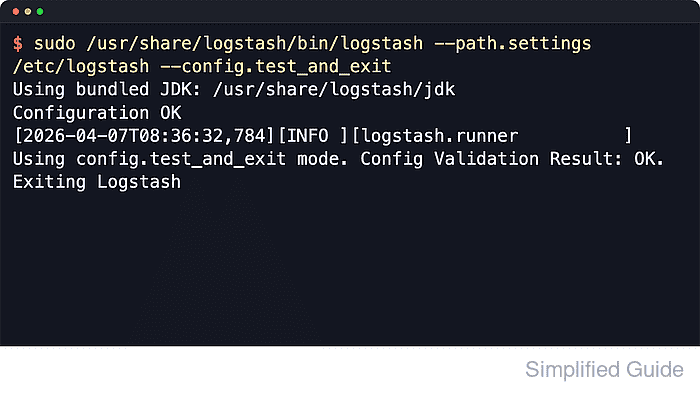
$ sudo -u logstash /usr/share/logstash/bin/logstash --path.settings /etc/logstash --path.data /tmp/logstash-file-input-test --config.test_and_exit -f /etc/logstash/conf.d/40-file-input.conf
Using bundled JDK: /usr/share/logstash/jdk
##### snipped #####
Configuration OK
[2026-06-18T15:17:02,718][INFO ][logstash.runner          ] Using config.test_and_exit mode. Config Validation Result: OK. Exiting Logstash
The temporary --path.data directory keeps the one-off validation away from /var/lib/logstash. Current package installs should run this check as the logstash service account unless allow_superuser was intentionally enabled.
- Remove the temporary validation data path.
$ sudo rm --recursive --force /tmp/logstash-file-input-test
- Restart the Logstash service to load the file input.
$ sudo systemctl restart logstash.service
Restarting Logstash pauses every active pipeline while inputs, filters, and outputs reopen.
- Check the Logstash service state after the restart.
$ sudo systemctl status logstash.service --no-pager --lines=0 ● logstash.service - logstash Loaded: loaded (/usr/lib/systemd/system/logstash.service; enabled; preset: enabled) Active: active (running) since Thu 2026-06-18 15:24:41 UTC; 7s ago Main PID: 24817 (java) Tasks: 96 (limit: 28486) Memory: 1.0G - Append a unique test line to a watched file.
$ printf '2026-06-18T15:25:00Z INFO request_id=9b2a5f2c status=200 path=/health logstash-file-input-test\n' | sudo tee -a /var/log/app/app.log
2026-06-18T15:25:00Z INFO request_id=9b2a5f2c status=200 path=/health logstash-file-input-test
Because the input runs in tail mode, append the smoke-test line after Logstash is running so it is treated as new data even when older sincedb state exists.
- Verify the sincedb file exists after the input consumes the line.
$ sudo ls -l /var/lib/logstash/file-input-app.sincedb
-rw------- 1 logstash logstash 105 Jun 18 15:25 /var/lib/logstash/file-input-app.sincedb
The timestamp should change after new lines are consumed. A missing file usually means the watched path did not match, Logstash could not read the file, or the pipeline did not start.
- Search the destination index for the smoke-test event.
$ curl --silent --show-error --fail "http://elasticsearch.example.net:9200/app-logs-*/_count?q=logstash-file-input-test&pretty"
{
  "count" : 1,
  "_shards" : {
    "total" : 1,
    "successful" : 1,
    "skipped" : 0,
    "failed" : 0
  }
}
A count of 1 or more confirms that the file input read the appended line and the output wrote it to the expected index pattern. If the count stays at 0, check /var/log/logstash/logstash-plain.log for file permission, sincedb, and output connection errors.

Mohd Shakir Zakaria is a cloud architect with deep roots in software development and open-source advocacy. Certified in AWS, Red Hat, VMware, ITIL, and Linux, he specializes in designing and managing robust cloud and on-premises infrastructures.


