Testing a Logstash pipeline configuration before a restart or reload catches parser errors while the running service continues to process events. It is the safest check after editing package-managed pipeline files or changing how the service loads them.
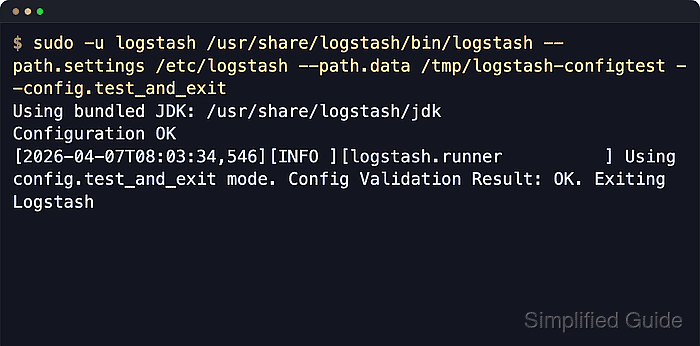
On package-based Linux installs, the validation command should use the same settings directory, pipeline manifest, and logging configuration as the service. A separate temporary data path gives the one-off validation a writable workspace without touching the live service data directory.
The syntax-test mode confirms that Logstash can compile the pipeline configuration and exits without starting inputs or outputs. It does not prove grok pattern matches, remote output reachability, credentials, TLS trust, or sender traffic, so runtime checks still matter after a clean parse.
Related: How to configure Logstash pipelines
Related: How to enable Logstash pipeline reloads
Steps to test a Logstash pipeline configuration:
- Check the active packaged pipeline manifest.
$ sudo cat /etc/logstash/pipelines.yml
# This file is where you define your pipelines. You can define multiple.
# For more information on multiple pipelines, see the documentation:
#   https://www.elastic.co/guide/en/logstash/current/multiple-pipelines.html

- pipeline.id: main
  path.config: "/etc/logstash/conf.d/*.conf"
Use the path.config value from this file when the host uses a custom pipeline ID, a different directory, or more than one pipeline.
- Run the configuration test with the packaged settings directory and a temporary data path.
$ sudo -u logstash /usr/share/logstash/bin/logstash --path.settings /etc/logstash --path.data /tmp/logstash-configtest --config.test_and_exit
Using bundled JDK: /usr/share/logstash/jdk
Sending Logstash logs to /var/log/logstash which is now configured via log4j2.properties
##### snipped #####
Configuration OK
[2026-06-18T14:55:46,347][INFO ][logstash.runner          ] Using config.test_and_exit mode. Config Validation Result: OK. Exiting Logstash
The temporary --path.data directory must be writable by the logstash user and keeps the validation away from the service data directory in /var/lib/logstash. Logstash defaults allow_superuser to false, so run package-based tests as the logstash service account unless that setting was intentionally changed.
- Confirm that the validation command exited successfully.
$ echo $?
0
Exit status 0 means Logstash accepted the configuration syntax and settings assembly for this validation run.
- Isolate a single pipeline file when the full test reports a syntax error.
$ sudo -u logstash /usr/share/logstash/bin/logstash --path.settings /etc/logstash --path.data /tmp/logstash-configtest --config.test_and_exit -f /etc/logstash/conf.d/10-main.conf
Using bundled JDK: /usr/share/logstash/jdk
Sending Logstash logs to /var/log/logstash which is now configured via log4j2.properties
##### snipped #####
[2026-06-18T14:55:52,321][WARN ][logstash.config.source.multilocal] Ignoring the 'pipelines.yml' file because command line options are specified
[2026-06-18T14:55:52,365][FATAL][logstash.runner          ] The given configuration is invalid. Reason: Expected one of [ \t\r\n], "#", "=>" at line 4, column 3 (byte 58) after filter {
  mutate {
    add_field => { "ingest_source"
The -f option validates only the specified file or directory for that run, so it can narrow an error without changing /etc/logstash/pipelines.yml.
- Fix the first file and line reported by Logstash.
$ sudoedit /etc/logstash/conf.d/10-main.conf
Related: How to configure Logstash pipelines
- Re-run the packaged configuration test until it reports a clean parse.
$ sudo -u logstash /usr/share/logstash/bin/logstash --path.settings /etc/logstash --path.data /tmp/logstash-configtest --config.test_and_exit
Using bundled JDK: /usr/share/logstash/jdk
##### snipped #####
Configuration OK
[2026-06-18T14:55:46,347][INFO ][logstash.runner          ] Using config.test_and_exit mode. Config Validation Result: OK. Exiting Logstash
--config.test_and_exit validates syntax and plugin settings assembly only. Follow a clean result with a service restart, automatic reload, or representative event test when the changed pipeline must receive live traffic.
Related: How to debug Logstash pipelines
- Remove the temporary validation data path.
$ sudo rm --recursive --force /tmp/logstash-configtest
Apply the validated pipeline through the normal service path after cleanup.
Related: How to manage the Logstash service with systemctl in Linux
Related: How to enable Logstash pipeline reloads

Mohd Shakir Zakaria is a cloud architect with deep roots in software development and open-source advocacy. Certified in AWS, Red Hat, VMware, ITIL, and Linux, he specializes in designing and managing robust cloud and on-premises infrastructures.


