Creating a data stream in Elasticsearch gives logs, metrics, and other append-only events one fixed write target while Elasticsearch rolls hidden backing indices in the background. That keeps ingest clients, searches, and dashboards pointed at one name instead of forcing them to follow rollover index names.
A data stream is created from a matching composable index template. That template must enable data_stream, and explicit mappings such as @timestamp keep timestamp fields predictable even though Elasticsearch can supply a default date mapping when the template omits it. Searches run against the stream name and span the hidden backing indices automatically.
Manual setup is most useful for application-owned pipelines and custom retention flows. A matching template must exist before PUT /_data_stream/<name> succeeds, current Elastic guidance recommends keeping custom template priority above built-in defaults when patterns might overlap, and secured clusters usually require HTTPS, authentication, and template-management privileges. This worked example sets number_of_replicas to 0 so a single-node validation cluster stays GREEN; increase it on multi-node clusters.
Tool: JSON Validator
Steps to create a data stream in Elasticsearch:
- Create a component template for the example stream's mappings and single-node settings.
$ curl --silent --show-error --fail --header "Content-Type: application/json" --request PUT "http://localhost:9200/_component_template/app-logs-mappings?pretty" --data '{
  "template": {
    "settings": {
      "number_of_replicas": 0
    },
    "mappings": {
      "properties": {
        "@timestamp": { "type": "date" },
        "message": { "type": "wildcard" },
        "service": {
          "properties": {
            "name": { "type": "keyword" }
          }
        }
      }
    }
  },
  "_meta": {
    "description": "Mappings and single-node settings for app-logs data stream"
  }
}'
{
  "acknowledged" : true
}
This example keeps the data stream GREEN on a one-node cluster by setting number_of_replicas to 0. Raise the replica count when the stream should stay available across multiple data nodes.
- Create an index template that matches the stream name and enables data_stream.
$ curl --silent --show-error --fail --header "Content-Type: application/json" --request PUT "http://localhost:9200/_index_template/app-logs-template?pretty" --data '{
  "index_patterns": ["app-logs"],
  "data_stream": {},
  "composed_of": ["app-logs-mappings"],
  "priority": 500,
  "_meta": {
    "description": "Template for app-logs data stream"
  }
}'
{
  "acknowledged" : true
}
The stream name must match at least one entry in index_patterns. Using priority 500 keeps this custom example above lower-priority built-in templates if patterns ever overlap.
- Create the data stream.
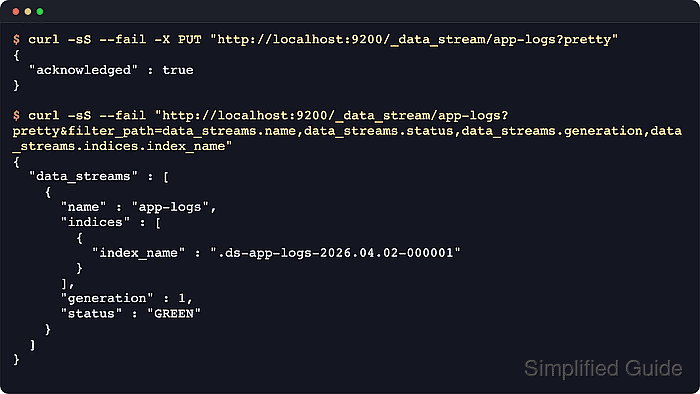
$ curl --silent --show-error --fail --request PUT "http://localhost:9200/_data_stream/app-logs?pretty"
{
  "acknowledged" : true
}
Creation fails if an index, alias, or data stream named app-logs already exists.
- Review the data stream status, generation, and backing index name.
$ curl --silent --show-error --fail "http://localhost:9200/_data_stream/app-logs?pretty&filter_path=data_streams.name,data_streams.status,data_streams.generation,data_streams.indices.index_name"
{
  "data_streams" : [
    {
      "name" : "app-logs",
      "indices" : [
        {
          "index_name" : ".ds-app-logs-2026.06.18-000001"
        }
      ],
      "generation" : 1,
      "status" : "GREEN"
    }
  ]
}
Backing indices roll over behind the stream, so names like .ds-app-logs-2026.06.18-000001 change over time while the write target remains app-logs.
- Index a test document into the data stream.
$ curl --silent --show-error --fail --header "Content-Type: application/json" --request POST "http://localhost:9200/app-logs/_doc?refresh=wait_for&pretty&filter_path=_index,_id,result" --data '{
  "@timestamp": "2026-04-02T05:00:00Z",
  "message": "login ok",
  "service": {
    "name": "payments"
  }
}'
{
  "_index" : ".ds-app-logs-2026.06.18-000001",
  "_id" : "LTv-2J4BU2Mw59UGC2F2",
  "result" : "created"
}
Data streams accept only create operations. Using POST /<stream>/_doc without an explicit document ID keeps the request in create mode while Elasticsearch generates the ID automatically.
Documents without an @timestamp field are rejected by this data stream mapping.
- Search the data stream for the newest event.
$ curl --silent --show-error --fail "http://localhost:9200/app-logs/_search?pretty&size=1&sort=%40timestamp:desc&filter_path=hits.hits._index,hits.hits._id,hits.hits._source"
{
  "hits" : {
    "hits" : [
      {
        "_index" : ".ds-app-logs-2026.06.18-000001",
        "_id" : "LTv-2J4BU2Mw59UGC2F2",
        "_source" : {
          "@timestamp" : "2026-04-02T05:00:00Z",
          "message" : "login ok",
          "service" : {
            "name" : "payments"
          }
        }
      }
    ]
  }
}
Searching app-logs spans all backing indices transparently, so there is usually no reason to query .ds-* names directly.

Mohd Shakir Zakaria is a cloud architect with deep roots in software development and open-source advocacy. Certified in AWS, Red Hat, VMware, ITIL, and Linux, he specializes in designing and managing robust cloud and on-premises infrastructures.


