How to configure Filebeat output to Kafka
Configuring Filebeat to publish events to Kafka places a durable broker layer between log collection and downstream processing. The Kafka topic can absorb short indexing slowdowns, maintenance windows, and multiple consumer groups without forcing every shipper host to connect directly to the final analytics system.
The output.kafka section belongs in the Outputs part of /etc/filebeat/filebeat.yml on packaged Linux installs. Filebeat uses the configured hosts list as bootstrap brokers for Kafka metadata, then publishes JSON-encoded events to the configured topic or to a topic selected from event fields.
Only one output.* block can be enabled at a time. Kafka timestamp handling and message-size limits still matter after Filebeat connects. Event timestamps can affect retention and timestamp validation on Kafka topics, and events larger than max_message_bytes are dropped before they are published.
Steps to configure Filebeat output to Kafka:
- Confirm the Kafka bootstrap brokers, listener security, and destination topic.
If automatic topic creation is disabled, create the topic through the cluster's normal change process before restarting Filebeat. Pick the partition count before routing production logs because partition count affects write spread, consumer parallelism, and keyed-event ordering.
Tool: Kafka Partition Count Calculator - Back up the active Filebeat configuration file.
$ sudo cp /etc/filebeat/filebeat.yml /etc/filebeat/filebeat.yml.bak
Switching outputs stops publishing to the current Elasticsearch, Logstash, Redis, file, or console destination until that output is restored.
- Open the main Filebeat configuration file.
$ sudoedit /etc/filebeat/filebeat.yml
Use the packaged Linux path shown here unless Filebeat starts with a different -c file.
- Disable the current output and add the Kafka output block.
- /etc/filebeat/filebeat.yml
#output.elasticsearch:
#  hosts: ["https://es.example.net:9200"]

output.kafka:
  hosts: ["kafka-1.example.net:9092", "kafka-2.example.net:9092"]
  topic: "filebeat-logs"
  partition.round_robin:
    reachable_only: true
  required_acks: 1
  compression: gzip
  max_message_bytes: 1000000
Filebeat accepts only one enabled output.* block. Comment out any existing output.elasticsearch, output.logstash, output.redis, output.file, or output.console section before enabling output.kafka.
Use a fixed topic for one destination topic, or use a format string such as '%{[data_stream.type]}-%{[data_stream.dataset]}-%{[data_stream.namespace]}' when the topic should follow event metadata.
- Add TLS or SASL settings under output.kafka when the Kafka listener requires them.
- /etc/filebeat/filebeat.yml
output.kafka:
  hosts: ["kafka-1.example.net:9093"]
  topic: "filebeat-logs"
  ssl.certificate_authorities: ["/etc/filebeat/certs/kafka-ca.pem"]
  username: "${KAFKA_USERNAME}"
  password: "${KAFKA_PASSWORD}"
  sasl.mechanism: SCRAM-SHA-512
Store shared secrets in the Filebeat keystore instead of plain YAML when possible. Keep the ssl.* and sasl.* settings aligned with the exact Kafka listener port that Filebeat uses.
Related: How to add a secret to a Filebeat keystore
Related: How to configure Filebeat for TLS - Test the Filebeat configuration for syntax errors.
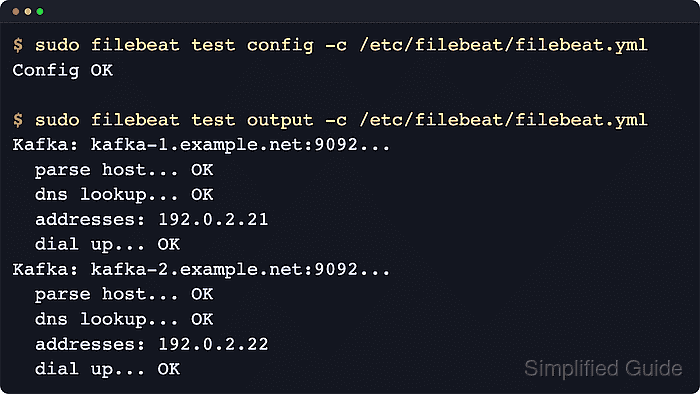
$ sudo filebeat test config -c /etc/filebeat/filebeat.yml
Config OK
Related: How to test a Filebeat configuration
- Test the Kafka output connection from the saved configuration.
$ sudo filebeat test output -c /etc/filebeat/filebeat.yml
Kafka: kafka-1.example.net:9092...
  parse host... OK
  dns lookup... OK
  addresses: 192.0.2.21
  dial up... OK
The output test confirms Filebeat can parse the broker address, resolve it, and open the Kafka listener from the saved output.kafka settings. It does not consume a message from the topic.
- Restart the Filebeat service to apply the Kafka output.
$ sudo systemctl restart filebeat
- Verify the Filebeat service returned to an active state.
$ sudo systemctl status filebeat --no-pager --lines=0
● filebeat.service - Filebeat sends log files to Logstash or directly to Elasticsearch.
     Loaded: loaded (/usr/lib/systemd/system/filebeat.service; enabled; preset: enabled)
     Active: active (running) since Thu 2026-04-02 19:58:41 UTC; 4s ago
##### snipped #####
An active service confirms the process restarted with the new configuration. Confirm one consumed Kafka event before treating the output change as fully proven.
- Generate one event through an enabled Filebeat input.
Use a log path or module that Filebeat already harvests. Configure a short filestream input first when testing a fresh host.
Related: How to configure a filestream input in Filebeat - Consume one message from the Kafka topic.
$ kafka-console-consumer.sh --bootstrap-server kafka-1.example.net:9092 --topic filebeat-logs --from-beginning --max-messages 1
{"@timestamp":"2026-04-02T19:59:08.112Z","message":"filebeat kafka smoke test","input":{"type":"filestream"},"agent":{"type":"filebeat","name":"loghost01"},"host":{"name":"loghost01"}}
Run the consumer from a Kafka admin host or another system that can reach the broker listener. The JSON event confirms Filebeat published to the configured topic.
- Review recent Filebeat logs if the topic does not receive the event.
$ sudo journalctl --unit=filebeat --since "5 min ago" --no-pager --lines=30
Look for broker listener addresses, authentication failures, certificate errors, publish backoff, or messages rejected by Kafka timestamp validation. When delayed events are discarded unexpectedly, review the topic's log.message.timestamp.type setting and use LogAppendTime only when broker-arrival time should control retention.