Testing Filebeat output connectivity before a restart or rollout catches unreachable destinations, bad credentials, and certificate problems before log shipping falls behind. It is a quick preflight check when the output.elasticsearch, output.logstash, output.kafka, or another publisher block has changed.
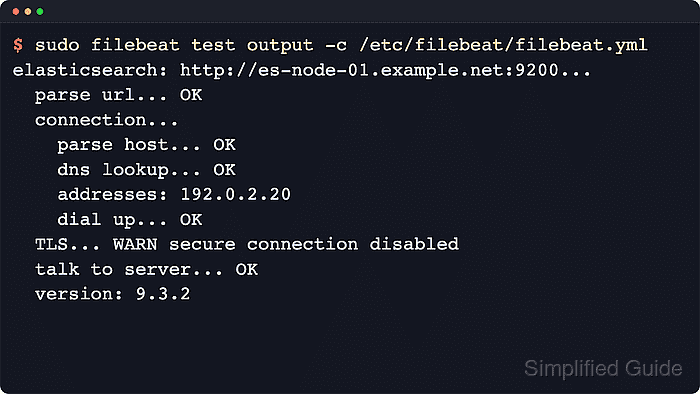
The filebeat test output subcommand reads the selected configuration file and checks the enabled output.* block with the same connection settings used during normal publishing. For network outputs, the check normally walks through URL or host parsing, DNS resolution, a TCP connection, optional TLS negotiation, and an application-level handshake with the remote service.
Filebeat does not publish a log event during the output test, but it still uses the live hosts, credentials, certificate settings, and output type from the selected config. Some outputs do not expose a connection test in current builds, so treat an unsupported-output message as a prompt to verify syntax, service logs, and destination-side evidence instead.
Steps to test Filebeat output connectivity:
- Run the output connectivity test against the active Filebeat configuration.
$ sudo filebeat test output -c /etc/filebeat/filebeat.yml
elasticsearch: http://es-node-01.example.net:9200...
  parse url... OK
  connection...
    parse host... OK
    dns lookup... OK
    addresses: 192.0.2.20
    dial up... OK
  TLS... WARN secure connection disabled
  talk to server... OK
  version: 9.4.2
The test uses the currently enabled output.* block and does not send a harvested event.
- Check that the test reaches the output-specific success line.
Elasticsearch output should reach talk to server... OK and print a version: line. Logstash output usually stops after talk to server... OK, while multi-host outputs can print one connection check per selected host. HTTPS outputs show certificate verification and handshake details in the TLS… block. If the failure stays there, test the same host name and port before changing Filebeat trust settings.
Related: How to configure Filebeat for TLS
Tool: TLS Handshake Trace - Test a non-default configuration file when staging or task-specific Filebeat configs live outside the packaged path.
$ sudo filebeat test output -c /etc/filebeat/filebeat-staging.yml
elasticsearch: http://staging-es.example.net:9200...
##### snipped #####
  talk to server... OK
  version: 9.4.2
The -c path is relative to path.config when it is not absolute. Add --path.config if the alternate file depends on nearby modules.d or included config files.
- Override an output host for one test run when a replacement endpoint needs a reachability check before editing YAML.
$ sudo filebeat test output -c /etc/filebeat/filebeat.yml -E 'output.elasticsearch.hosts=["http://es-node-02.example.net:9200"]'
elasticsearch: http://es-node-02.example.net:9200...
##### snipped #####
  talk to server... OK
  version: 9.4.2
The -E override applies only to the current Filebeat process and does not modify /etc/filebeat/filebeat.yml. Use the matching setting name, such as output.logstash.hosts, when a different output type is enabled.
- Check the exit status when automation needs a simple pass or fail value.
$ echo $?
0
A zero exit status means Filebeat completed the selected output test successfully.
- Run the configuration test when the output test fails before the connection… stage or reports YAML, ownership, permission, or missing-output errors.
$ sudo filebeat test config -c /etc/filebeat/filebeat.yml
Config OK
Fix config loading errors before chasing network or certificate problems.
Related: How to test a Filebeat configuration

Mohd Shakir Zakaria is a cloud architect with deep roots in software development and open-source advocacy. Certified in AWS, Red Hat, VMware, ITIL, and Linux, he specializes in designing and managing robust cloud and on-premises infrastructures.


